How graphics cards store colour
An image is a row of bytes
A 4 × 2 RGB image, 8 bits per channel, pixels numbered 0–7 row by row:
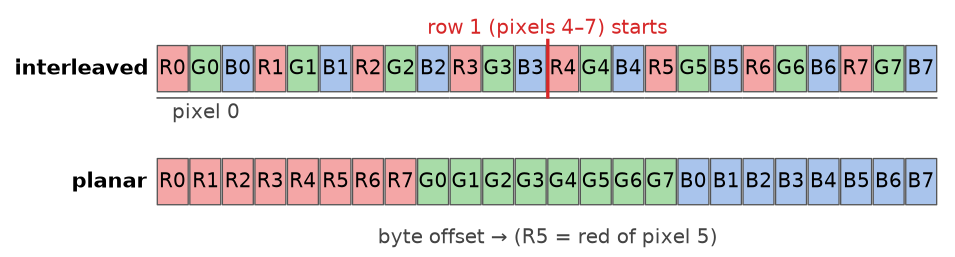
- Interleaved keeps one pixel’s channels together: what screens, cameras and textures use.
- Planar keeps one channel together: convenient when each channel is processed alone (e.g. a microscope with one image per fluorescent dye).
- Channel order is a convention: RGBA or BGRA (common in camera drivers and on Windows). Swap it by mistake and red and blue trade places.
Rows are padded: the stride
Hardware likes rows that start at a multiple of 4 (or more) bytes. Each row may end with unused padding bytes.
- Stride (pitch) = bytes from the start of one row to the start of the next, including padding.
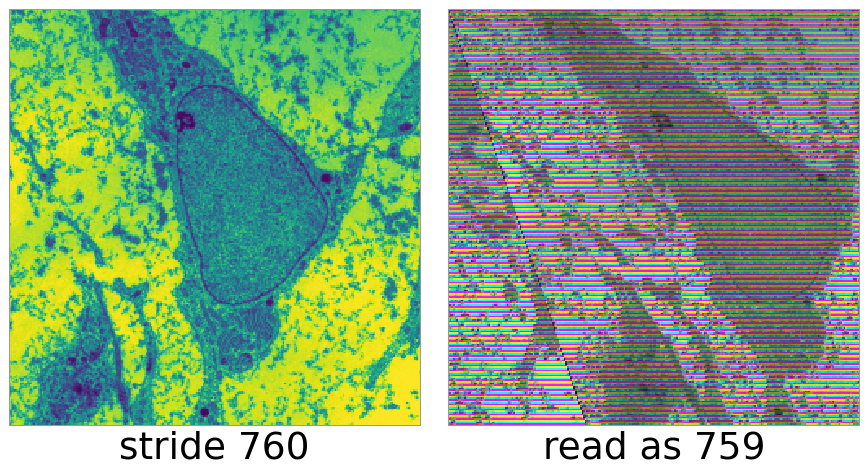
- An RGB image 1001 pixels wide: 3 \cdot 1001 = 3003 bytes of data per row, padded to a stride of 3004.
- Read it with the wrong stride (3003) and row y is read starting y bytes too early: the image is sheared by a third of a pixel per row, and the colours cycle from row to row (each byte is read as the wrong channel).
Always ask an image buffer for its stride; do not compute it from the width.
Bytes in a multi-byte number: endianness
A 16-bit value occupies two bytes. Which comes first?
- Little-endian (almost all CPUs and GPUs today): low byte first. 1000 = 0x03E8 is stored as E8 03.
- Big-endian (some file formats, network order): high byte first, 03 E8.
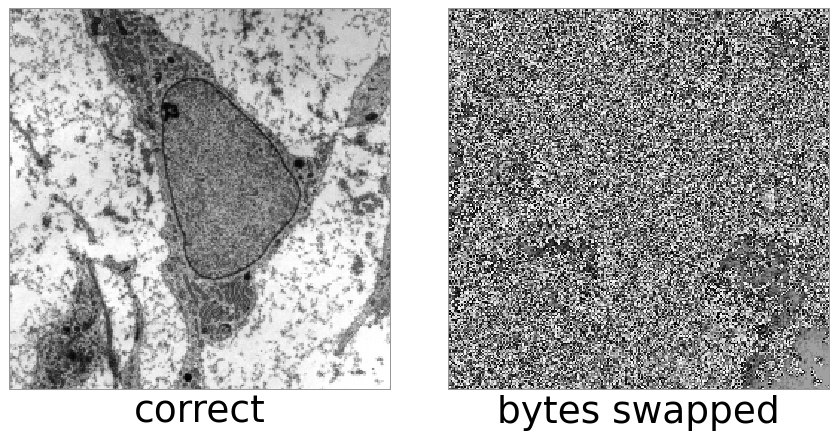
- Read little-endian data as big-endian and 1000 becomes 0xE803 = 59 395: a smooth image turns into noise-like garbage, because the low byte changes fastest.
Image file formats state their byte order in the header; 8-bit images do not have the problem.
Packed formats: bits shared out
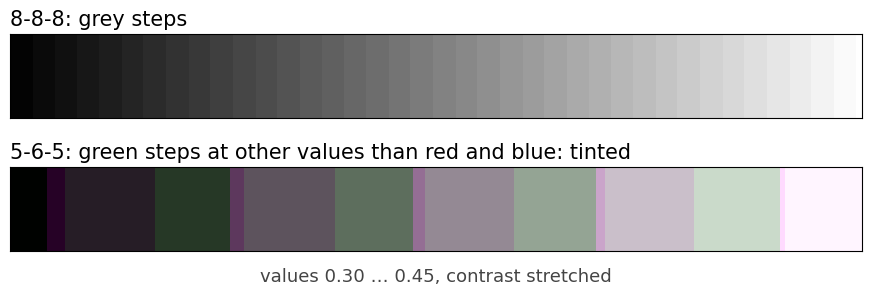
When memory or bandwidth is tight, channels get unequal numbers of bits in one 16- or 32-bit word:
- 5-6-5: red 5 bits, green 6, blue 5 = 16 bits per pixel. Green gets the extra bit because the eye is most sensitive to green (colour day). A grey ramp gets tinted steps, because green steps at different places than red and blue.
- 10-10-10-2: 10 bits per colour, 2 bits of alpha = 32 bits, the same memory as 8 bits per channel, but 4 times finer steps. Used for HDR displays and medical monitors.
sRGB storage: more codes for the dark
Light intensities and perceived brightness are not proportional: we notice small differences in dark tones much more than in bright ones.
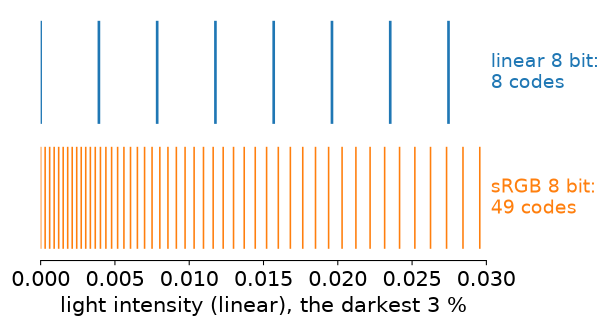
- An sRGB-encoded 8-bit value is not proportional to light: the 256 codes are spaced closely in the dark and widely in the bright. Most 8-bit photos and screenshots are stored this way.
- A linear value of 0.005 is code 1 in plain 8 bit, but code 16 in sRGB 8 bit.
- An sRGB texture format tells the GPU so: it decodes to linear values when the shader reads the texture, before filtering or blending.
- Why the curve has its shape, and why averaging must happen on linear values, is the subject of the colour day. Here: sRGB is a storage encoding, and the GPU undoes it for you if you declare it.
Filtering in hardware
When a texture is drawn larger or smaller than its pixels, the GPU interpolates for free:
- Each pixel gets texture coordinates (u, v), interpolated perspective-correctly across its triangle (previous unit), and the texture is sampled there.
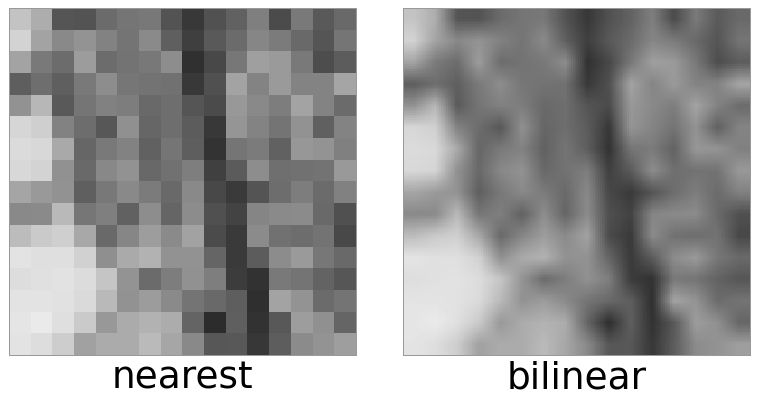
- nearest: take the closest texel (blocky); linear: bilinear interpolation of the 4 nearest texels (as in the images unit).
- Normalised and float formats can be filtered. Integer formats cannot: a texture with linear filtering and an integer format is “incomplete” and reads as black. (Interpolating label 3 and label 7 to give 5 would be wrong anyway.)
- Some GPUs cannot filter 32-bit float textures; half floats always can.
- Filtering is a weighted average, so it is only right on values proportional to light: hence the sRGB decode first, and premultiplied alpha.
Premultiplied alpha
Alpha \alpha is opacity: 1 = opaque, 0 = fully transparent. A transparent pixel’s colour is meaningless but still stored.
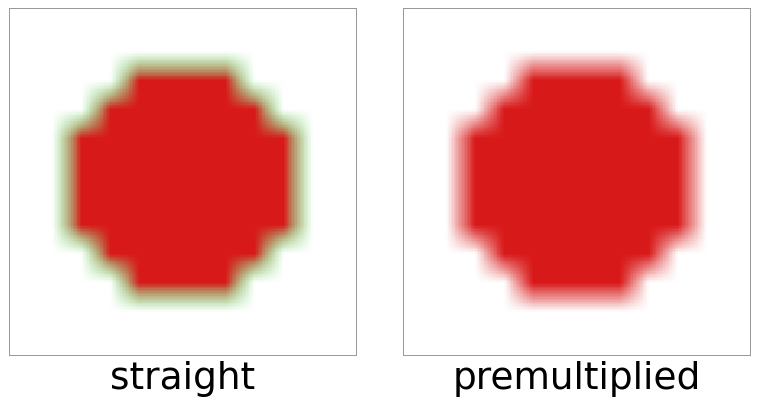
- Straight alpha stores (R, G, B, \alpha). Average an opaque red texel with a transparent green one: (0.5, 0.5, 0, 0.5): a half-transparent olive. Green leaks in from a pixel you cannot see: dark or coloured fringes around cut-out objects.
- Premultiplied alpha stores (\alpha R, \alpha G, \alpha B, \alpha). The transparent green becomes (0, 0, 0, 0), and the average is (0.5, 0, 0, 0.5): half-transparent red, correct.
- So filtering, blending and resizing images with transparency should work on premultiplied values.
Mipmaps and memory
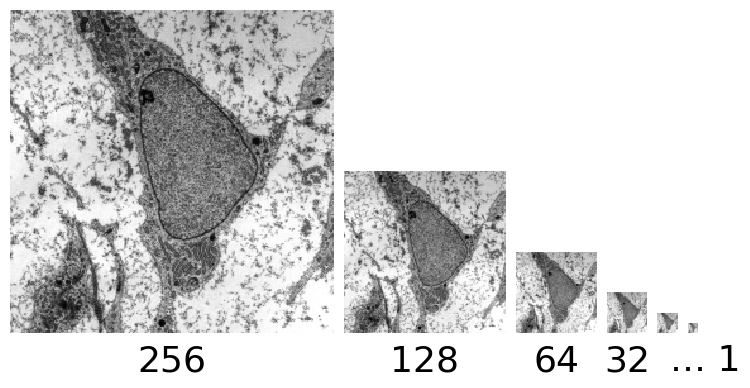
- A mipmap stores the texture at full, half, quarter, … size, down to 1 × 1. When the texture is drawn small, the GPU reads a pre-shrunk (pre-blurred) level instead of skipping pixels, which would alias (Fourier unit). Cost: +1/3 memory.
- Memory = width × height × bytes per texel:
| format, 4096 × 4096 | bytes/texel | memory | with mipmaps |
|---|---|---|---|
| RGBA 8 bit | 4 | 64 MiB | 85.3 MiB |
| RGBA half float | 8 | 128 MiB | 170.7 MiB |
| RGBA float32 | 16 | 256 MiB | 341.3 MiB |
- Compressed texture formats store 4 × 4 blocks in 4–8 bits per pixel, lossy, decoded in hardware.