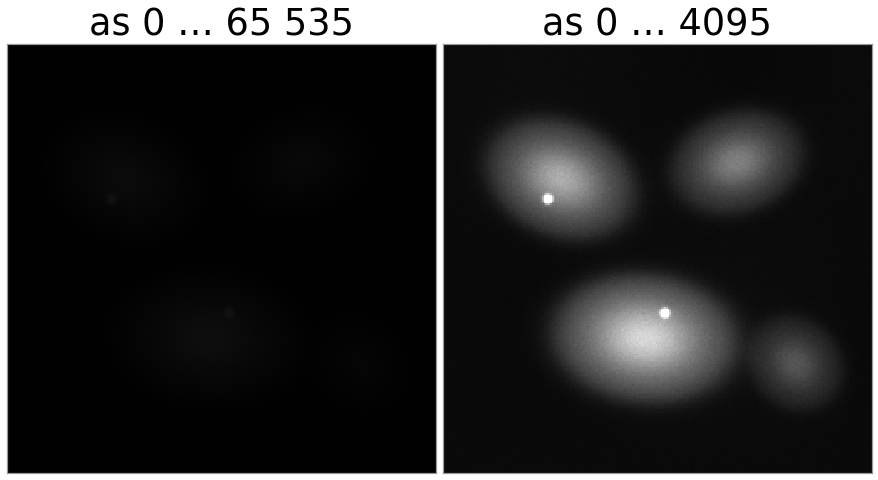
The brightest pixel is shown as a dark grey: the image looks black, but nothing is wrong with the data. Only the display range is wrong.
LSB-aligned: the 12 bits are the low bits; values 0…4095. The usual case.
MSB-aligned: the 12 bits are shifted to the top (value × 16); values 0…65 520, every 16th value used. Displays fine, but the histogram is a comb.
Packed: two 12-bit pixels in 3 bytes, no wasted bits (25 % smaller); must be unpacked before use.
Try it: show a 12-bit image
Integer types
type
bits
range
unsigned 8-bit (uint8)
8
0 … 255
signed 8-bit (int8)
8
−128 … 127
unsigned 16-bit (uint16)
16
0 … 65 535
signed 16-bit (int16)
16
−32 768 … 32 767
signed 32-bit (int32)
32
about ±2.1 × 10⁹
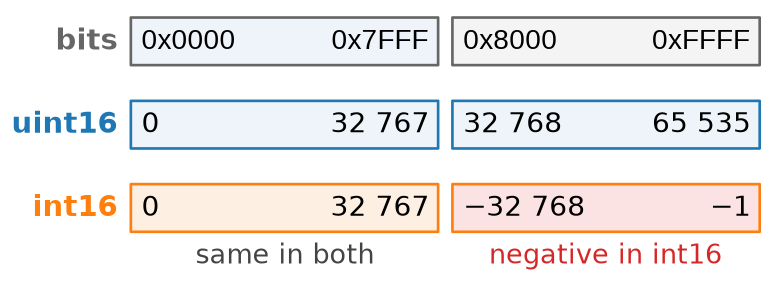
Signed integers use two’s complement: −1 is stored as all ones (0xFFFF in 16 bits), −30 as 65 506.
The same 16 bits mean 65 506 as uint16 and −30 as int16. The bits do not know their type; the file header or your program decides.
When the result does not fit
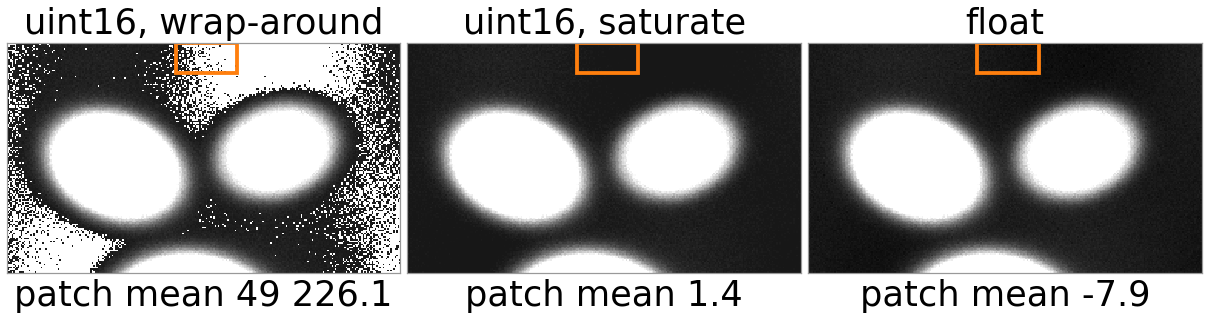
Subtract a background of 160 from a pixel of 150, in uint16:
arithmetic
result
what you see
wrap-around (what plain integer arithmetic does)
65 526
the darkest pixels become the brightest
saturation (clip to the range)
0
negatives become 0: the noise is cut on one side, the mean is biased up
float (or a wider signed type)
−10
correct; decide later what to do with negatives
Same trap when averaging: in uint16, (40\,000 + 30\,000)/2 gives 2232 instead of 35 000, because the sum wraps before the division.
The math: wrap-around is arithmetic modulo 2^n
An n-bit unsigned integer stores every result modulo2^n:
a \ominus b = (a - b) \bmod 2^n, \qquad 150 \ominus 160 = -10 + 65\,536 = 65\,526.
Two’s complement uses the same rule to store negatives: -x is stored as 2^n - x. That is why addition and subtraction circuits do not care whether a number is signed: only the interpretation of the top half of the range differs (2^{n-1} \dots 2^n - 1 means -2^{n-1} \dots -1).
Saturation is \min(\max(a - b, 0), 2^n - 1): not modular, and not linear either; \mathbb E[\max(X, 0)] > \mathbb E[X] when X has noise around 0.
Rules for arithmetic
Compute in a wider type: convert to float (or int32) before subtracting, adding, averaging, filtering. A filter with negative weights needs signed results anyway.
Convert back on purpose, with an explicit scale and clip, and only for storage or display.
Watch the conventions: some programs scale floats to [0, 1], others keep raw counts. Converting 4095 (uint16) to a “[0, 1] float” can give 4095/65\,535 \approx 0.0625, not 1.
Summing frames: 16 frames of a 12-bit camera fit in uint16 (16 \cdot 4095 = 65\,520); the 17th does not.
Showing 12–16 bits on an 8-bit screen: windows
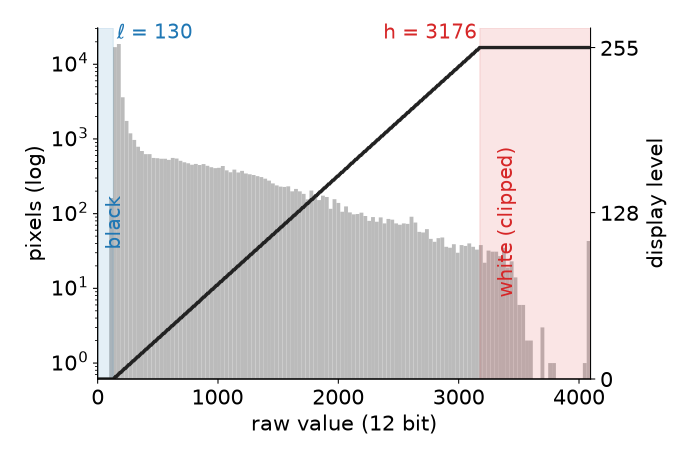
A window[\ell, h] maps raw values linearly to the 256 display levels and clips the rest:
v \le \ell → black, v \ge h → white, in between a linear ramp.
Window/level: width W = h - \ell, centre L = (\ell + h)/2.
A narrow window spreads a small range of values over all display levels: more contrast, more clipping.
Auto-contrast: set \ell and h to percentiles (say 0.5 % and 99.5 %), so a few saturated or dead pixels do not set the scale.
The window changes only the display. Measure on the raw values.
The math: the window formula
The display level of a raw value v is the straight line through (\ell, 0) and (h, 255), clipped and rounded:
With width W = h - \ell, one display level covers W/256 raw values: for W = 4096, 16 raw values share one grey on screen. A LUT (look-up table) generalises this: any function from raw value to colour, stored as a table. The window is the linear LUT.
CT: Hounsfield units and windows
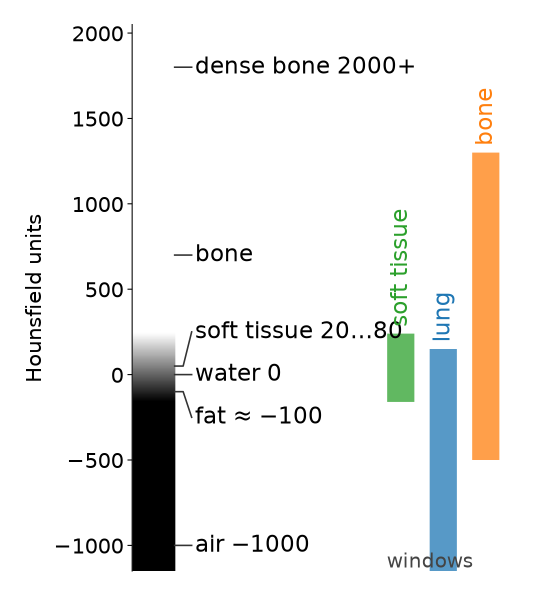
CT measures X-ray attenuation \mu and reports it relative to water, in Hounsfield units (HU): air −1000, fat ≈ −100, water 0, soft tissue 20–80, bone several hundred to 2000+.
Soft tissue differs by tens of HU, but the image spans 4000 HU: no single window shows everything. Radiologists switch between standard windows:
window
W
L
range shown
soft tissue
400
40
−160 … 240
lung
1500
−600
−1350 … 150
bone
1800
400
−500 … 1300
Files often store HU + 1024 as unsigned numbers, with the offset in the header; forget it and every window is 1024 HU off.
Water is 0 and air is −1000 by construction; one HU is 0.1 % of the attenuation of water. A stored value s becomes HU through a linear rescale, \text{HU} = a\,s + c (often a = 1, c = -1024), recorded in the file header.
Try it: CT windows
Colour maps, HDR and tone mapping
A LUT can map grey values to colours. A “hi-lo” LUT marks clipped pixels (blue below, red above): use it to set a window honestly. Perceptual colour maps are on the colour day (colour for display).
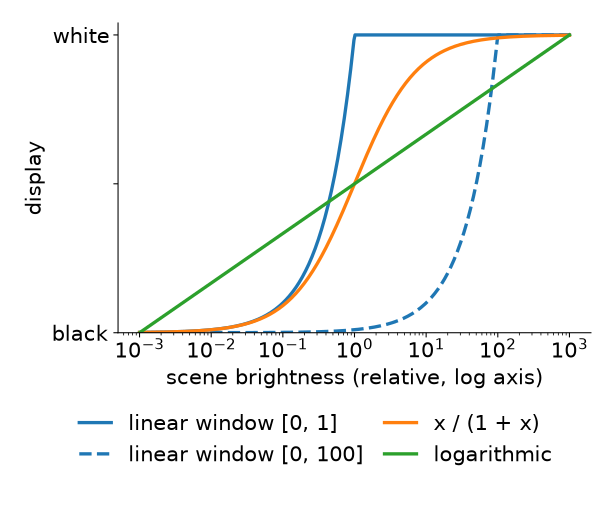
High dynamic range (HDR) scenes span 10^5 : 1 or more. A linear window either loses the shadows or the highlights.
Tone mapping compresses the range with a non-linear curve (e.g. logarithmic, or x/(1 + x)), globally or adapted to the neighbourhood. Good for looking, bad for measuring: it changes the ratios between pixels. Other curves (gamma, log, equalisation): the next unit.
Summary
12-bit data in a 16-bit container look black when shown as 0…65 535: the display range, not the data, is wrong.
Integer arithmetic wraps (modulo 2^n) or saturates; both are wrong for negative results. Compute in float or a wider type.
A window maps a range of raw values to the 256 display levels; CT uses standard windows in Hounsfield units.
Displays, LUTs and tone mapping are for looking; analysis uses the raw numbers.