A course or project page
Part 3: Sharing
About this lecture
You have figures made by a script and a repository on GitHub. Now they should be somewhere anyone can open with one link: a web page for your project or your course, which you update with one prompt whenever the figures change.
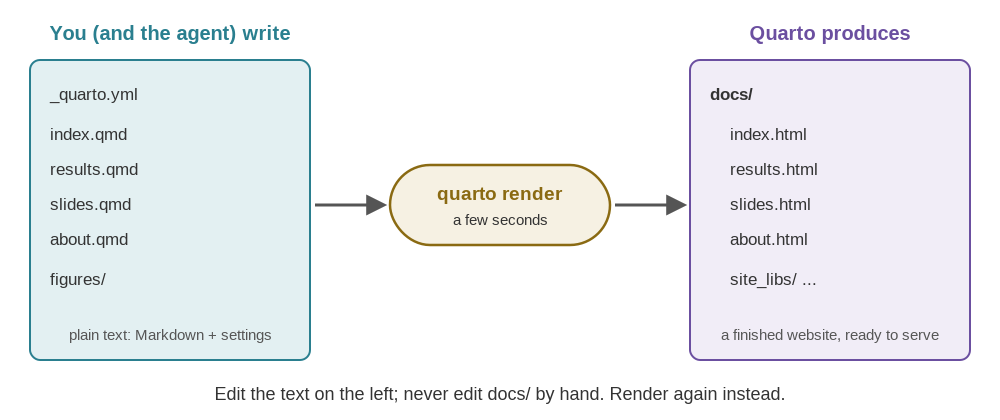
- A Quarto website is a folder of text files that Quarto turns into web pages.
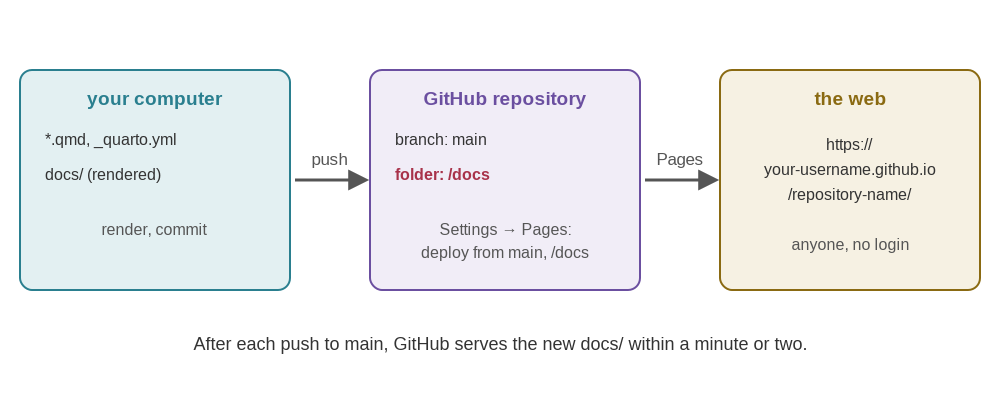
- GitHub Pages serves the
docs/folder of a repository atyour-username.github.io/repository/. This course site is built exactly that way. - The agent installs Quarto, scaffolds the site, renders and pushes. You decide what goes on it and check the live page.
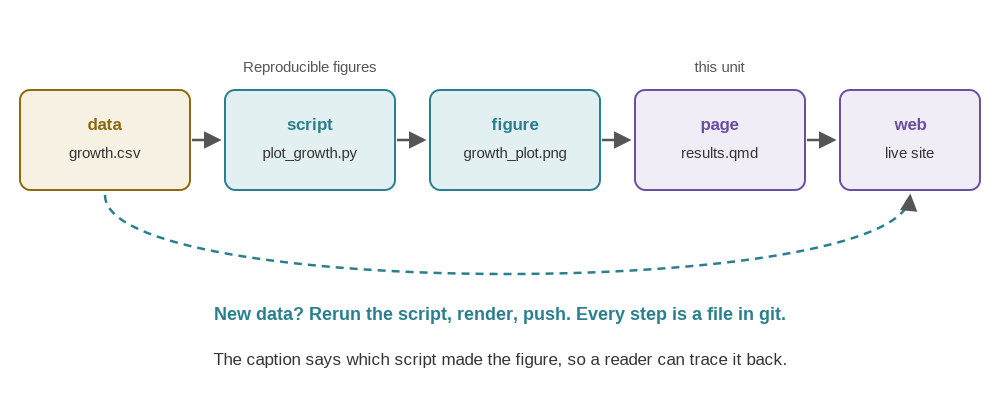
- The figures from Reproducible figures are the first content, with a caption that says which script made them.
- Everything in the repository becomes public, including its history. Decide what goes in before you switch Pages on.
This is a hands-on unit. Interactive pages come next (Interactive demos), and they will live on this site.
Your project’s results are scattered over five places
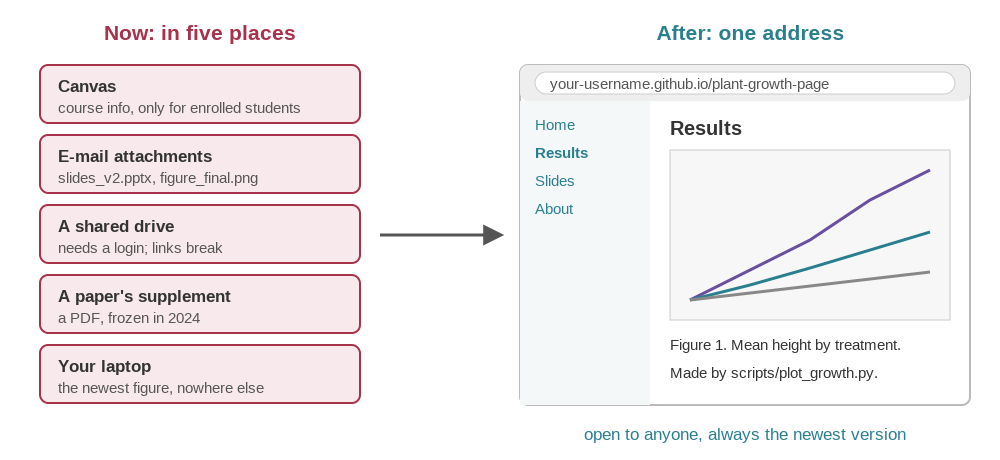
A Quarto website is a folder of text files turned into web pages
GitHub Pages serves the docs/ folder of your repository as a website
This course site is built exactly this way
The real _quarto.yml of this course (shortened):
project:
  type: website
  output-dir: docs          # Quarto writes the site here; Pages serves it
  render:                   # which files become pages
    - "*/*.qmd"
    - "!contentplan.md"     # teacher-only: in the repo, not on the site
    - "!*/data/"

website:
  title: "Introduction to agentic AI"
  sidebar:
    contents:
      - section: "Part 1: Getting started"
        contents:
          - section: "Why agentic AI?"
            contents:
              - text: "Lecture (slides)"
href: why-agentic/lec.qmdThe agent installs Quarto, one approved step at a time
- Ask: “Is Quarto installed? If not, install it with the official method for my system. Explain each command first.”
- On a Mac the agent often proposes
brew install --cask quartoor the installer from quarto.org; on Windows,wingetor the installer. - An installer may ask for your computer password in a separate window. That is you, not the agent.
- Check:
quarto --versionprints a version number. If “command not found”, reopen the terminal.
Describe the site; the agent scaffolds it
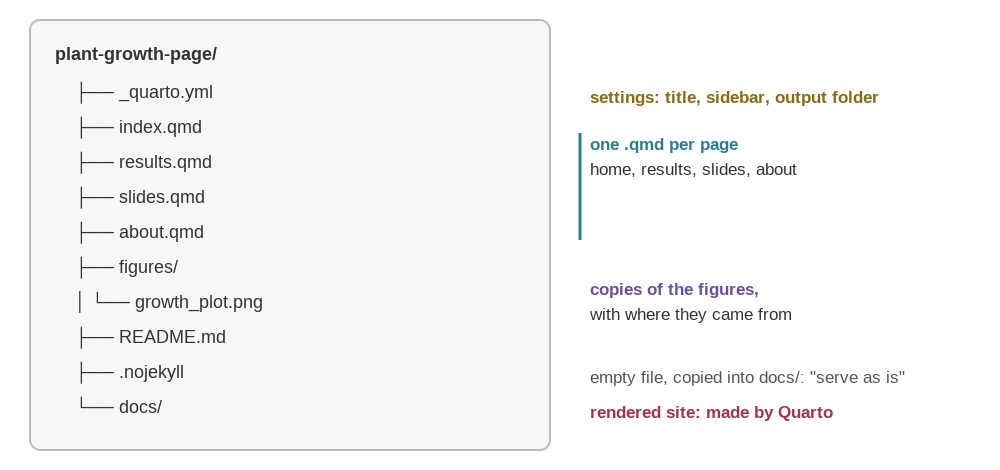
A page is a short header and Markdown
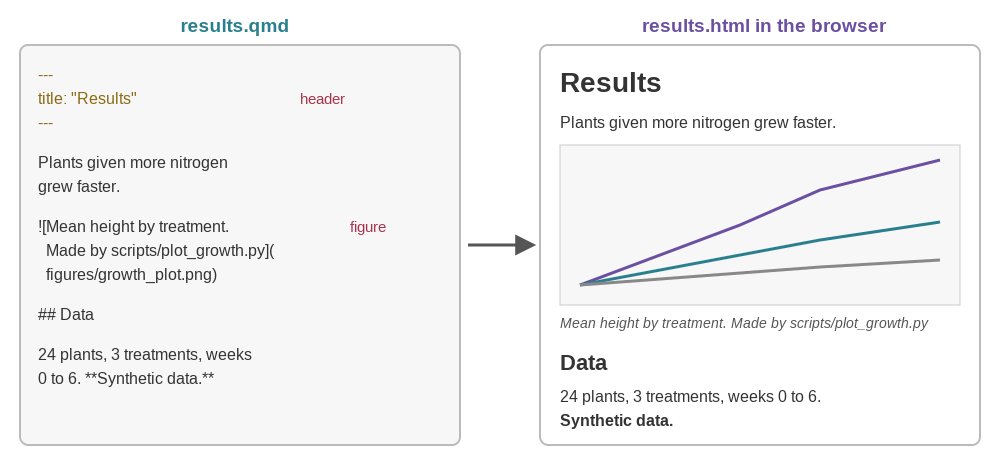
Five Markdown constructs cover most pages
| You write | You get |
|---|---|
## Results |
a heading (and an entry in the page’s table of contents) |
**important** |
important |
- first point on separate lines |
a bullet list |
[Course plan](plan.qmd) or [Quarto](https://quarto.org) |
a link to another page or another site |
 |
a figure with a caption |
Tables, callout boxes, columns, footnotes and citations exist too. Ask the agent when you need them.
The sidebar lists the pages in the order you choose
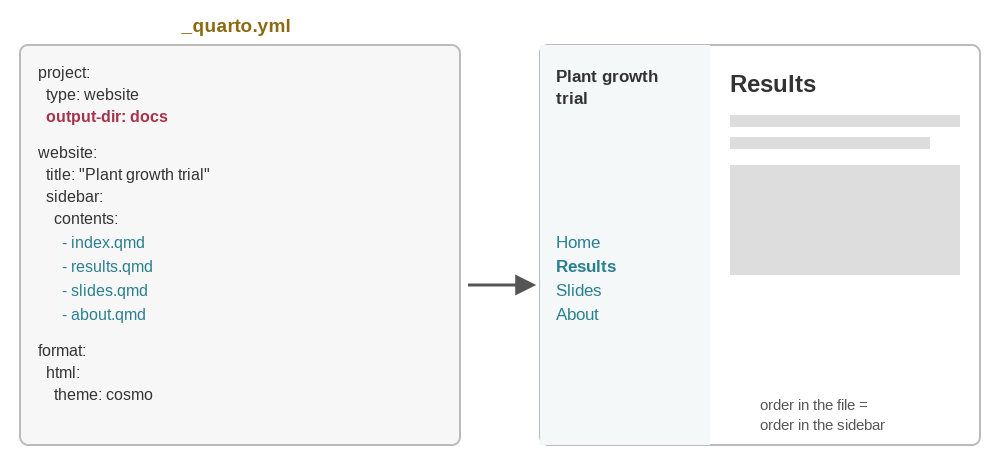
The figures from Reproducible figures are the first content
Look at the site on your own computer before anything is public
- After
quarto render, opendocs/index.htmlin your browser: double-click it in the file browser. - Or ask the agent to run
quarto preview: a local preview that updates when you save. Stop it with Ctrl+C. - Check every page, every link, every figure. Read the text as a stranger would.
- Nothing is public until you push and Pages is switched on.
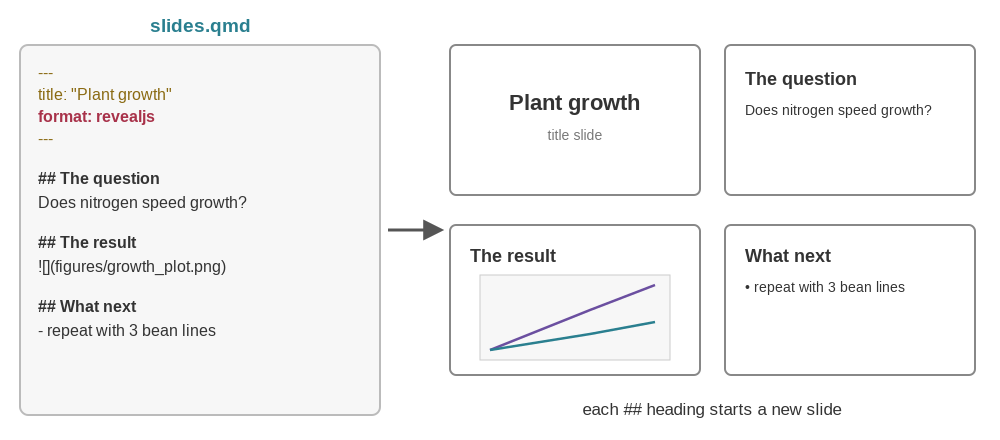
Slides are pages too: format: revealjs
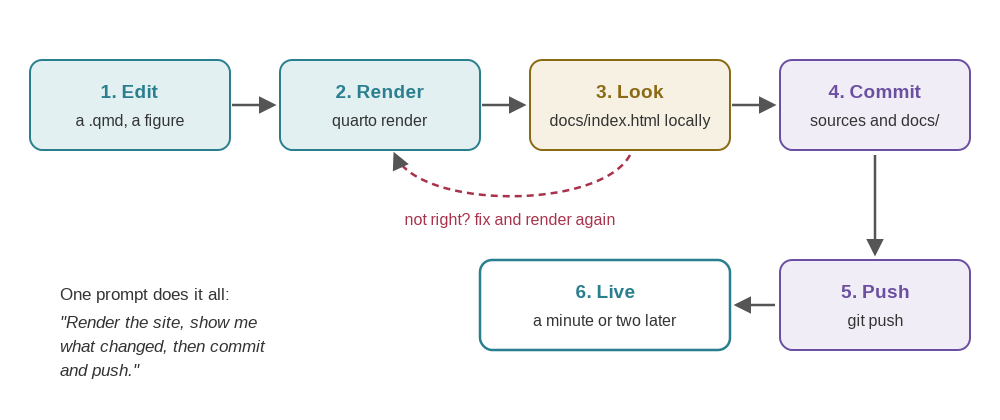
Updating the page is the same loop every time
Switch Pages on once: Settings → Pages → main, /docs
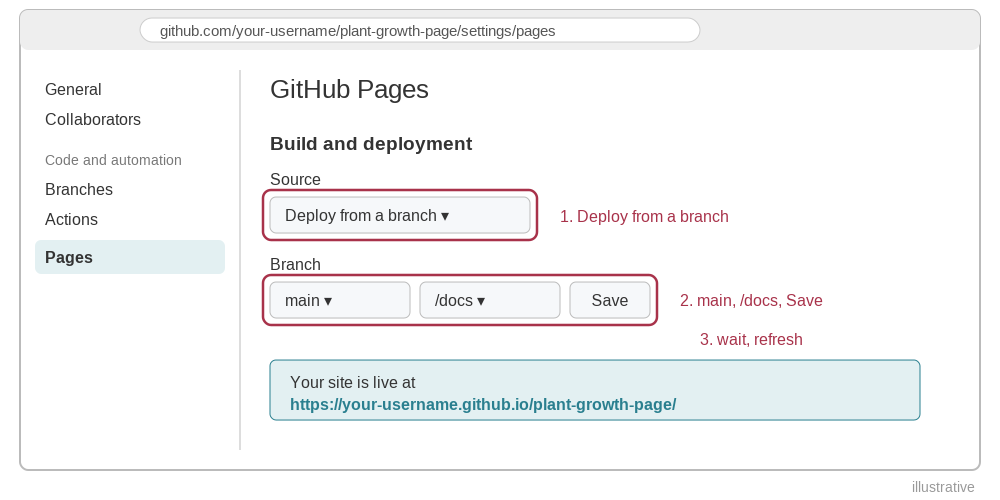
Or let the agent switch it on with gh api
The agent can make the same setting with the GitHub API:
echo '{"source":{"branch":"main","path":"/docs"}}' | \
  gh api -X POST repos/OWNER/REPO/pages --input -
And ask for the address afterwards:
- This changes a setting on GitHub. Read it: the branch is
main, the folder is/docs. - Either way works. The settings page shows you what happened; the command leaves a record in the session.
On a free account, Pages needs a public repository
- GitHub Free: Pages works only from a public repository.
- Paid plans (Pro, Team, Enterprise; some education benefits): also from a private repository, but the site itself is still public.
- So on a free account: switching Pages on means making the whole repository public.
- The page you publish is open to anyone, indexed by search engines and copied by archives.
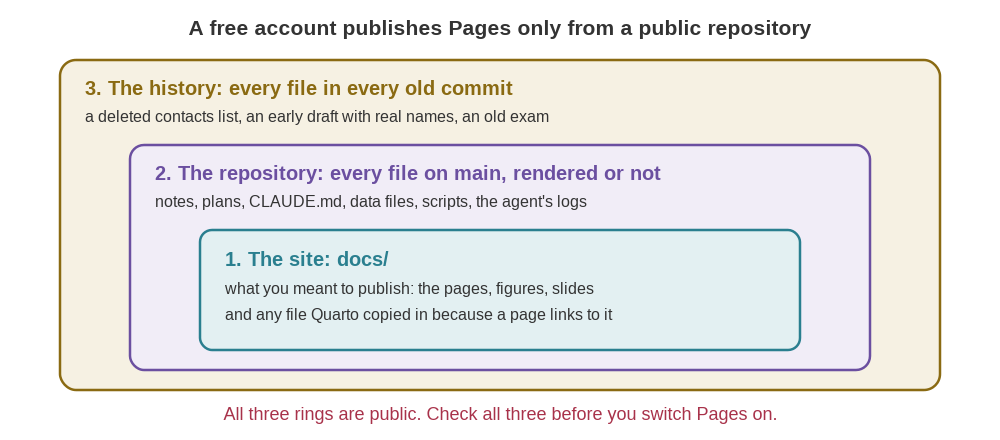
Three rings become public: the site, the repository and its history
A separate page repository keeps your project private
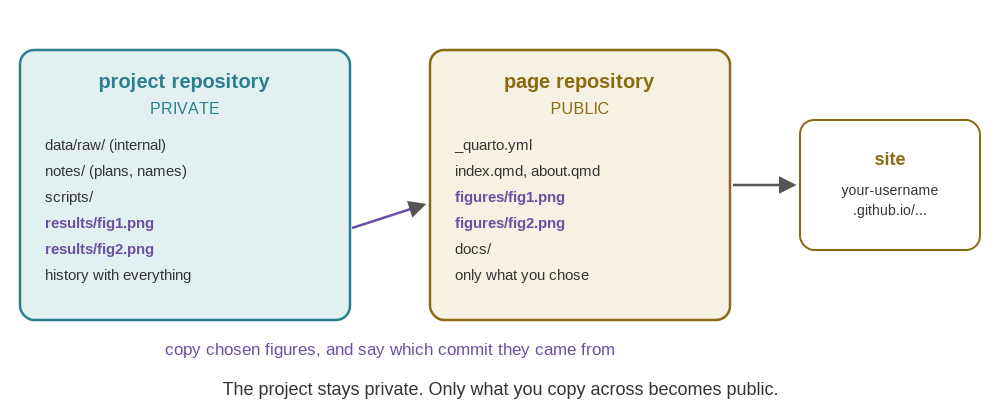
- Same repository (as this course does): only if everything in the project, including its history, may be public.
- Separate page repository: the default for your own project. Copy the chosen figures across and note the source commit.
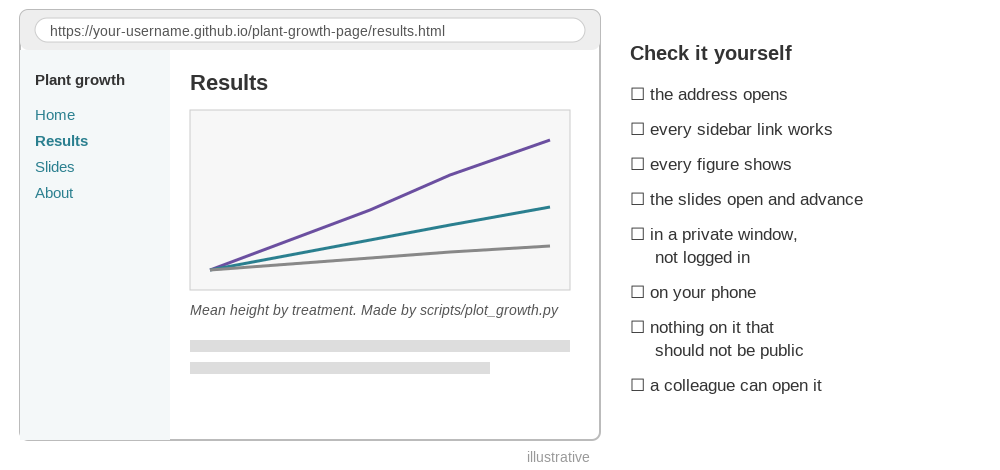
Check the live page yourself, as a stranger would
A page should say who made it, under what licence, and how AI was used
| On the page | Why |
|---|---|
| Your name, affiliation, a contact route (a university page, not a private phone number) | readers know whose work it is |
| What the figures show and which script and data made them | readers can trace and reuse them |
| A licence: CC BY 4.0 for text and figures, MIT for code | readers know what they may reuse (GitHub) |
| “Synthetic data” or “data from …, under licence …” | readers know what they are looking at |
| How AI was used, in a sentence | as you would disclose it in a paper (Privacy, ethics and safety) |
| The date of the last update | readers know whether it is current |
Other ways to make a page exist; a git-based page is the reproducible one
| Google Sites, Canvas pages, university CMS | Quarto + GitHub Pages | |
|---|---|---|
| Making a page | click and type in a web editor | describe it; the agent writes text files |
| Updating a figure | upload the new image by hand, every time | rerun the script, render, push |
| History | limited or none | every version, with who and why |
| Moving elsewhere | copy and paste | the files go anywhere; Quarto also makes PDF and Word |
| Who can read it | often only students, or only staff | anyone |
| Works with the agent | barely: it cannot click in your browser | fully: everything is a file |
Use your university’s system where it is required, for example for grades and enrolment. Link to the Quarto page from there.
From now on, every unit adds something to this page
- Interactive demos (next): a self-contained HTML page that explains a concept, embedded in this site.
- Shiny apps: an app for exploring your data, published next to the page where possible.
- Part 4: the verified literature table, extracted data, a grant analysis, each as a page.
- Each time: edit, render, look, commit, push, check live.
Where this goes wrong
- 404 on the live address. Pages not switched on, wrong folder (not
/docs),output-dirmissing, or the address has the wrong repository name. - Page looks unstyled or broken.
docs/.nojekyllmissing, ordocs/site_libs/not committed. - Figure missing online but fine locally. File not committed, or
Growth.pngvsgrowth.png. - Old version still showing. Wait a minute or two; reload without the cache (Shift+reload).
- New page not in the sidebar. It is not listed under
sidebar: contents. - Something private became public. Notes, data, or a file in the history. Check all three rings before Pages goes on.
- Edited
docs/by hand. The next render overwrites it. Edit the.qmdinstead. - The agent rendered something you did not read. Look at the page before you push.
Summary
| Concept | Key fact |
|---|---|
| Quarto website | .qmd text files + _quarto.yml → quarto render → HTML in docs/ |
| GitHub Pages | serves docs/ on main at your-username.github.io/repository/ |
| This course | built exactly this way; see its _quarto.yml |
| Sidebar | pages listed under website: sidebar: contents, in order |
| Slides | format: revealjs; each ## heading starts a slide |
| First content | figures from Reproducible figures, with the script named in the caption |
Summary (continued)
| Concept | Key fact |
|---|---|
| Switch on | Settings → Pages → Deploy from a branch → main, /docs (or gh api) |
| Free account | Pages only from a public repository; the site is always public |
| What becomes public | the site, the repository and its whole history |
| Separate page repository | the default when the project itself must stay private |
| The loop | edit, render, look, commit, push, check live |
Next (Interactive demos): one self-contained HTML page that explains a concept from your own field, embedded in the page you built today.