In First delegations you described the result you wanted and the agent did the rest. That worked because the jobs were small and the example data had known answers. Your own project is bigger, vaguer and has no answer key. This unit is about writing a brief: a short description of a job that an agent can carry out and that you can check.
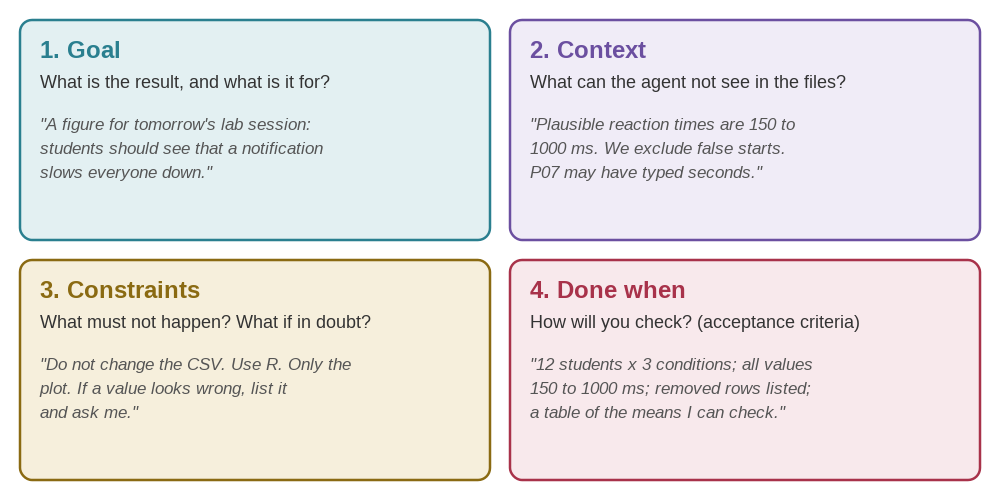
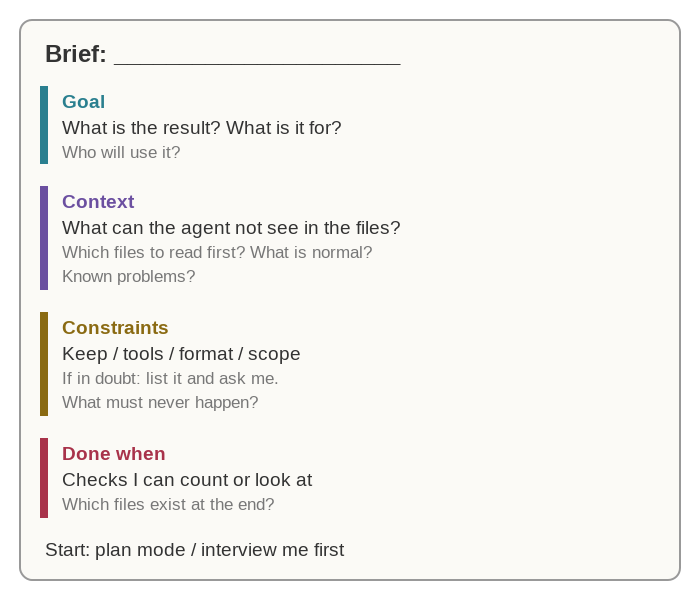
A brief has four parts: goal, context, constraints and acceptance criteria.
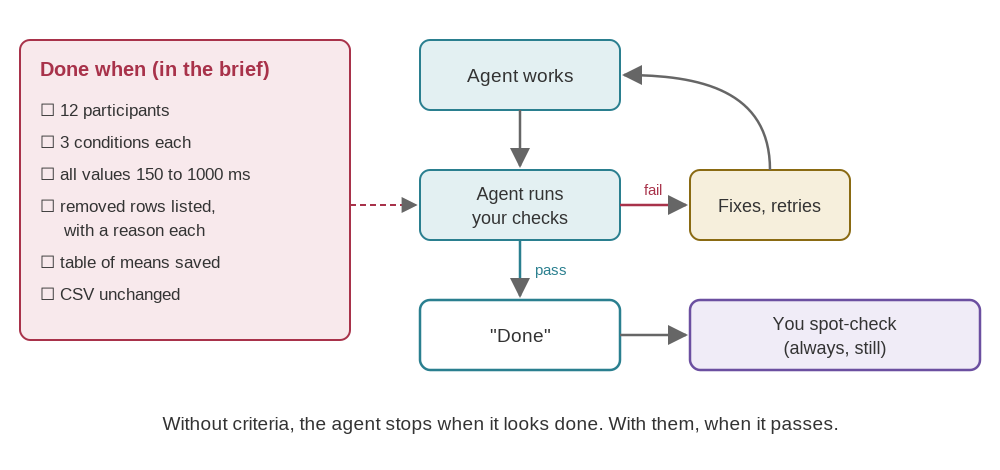
Acceptance criteria say how you will check, so the agent can check too.
Plan mode lets the agent read and propose before it changes anything.
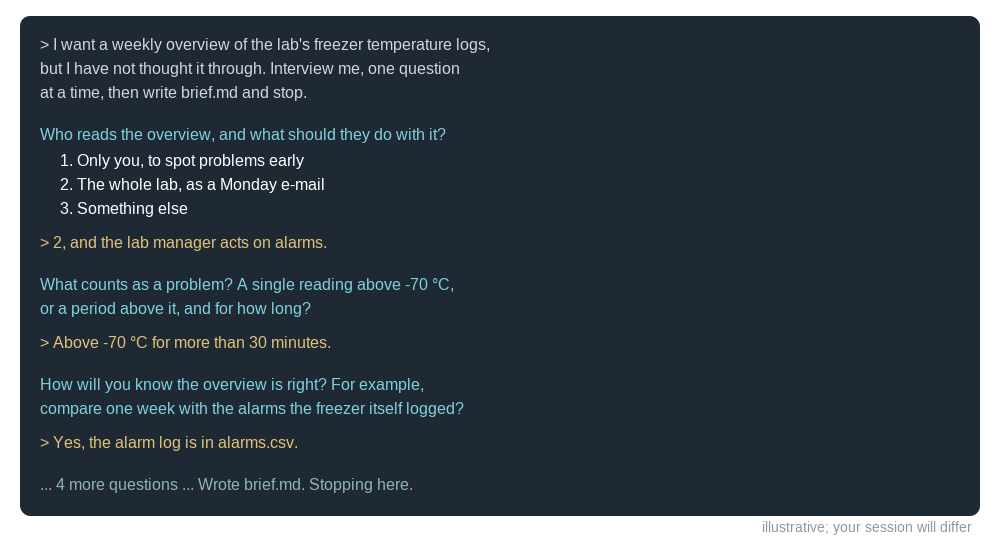
“Interview me first” turns a vague idea into a written brief.
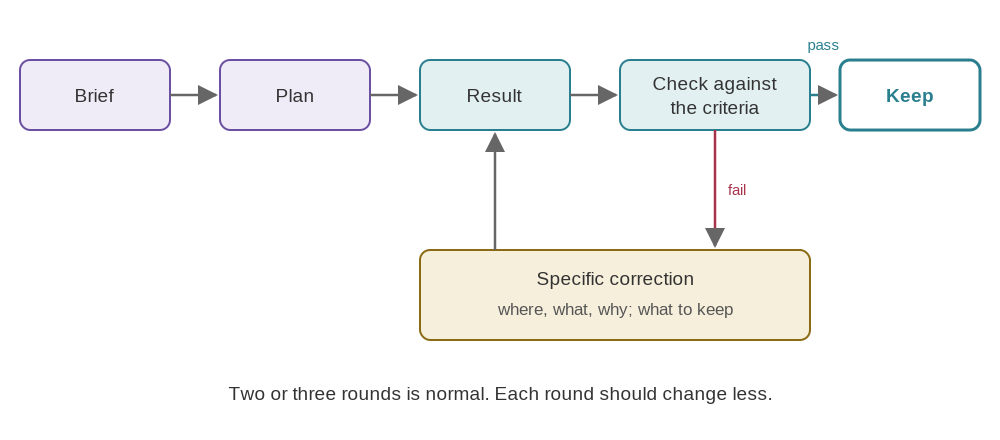
Correct with specifics, and know when a fresh session is the better fix.
This is a hands-on unit. You end with the first real brief for your own project. How to organise the project folder so that every session starts well comes next, in Organising a project for an agent.
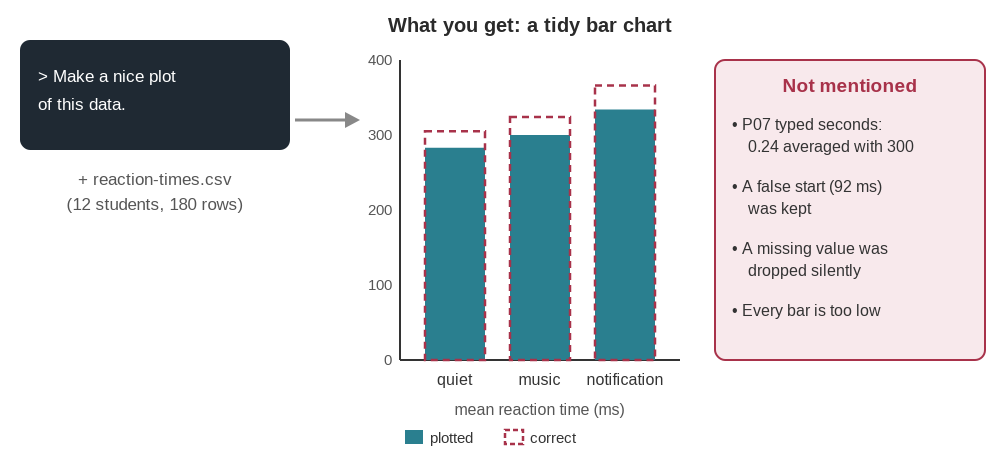
“Make a nice plot of this data” gives a nice plot of the wrong numbers
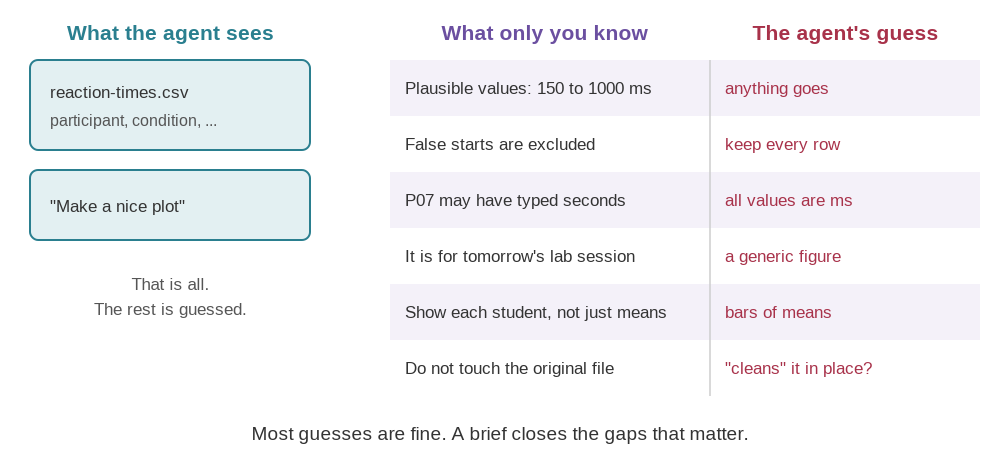
The agent fills every gap in your prompt with a guess
A good brief answers four questions
The goal says what the result is for, not only what it is
Weak goal
Strong goal
“Make a plot.”
“A figure for tomorrow’s lab session: students should see that a notification slows everyone down.”
“Summarise these papers.”
“A table I can paste into the background section of a grant, one row per paper.”
“Write exam questions.”
“Ten questions for a first-year exam that test understanding, not recall.”
The purpose decides a hundred small things you will not think to mention: scale, wording, level of detail.
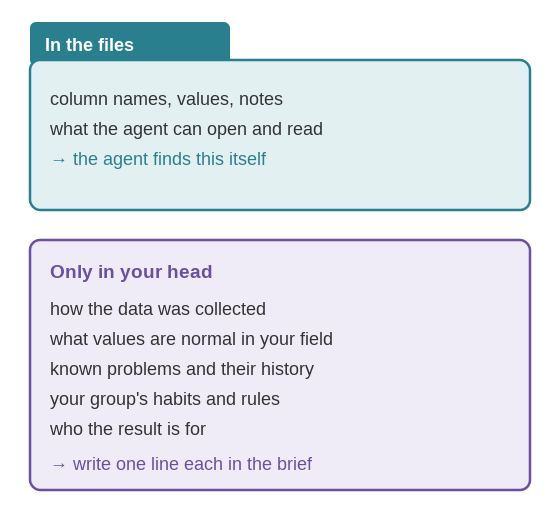
Context is what the agent cannot read from the files
How the data was collected: “students timed themselves with a web tool”.
What is normal in your field: “human reaction times are 150 to 600 ms”.
Known problems: “some students may have typed seconds”.
House rules: “we exclude false starts”.
Where things are: “the course plan is in notes/course-plan.md”.
Constraints say what must not happen
Keep: “Do not change reaction-times.csv. Write new files only.”
Limit: “Use R and ggplot2, which I already have installed.”
Format: “Save as PNG and PDF, 16 cm wide, readable on a projector.”
Scope: “Only the plot. Do not write a report.”
Doubt: “If a value looks wrong, do not fix or drop it. List it and ask me.”
The last one is the most valuable sentence in most briefs.
Acceptance criteria say how you will check, so the agent can check too
Good acceptance criteria can be checked by counting or looking
Vague
Checkable
“Make sure the data is clean.”
“After cleaning: 12 participants × 3 conditions; every value between 150 and 1000 ms.”
“Check your work.”
“Print the number of rows removed and the reason for each.”
“The references should be correct.”
“Every reference has a DOI that resolves; list the ones that do not.”
“Good exam questions.”
“Each question names the learning outcome it tests; no outcome is tested twice.”
“The plot should look nice.”
“All text readable at 16 cm width; axis labels in words with units.”
If you cannot say how you would check it, the agent cannot either. Then the brief is not finished.
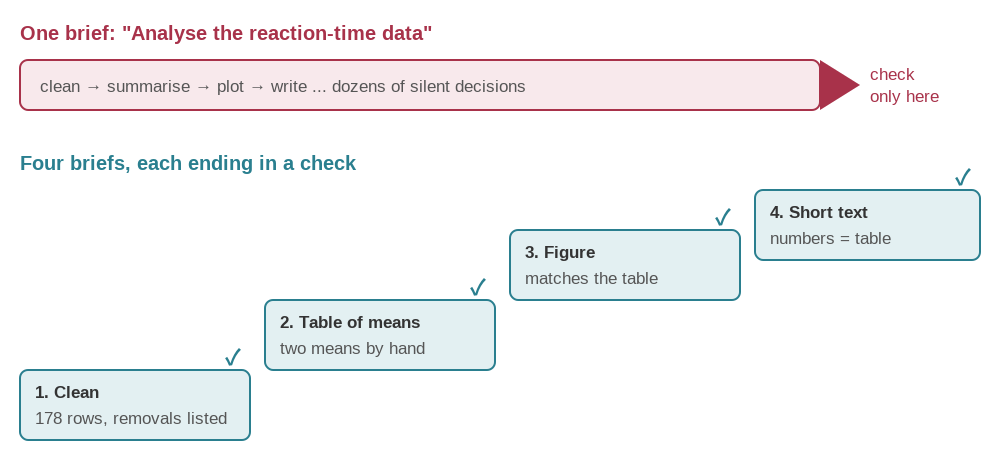
A big job is several briefs, not one long one
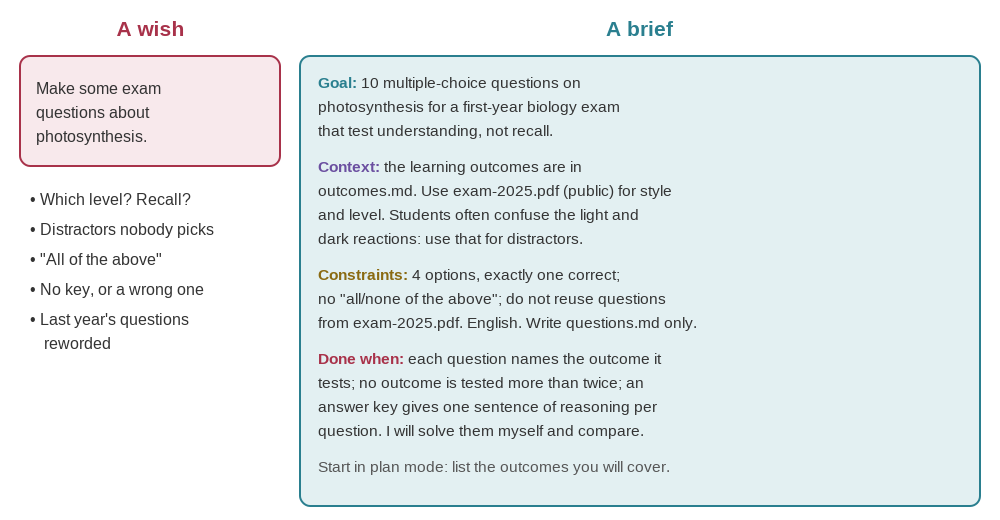
Teaching example: from a wish to a brief
Research example: from a wish to a brief
Weak: “Find papers on microplastics in fish.”
Strong:
Goal: a table of field studies that measured microplastics in the gut of
freshwater fish, for the background section of a grant (about 15 studies).
Context: I work on Swedish lakes; marine studies and lab exposure
experiments are not relevant.
Constraints: search PubMed and Google Scholar only, 2015 to 2025.
Do not include a study you could not open. Write "not stated" for
anything the paper does not say.
Done when: microplastics-table.csv has columns doi, year, country,
species, n_fish, percent_with_plastic, page; every DOI opens the right
paper; you list the search terms you used and how many hits each gave.
A strong brief is specific, not long
Most good briefs are 5 to 15 lines.
One line per fact. No background the agent does not need.
Leave out what the agent can see for itself: it reads the files.
Contradictions are worse than gaps: “keep all rows” and “remove outliers” in one brief.
No magic words. Capitals, “IMPORTANT” and “think very hard” do not make a brief better.
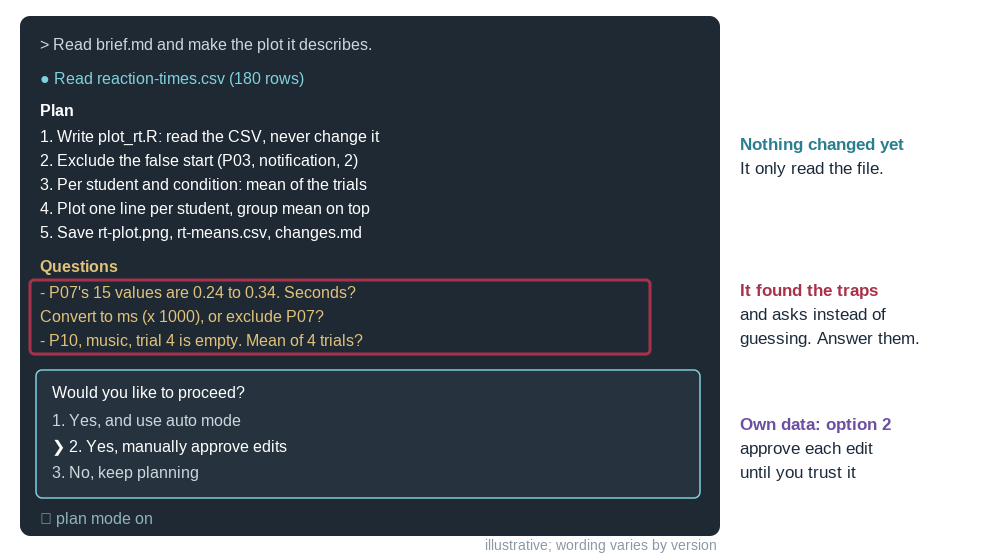
Plan mode: the agent reads and proposes, but changes nothing
Plan mode in each tool
Claude Code
Codex
Switch on
Shift+Tab until the status line shows ⏸ plan mode on
Type /plan and press Enter
For one prompt only
Start the prompt with /plan
/plan followed by your prompt
While planning
Reads files, runs harmless commands, writes a plan; no edits
Reads, may ask clarifying questions, writes a plan
Approve
Choose Yes, manually approve edits (careful) or the option that switches to auto mode
Tell it to go ahead with the plan
Not happy
No, keep planning, then say what to change
Reply with what to change
For your own project, choose to approve edits one by one until you trust the plan.
Reading a plan: five things to look for
Did it understand the goal? The first lines should say back your purpose in its own words.
Which files will it change or create? Anything outside what you expected is scope creep.
What did it find? “Participant P07’s values are between 0.24 and 0.34”: a good plan notices problems.
Which decisions has it already made? “I will drop values below 150 ms”: is that what you want?
What does it ask? Answer every question. A plan with no questions about messy data is suspicious.
A plan costs one minute to read. A wrong result costs an hour to untangle.
“Interview me first” when you do not yet know exactly what you want
The interview ends in a written brief, not in work
I want to <rough idea>, but I have not thought it through.
Interview me, one question at a time, until you could write a brief
with four parts: goal, context, constraints and how I will check the
result. Challenge my assumptions where they seem weak.
Then write the brief to brief.md and stop. Do not start the work.
Read brief.md and edit it yourself. It is your brief now.
Then start a fresh session and give it: “Read brief.md and carry it out. Use plan mode.”
The first result is a draft: check it against the criteria
A specific correction points, explains and fixes the cause
Vague
Specific
“The plot is wrong.”
“P07’s points are near zero. Those values are in seconds; multiply them by 1000 in the script, rerun and update the list of changes.”
“That’s not what I meant.”
“I want one line per student across the three conditions, not bars. Keep the colours.”
“Try again.”
“Keep the table. Only the y-axis label is wrong: it should be ‘Reaction time (ms)’.”
“Too long.”
“At most 120 words. Cut the background paragraph; keep the numbers.”
Say what to keep, too. Otherwise the agent may change parts that were right.
Stop it early when it goes the wrong way
Esc interrupts the agent in both tools. The work so far is kept; type a correction.
Watch the first minute: the first steps show whether it understood.
Claude Code: Esc twice (or /rewind) goes back to an earlier point in the conversation and, if you want, the files.
After Git as undo button and lab notebook you can undo any change, in any tool.
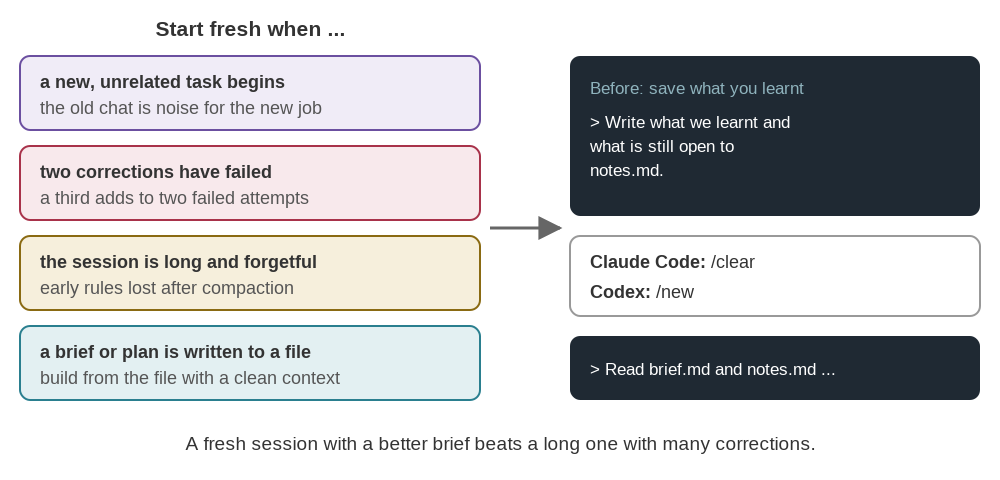
Start a fresh session more often than you think
What you learnt goes into the next brief, not into a long chat
Before you clear, ask: “Write what we learnt and what is still open to notes.md.”
Then fix the brief: add the context or criterion that was missing.
Start fresh: “Read brief.md and notes.md. Then …”
Coming back to a task later: claude --continue or /resume (Claude Code), codex resume or /resume (Codex).
A fresh session with a better brief beats a long session with many corrections.
A brief template that fits on one screen
The same brief still gives a different session each time
Two runs of the same brief: different steps, different wording, sometimes a different script.
A good brief makes the results comparable: both must pass the same criteria.
If two runs disagree on a number, at least one is wrong. Find out which.
Your session will not look like the examples in this lecture or the exercise.
Where this goes wrong
Steps instead of a goal. The agent follows your steps into a wall it could have walked around.
No acceptance criteria. The agent stops when it looks done, not when it is done.
Criteria the agent checks for you. “I verified all values are plausible” is a claim; you still spot-check.
One huge brief. Mistakes from step 2 hide under steps 3 to 10.
Approving the plan unread. Plan mode only helps if you read the plan.
Leading the interview. If you answer every question with “whatever you think”, you get the agent’s project, not yours.
Correcting forever. Two failed corrections: clear, improve the brief, start fresh.
Own data in the brief. A brief goes to the provider like everything else. No names, no confidential details (Privacy, ethics and safety).
Summary
Concept
Key fact
Brief
goal, context, constraints, acceptance criteria; usually 5 to 15 lines
Goal
what the result is for; the purpose decides many small things
Context
what the agent cannot read from the files; point at files rather than retype
Constraints
what to keep, limits, scope, and “if in doubt, list it and ask”
Acceptance criteria
how you will check, written so the agent can check too
Plan mode
reads and proposes, changes nothing; Shift+Tab (Claude Code), /plan (Codex)
Interview me first
one question at a time, ends in brief.md, not in work
Specific corrections
where, what, why; fix the cause; say what to keep
Fresh session
new task, two failed corrections, long session, after a written brief
Next (Organising a project for an agent): give your project a folder structure and an AGENTS.md file, so that every new session starts knowing what the project is and where things are.