Your project folder is now a git repository with a history, but it lives on one computer. GitHub keeps a copy of that repository online, so it survives a lost laptop, you can work on it from two computers, and a colleague can read it, comment on it and help.
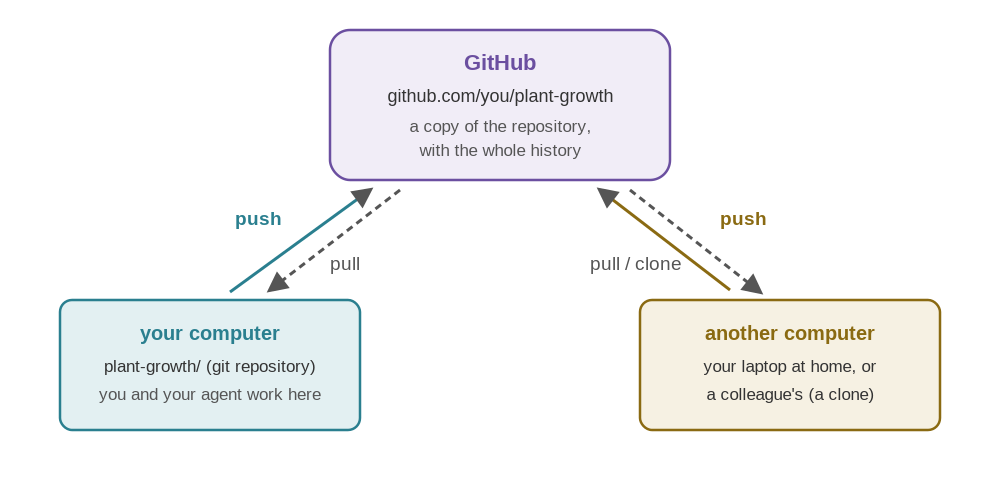
A repository on GitHub is a copy of your git repository, history included. Push sends commits up; pull brings them down.
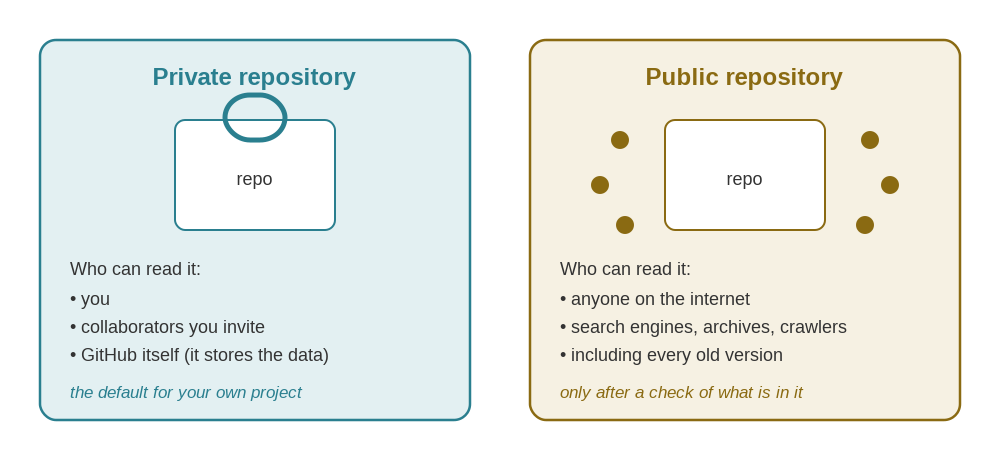
Private or public decides who can read everything in it, including every old version.
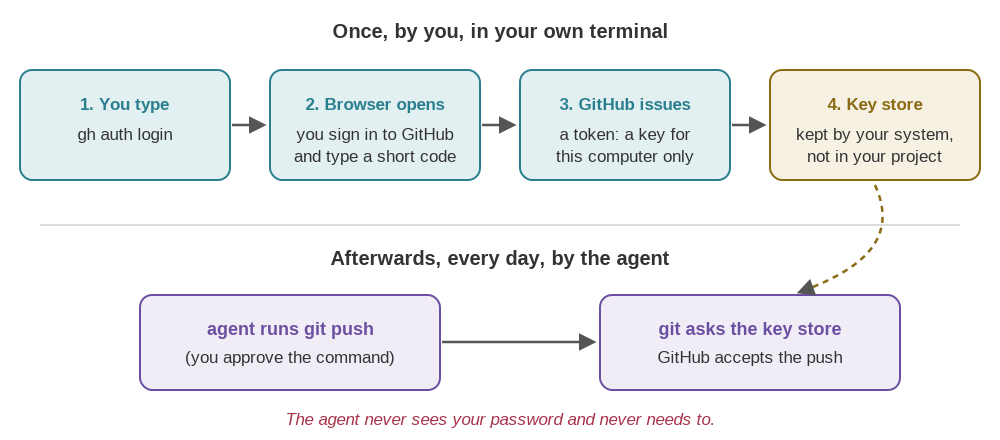
You log in once with gh auth login. After that the agent can create repositories and push, and you approve each step.
Issues are a shared to-do list, collaborators can read and push, pull requests propose changes.
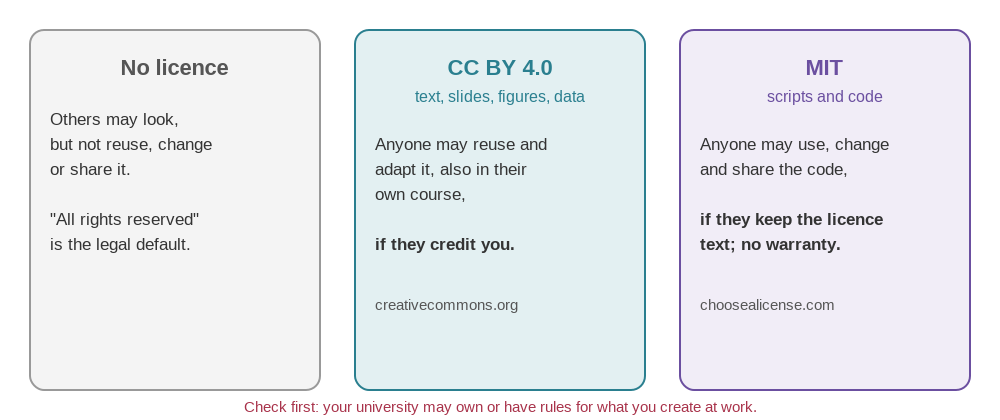
A licence says what others may do: CC BY for teaching material, MIT for code.
This is a hands-on unit. You put a project on GitHub and swap repositories with another participant. Publishing a web page from a repository comes next (A course or project page).
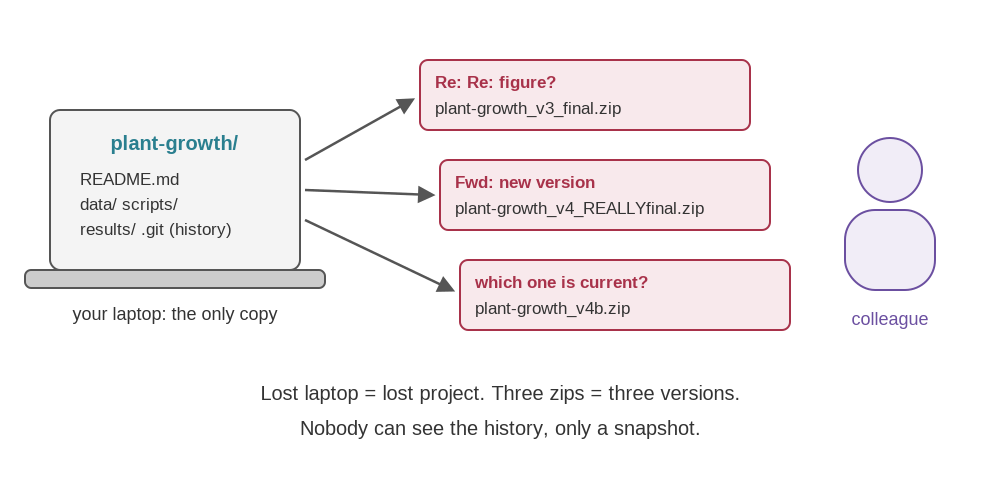
A colleague asks: “Can I see your project?”
GitHub keeps a copy of your repository, with its history
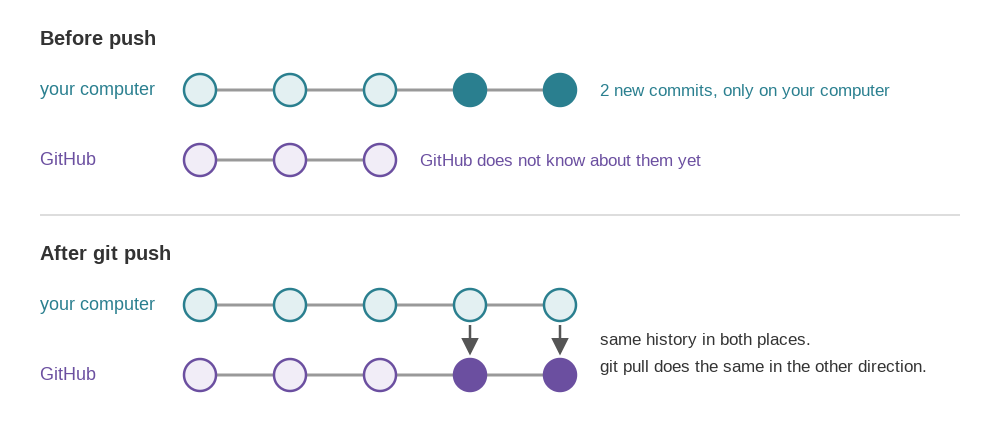
Push sends your new commits up; pull brings new commits down
A commit stays on your computer until you push. “Committed” is not “backed up”.
Before you start work on a second computer, pull. Then you start from the newest version.
Private or public decides who can read the repository
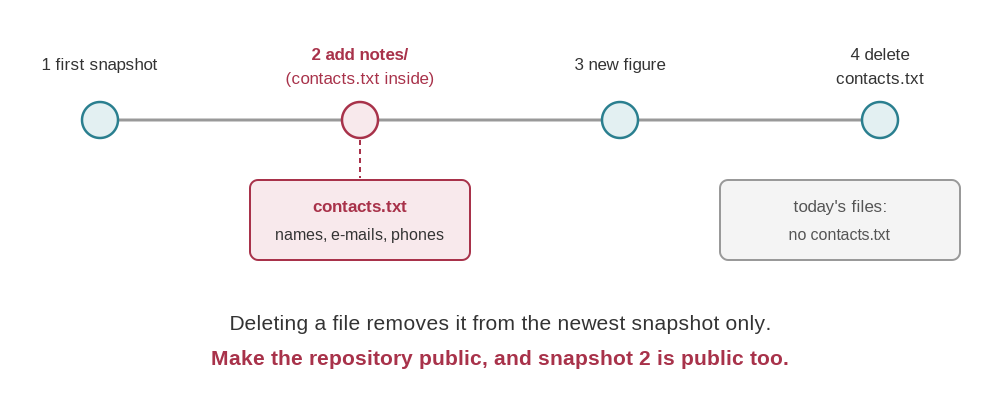
Public means every file in every old version, not only today’s files
Your data class decides where the repository may live
Data class (from Privacy, ethics and safety)
On GitHub?
Public: open data, published material, your teaching material
Private or public. Public after a check of files and history
Internal: your unpublished results, a draft course plan
Private only, and only if your university allows GitHub for this
Personal data: names, grades, e-mails of students
Not in the repository. Use a synthetic stand-in, add the real files to .gitignore
Sensitive personal data or material given in confidence
Never
Exam questions before the exam
Private only; better not on GitHub at all until after the exam
A private repository is still on someone else’s server. Your university’s rules may name an approved alternative, often an internal GitLab.
.gitignore keeps files out of the repository altogether
A text file .gitignore in the project folder lists files and folders git should never commit.
Ignored files stay on your computer, untouched. They are just never snapshotted, never pushed.
Add a file to .gitignorebefore its first commit. Once it is committed, it is in the history.
Ask the agent: “Add our real data files to .gitignore, then show me with git status that they are not tracked.”
You log in once; after that the agent can push for you
The agent installs gh; you run the login yourself
In the agent, ask: “Install the GitHub CLI, gh, using the official method for my system. Explain each command first.”
Approve the install command. On a Mac it is often brew install gh; on Windows often winget install --id GitHub.cli.
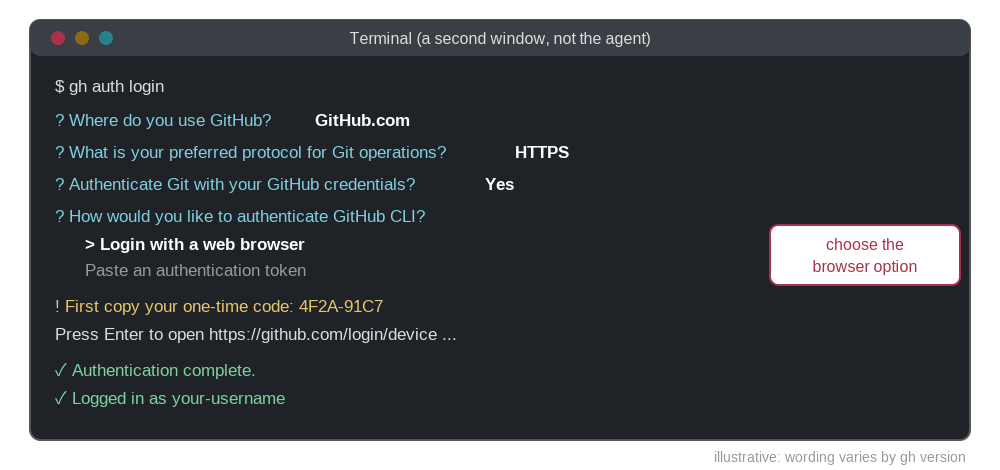
Open a second terminal window and type gh auth login. Not inside the agent.
Check with gh auth status: it should say you are logged in to github.com.
Never paste a token, password or login code into the agent’s prompt.
gh auth login asks four questions
GitHub.com · HTTPS · Yes, authenticate Git · Login with a web browser.
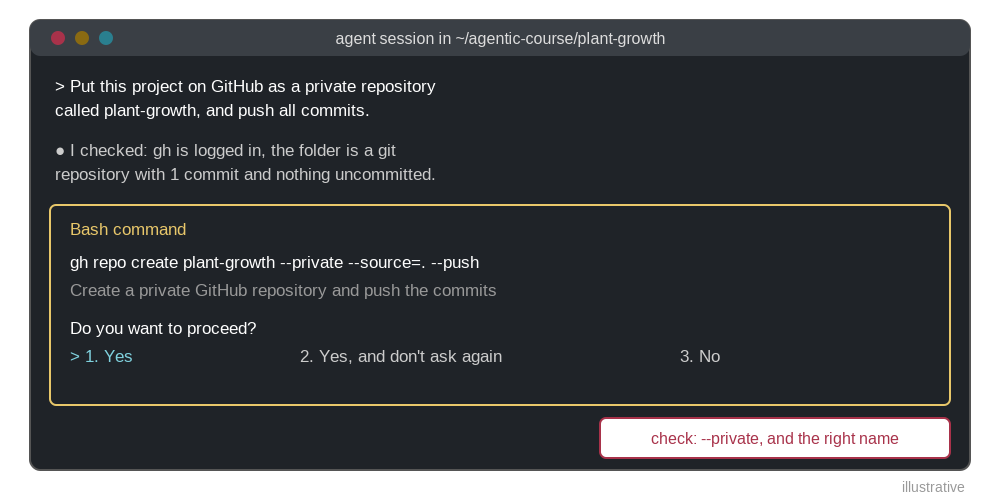
The agent creates the repository and pushes, in one approved step
Read GitHub commands before you approve them
Command the agent proposes
What it does
Risk
gh auth status, git remote -v, gh repo view
only looks
none
git push
sends your commits to GitHub
low, if the repository is private
gh repo create NAME --private --source=. --push
new repository from this folder
check private and the name
gh issue create, gh issue comment
writes an issue or comment, in your name
check the text first
gh repo edit --visibility public --accept-visibility-change-consequences
makes the repository public
high: everything, with history
git push --force, gh repo delete
overwrites history on GitHub; deletes the repository
high: say no unless you asked for it
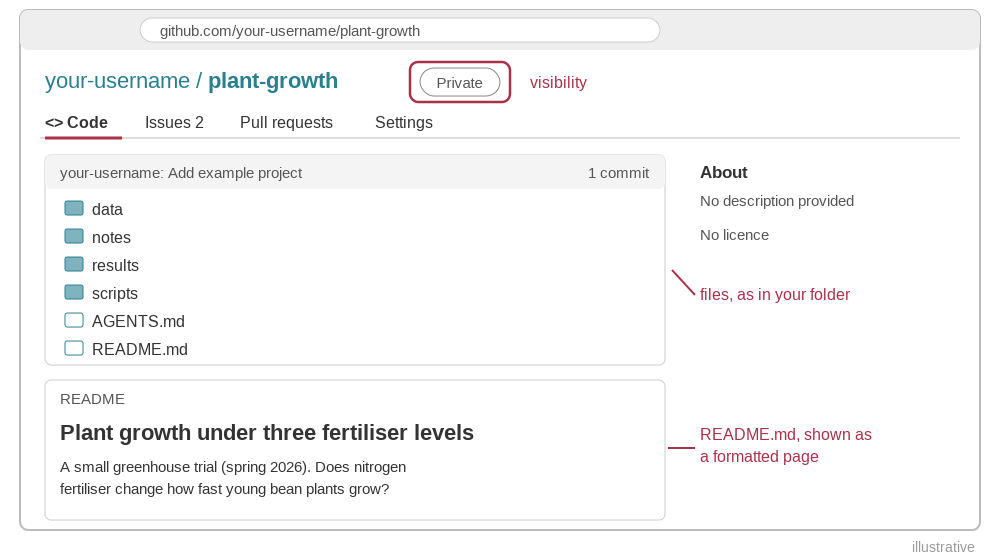
The repository page shows your files and your README
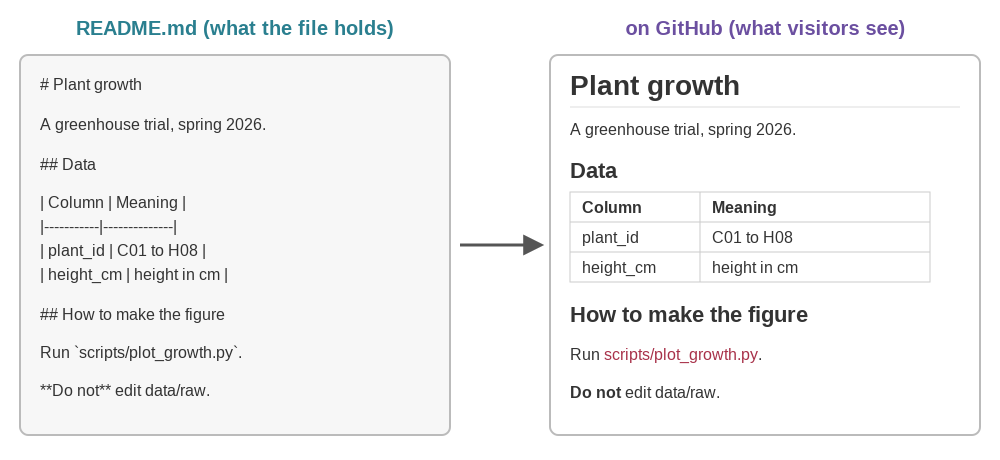
README.md is plain text that GitHub shows as a formatted page
A visitor’s first questions should be answered by the README
What is this? One or two sentences: the goal, in plain words.
What is in it? The folder layout and a data dictionary: what each column means.
How do I rerun it? The exact command, the software needed, the order of the steps.
Where do the results come from? Which script makes which figure.
Can I reuse it? The licence, and how to cite or credit.
What is not here, and why? “The raw data is personal and not in this repository; a synthetic sample is in data/example/.”
You wrote most of this in Organising a project for an agent. GitHub is where you find out whether it works for someone else.
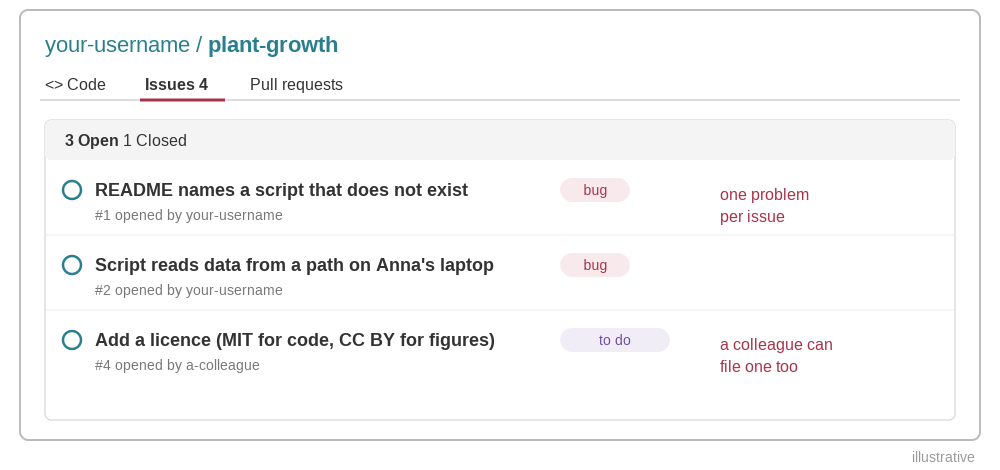
Issues are a to-do list that lives next to the project
A useful issue says what is wrong, where, and how you know
Not useful
Useful
“The script doesn’t work.”
“scripts/plot_growth.py stops with FileNotFoundError: it reads C:/Users/anna.k/Desktop/greenhouse/growth.csv (line 8). It should read data/raw/growth.csv.”
“README is confusing.”
“README says to run scripts/make_figure.py, but that file does not exist. I think it means scripts/plot_growth.py.”
“Add more documentation.”
“The README’s data table lists a column height_cm, but growth.csv calls it ht. Rename one of them so they match.”
The same rule as in First delegations: point to the place, say what you expected, give the reason.
The agent can read, write and close issues with gh
“List the open issues in this repository.” → gh issue list
“File an issue for the wrong file name in the README. Show me the text first.” → gh issue create
“Fix issue 1. Commit with the message Fix script name in README (fixes #1) and push.”
A commit message with fixes #1 closes issue 1 automatically when it reaches GitHub.
You can do all of this on the website too. Use whichever is quicker.
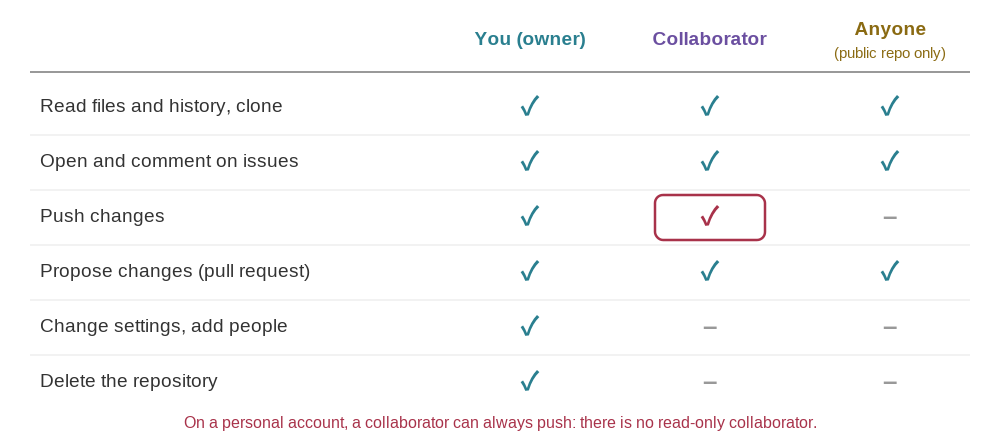
Collaborators can read and push, so invite only people you trust
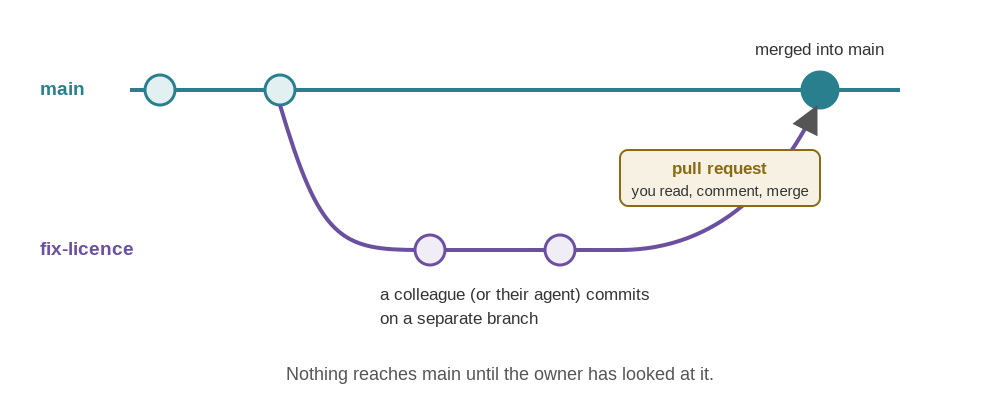
A pull request proposes a change instead of pushing it
Use them when several people work on one repository, or to let an agent’s change wait for review.
For your own project, working alone, committing to main is fine.
Without a licence, others may look but not reuse
Adding a licence is one file and one sentence in the README
Ask: “Add an MIT licence for the scripts and a CC BY 4.0 licence for the text and figures. Put the MIT text in LICENSE and explain the split in the README.”
GitHub recognises a LICENSE file and shows it in the About box.
Fill in the copyright holder correctly: you, or your university.
A licence only grants what is yours to give. Third-party figures and data keep their own licence.
Pull when you start, push when you stop
When
Ask the agent
Command it uses
You sit down
“Pull the newest version from GitHub.”
git pull
You finish a step
“Commit this with a clear message.”
git add, git commit
You stop for the day
“Push my commits.”
git push
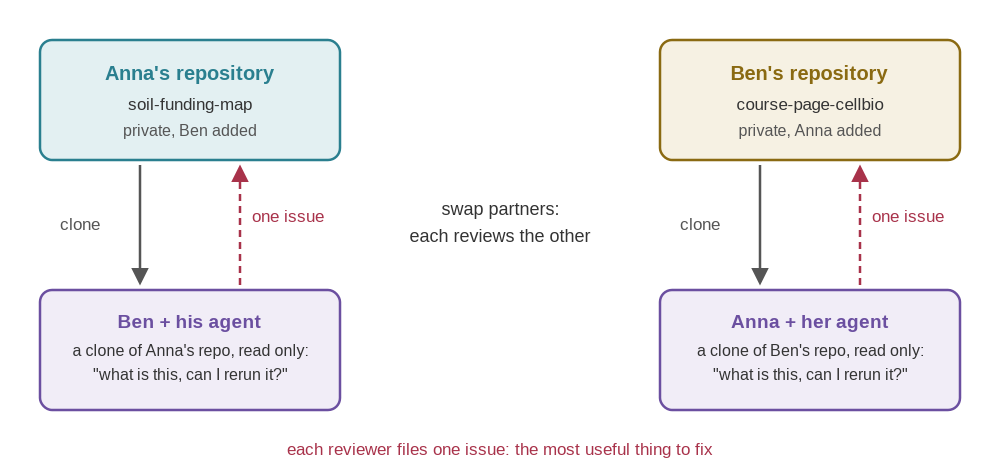
Peer exercise: swap repositories and review each other’s with your agent
Someone else’s repository is untrusted input: read it, do not run it
Start the agent in a read-only mode: plan mode in Claude Code (Shift+Tab), Read Only in Codex (/permissions).
Clone into a separate folder, for example ~/agentic-course/peer-review/, never into your own project.
Do not run their scripts yet. Read them. Running comes after you trust the code.
Files can contain instructions to the agent (Privacy, ethics and safety). Read what it wants to do.
You can push to their repository, but do not. Your output is one issue.
A good review checks what Organising a project promised
Question for your agent
What it tests
“In three sentences: what is this project and what is its current state?”
the README and the goal
“Which files are raw data, which are results, which are scripts?”
the folder layout
“What would I run to reproduce the main figure? Do not run it.”
reproducibility
“Do the README, the agent instructions and the files agree?”
stale documentation
“Is there anything here that should not be in a shared repository?”
privacy
“What is the single most useful thing to fix?”
the issue you file
Then check one answer yourself: open the file the agent points to.
Where this goes wrong
Public by mistake. Check the label on the repository page. Private is the default for your own project.
“Deleted” is still in the history. Check the history, not only today’s files, before anything goes public.
Personal data committed. Use .gitignore before the first commit, and stand-ins for real data.
Login inside the agent. Run gh auth login yourself, in a second terminal. Never paste tokens into a prompt.
Forgot to push. Committed is not backed up. Push when you stop.
Force-push or delete proposed. Say no unless you asked for it, and ask why.
Collaborators can push. Invite only people you trust; remove them afterwards.
No licence. Others may look but not reuse.
Trusting the reviewer agent blindly. Check a finding yourself before you file it.
Summary
Concept
Key fact
GitHub
an online copy of your git repository, with the whole history
Push and pull
push sends commits up, pull brings them down; committed is not backed up
Private vs public
private for your own project; public only after checking files and history
.gitignore
keeps files out of the repository before their first commit
gh auth login
you, once, in a second terminal; the agent then pushes with your approval
gh repo create --private
one command: new repository from this folder, pushed
Summary (continued)
Concept
Key fact
README
rendered on the repository page; answers a visitor’s first questions
Issues
a to-do list next to the project; “fixes #1” in a commit closes issue 1
Collaborators
can read and push on a personal account; invite only people you trust
Pull requests
propose a change for review instead of pushing it
Licence
CC BY for teaching material, MIT for code; none means no reuse
Next (A course or project page): turn a repository into a public web site with Quarto and GitHub Pages, with your figures from Reproducible figures as the first content.