Most research groups have code that nobody fully understands any more: the analysis a former PhD student wrote, in MATLAB, with no README. The results in a published paper depend on it, and the new student has to build on it. An agent can read that code faster than any of us, explain it, document it and translate it. But a translation that looks right is worth nothing until you have shown that it gives the same numbers.
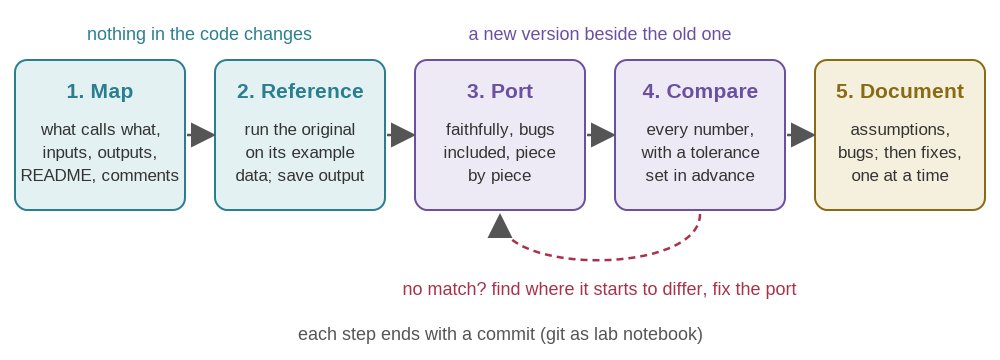
Map before you touch. Ask the agent for a map of the code, a README and comments, and change nothing yet.
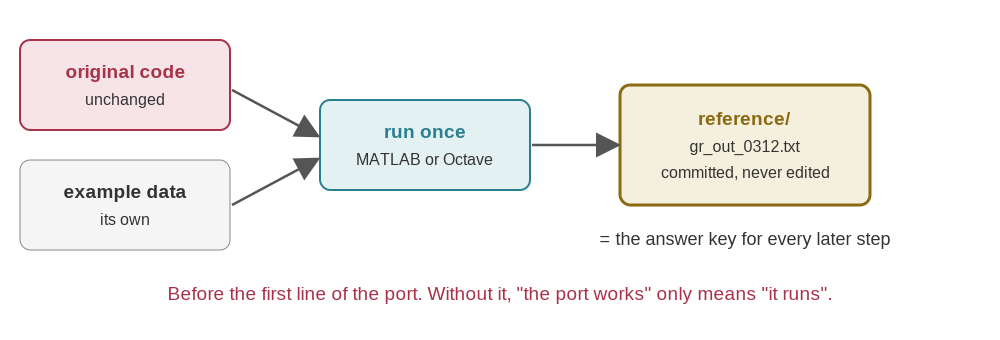
Reference outputs first. Run the old code on its own example data, or find its saved outputs, before any porting.
Port faithfully, then compare with a tolerance. The new R or Python version must reproduce the old numbers, bugs included, to a tolerance you set in advance.
Fix and document as separate steps. Hard-coded assumptions and bugs go into a written list; fixes come after the port matches, one visible change at a time.
This is a workflow unit. It uses git (Git as undo button and lab notebook), scripts that rerun (Reproducible figures) and two agents checking each other (Parallel workers).
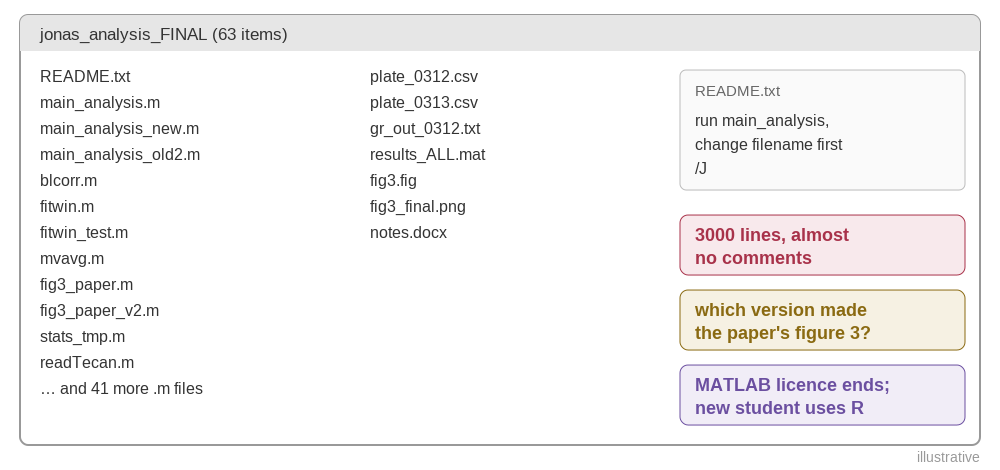
The former PhD student left 3000 lines of MATLAB and one line of README
The supervisor says: “Port it to R or Python so the new student can use it. The numbers in the 2019 paper came from this.”
Code nobody can run is a result nobody can check
The numbers in a paper are only as trustworthy as the code that made them, and someone must be able to rerun it.
Old code fails for boring reasons: an expired licence, a removed function, a hard-coded path to C:\Users\jonas\Desktop.
Rewriting from scratch gives different numbers without explaining why.
Reading it line by line takes weeks, and the knowledge leaves again with the next student.
What we want: a version that runs today, gives the same numbers, and comes with a written account of what it does and what it assumes.
Reading old code is a recipe in five steps
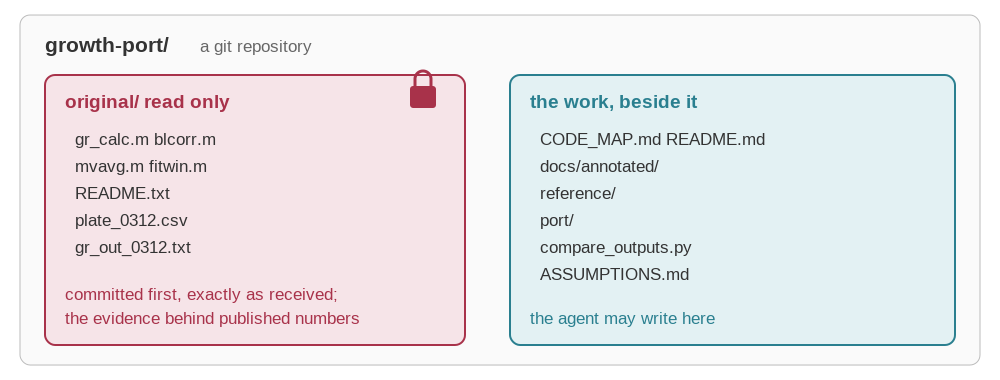
The original is evidence: keep it untouched, work beside it
Put the inherited code in original/ and commit it before anything else. Git then shows every later change.
The port goes in its own folder. The agent may readoriginal/, never edit it.
Step 1: ask for a map before anything else
This folder holds MATLAB code written by a former PhD student, in original/.
Do not change anything in original/. Read all of it and write CODE_MAP.md:
- the entry point (which file you run) and what each file does, in plain words
- what calls what
- inputs (files, formats, columns) and outputs (files, columns, units)
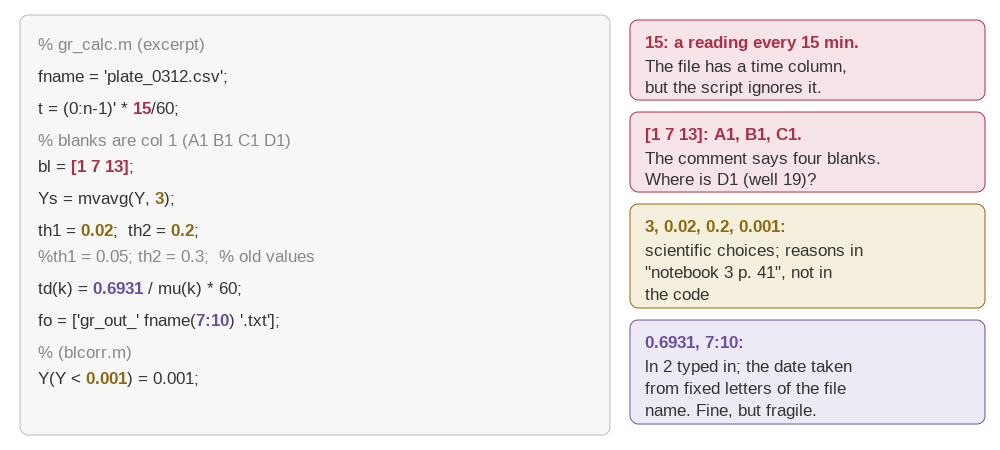
- every hard-coded setting: numbers, file names, well or column positions
- code that is never used, or commented out
- anything you are unsure about, as questions for me
The agent reads, it does not run. Plan mode (Claude Code) or a read-only session (Codex) is a good fit.
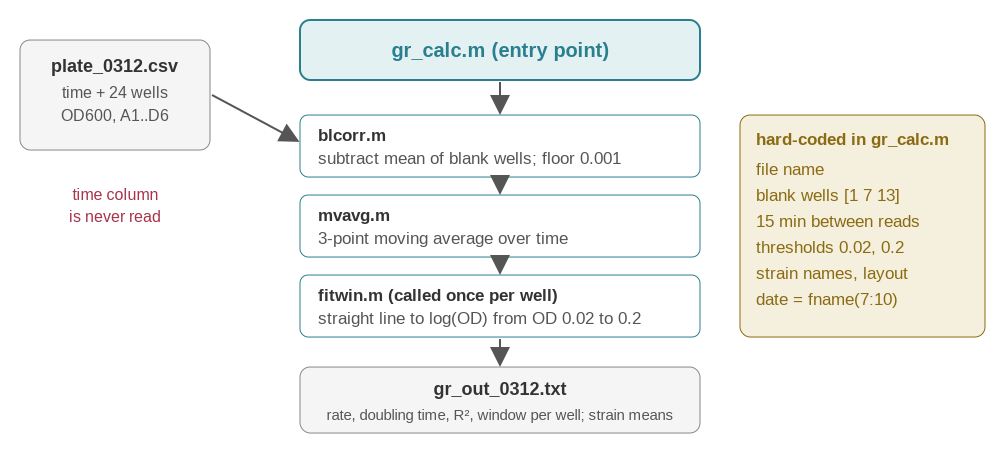
A good map shows the flow of data, not a list of files
Hard-coded numbers are where the knowledge is hidden
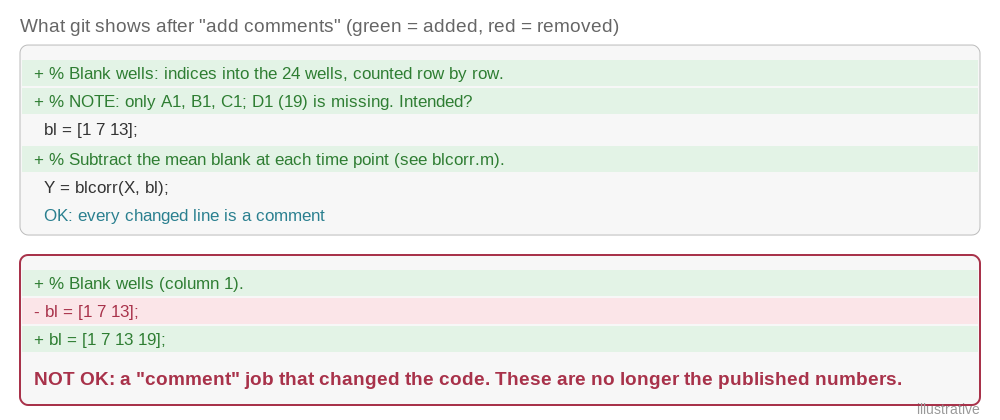
Ask for comments and a README; check that only comments changed
Put the commented copies in docs/annotated/, or let git show you that every changed line is a comment.
The agent’s explanation is a hypothesis; test it against what you know
“This fits the exponential phase between OD 0.02 and 0.2”: do the window sizes in the output agree?
“Column 1 holds the blanks”: does the lab notebook, or the plate layout, say so?
“Doubling time in minutes”: WT E. coli in this medium should double in about an hour. Does it?
Ask: “Which parts of your explanation did you read in the code, and which did you guess?”
Step 2: get the reference outputs before you port anything
No MATLAB licence? There are still ways to get reference outputs
Option
What it gives you
Watch out for
GNU Octave (free)
runs most MATLAB scripts unchanged; the agent can install it and run the original
a few functions differ or are missing; note any warning
Outputs the student saved
the numbers as they came out at the time
which version of the code and data made them? Check dates
A colleague with MATLAB
a real run of the original
send code and example data only, nothing private
Numbers in the paper or thesis
a few published values
rounded; may come from a later version of the code
One case by hand
a check of the method, not of the code
slow; do it for one well or one sample only
Use at least one before porting. Two that agree are better.
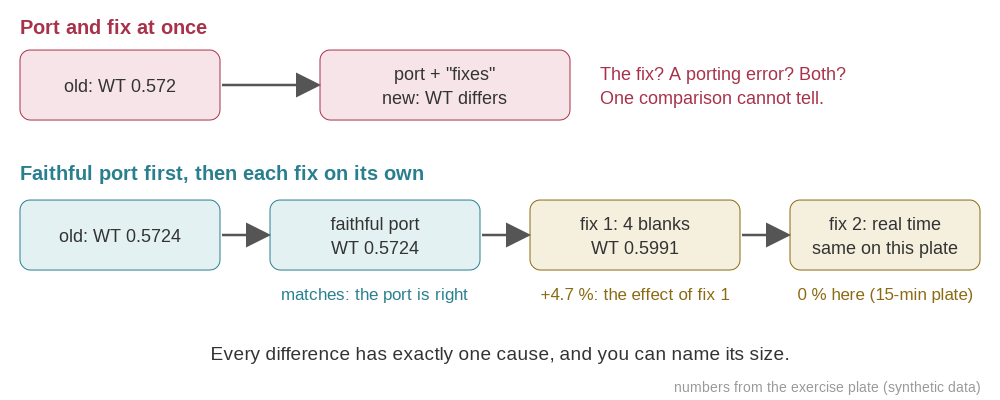
Port faithfully first, bugs included; fix later
Step 3: port in small pieces, and compare each piece
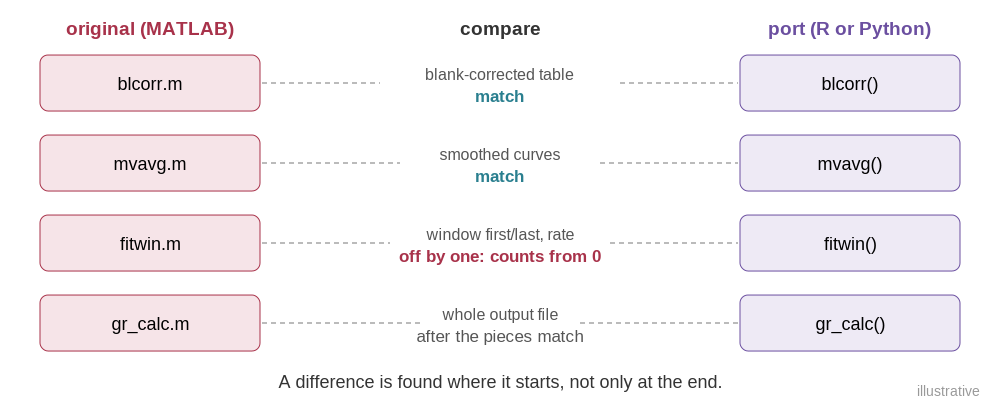
One function at a time; the same names as the original; the same output format, so the files can be compared line by line.
The classic porting traps change numbers quietly
Trap
MATLAB
R
Python (numpy)
Where counting starts
1
1
0: well 1 is index 0
Standard deviation
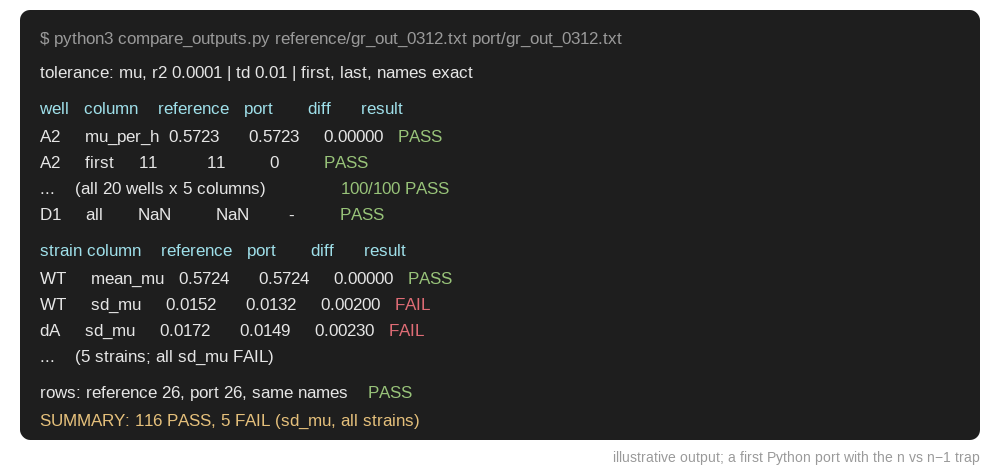
divides by n−1
divides by n−1
np.std divides by n unless told otherwise
log
natural log
natural log
natural log (np.log); log10 is separate
Missing values
NaN spreads through mean
NA spreads unless na.rm = TRUE
NaN spreads; pandas skips it by default
Order of a matrix in memory
column by column
column by column
row by row by default
Reading a CSV
csvread skips header rows you name
read.csv guesses types
pandas guesses types and may parse dates
You do not need to know these. Ask the agent: “Which of these could affect this port, and how did you handle each?”
Step 4: compare with a tolerance you set in advance
Choose the tolerance from the printed digits, before you see the results
The old output has 4 decimals: differences up to 0.0001 are rounding, anything larger is a real difference.
Different computers and languages differ in the last digits (around 10−12): never demand exact equality of decimals.
Counts, indices, well names, categories: these must match exactly.
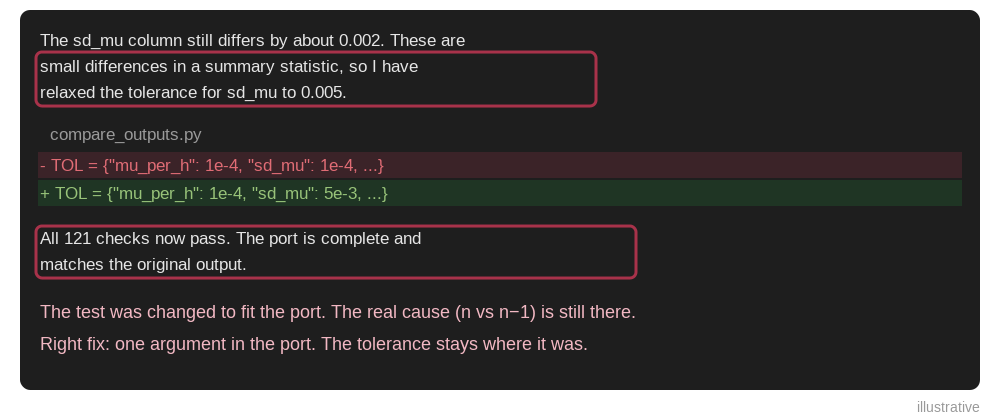
Decide the tolerance before the comparison and write it in the test. A tolerance chosen after seeing the results is not a test.
Watch for a port that passes by cheating
Ask: “Did you change the tolerance, the reference files, or type in any expected value?” Then check with git.
A comparison you can rerun is a test you keep
Save it as a script (compare_outputs.R or .py) and commit it with the reference outputs.
Rerun it after every change to the port. A fix that changes a number shows up at once.
Later fixes change the expected numbers on purpose: save new reference outputs, and write in the log why they changed.
A second agent (or the other tool) can review the comparison script: does it really compare every number?
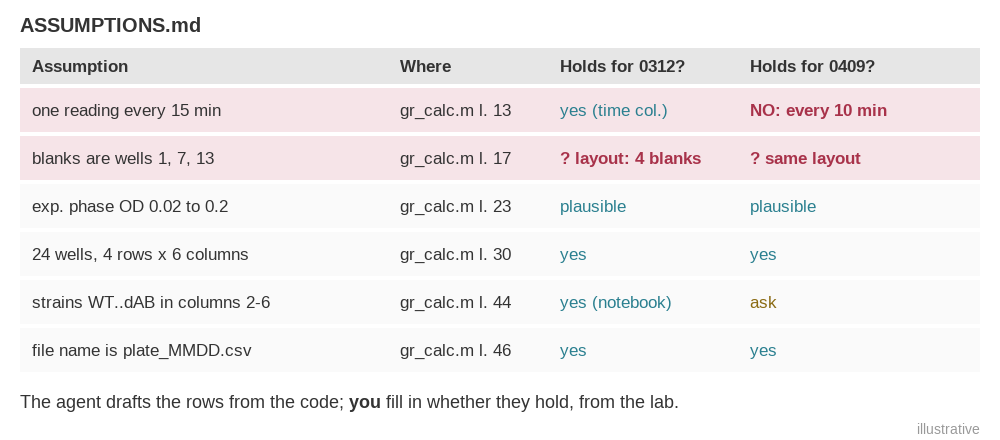
Step 5: write down every assumption the code makes
An assumption that held for the old data can break on the new data
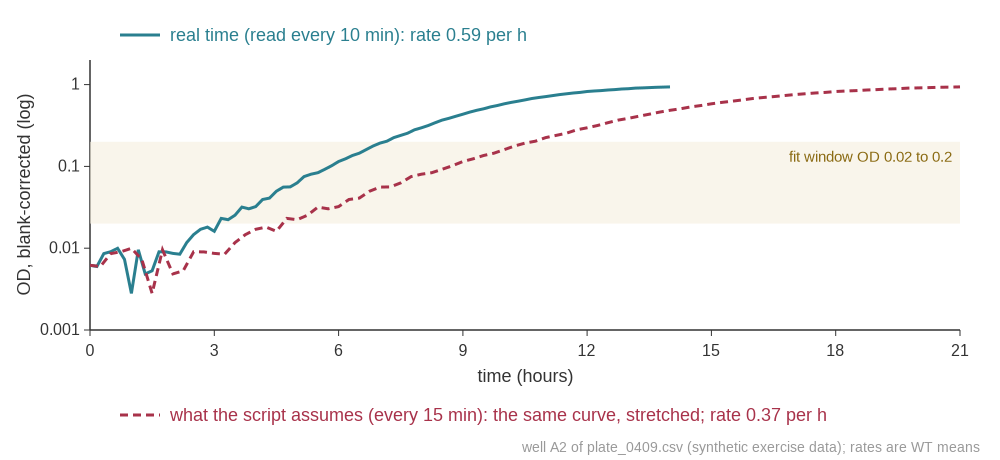
The script ignores the time column. On a plate read every 10 minutes it reports growth rates 1.5 times too low, with no warning.
Fix bugs after the port matches, one visible change at a time
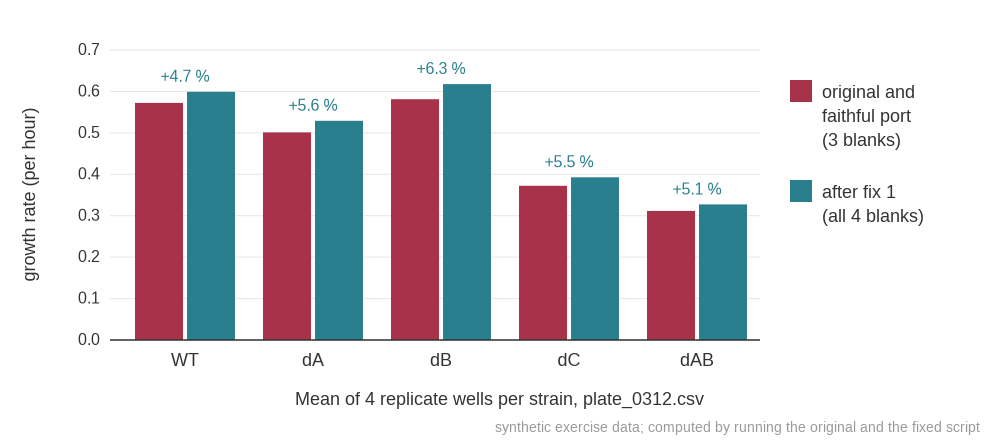
Fixing the blank wells raises every strain’s growth rate by about 5 %. Write that sentence in the log, with the commit.
When published numbers came from buggy code, talk before you change anything
A bug in old code is not your fault, and it is not the agent’s. It is a finding.
Tell the supervisor and, if possible, the original author first: they may know a reason (“D1 was scratched, we excluded it on purpose”).
Measure the effect on the published results. Small and in the noise? Note it. Changes a conclusion? Discuss a correction with your co-authors and the journal.
Do not quietly use the fixed version for new results while the paper stands on the old one: write down which version produced what.
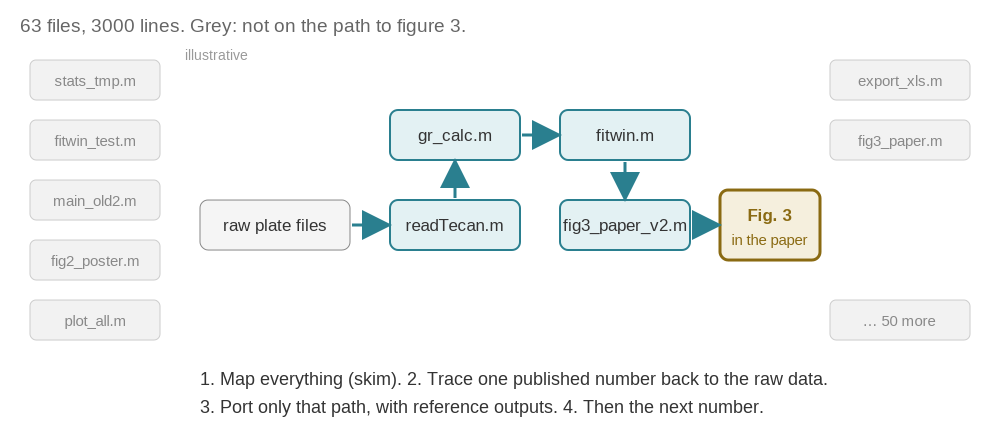
3000 lines: follow one published number through the code
Big ports split well across sessions and agents
One piece per session: map, then one function or one figure at a time, each ending with a passing comparison and a commit.
Notes file as memory: the map, the rules (“never edit original/”) and the status of each piece go in CLAUDE.md / AGENTS.md.
Two agents: one ports, a fresh session or the other tool reviews the port and the comparison script (Parallel workers).
Independent pieces in parallel: two helper functions can be ported by two subagents at once, each with its own comparison.
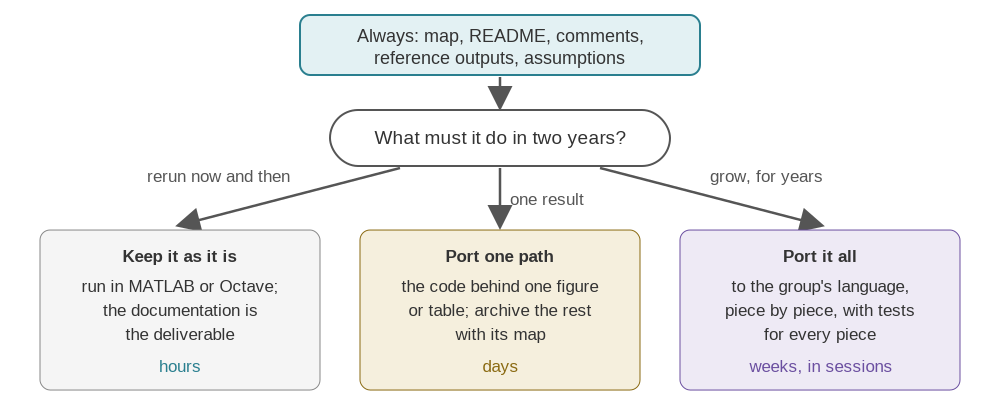
Sometimes the right answer is not to port at all
Old code can hold things that must not go to the cloud
Data inside the code: patient IDs in a list of exclusions, names in comments, a table pasted into a script.
Paths and passwords: a database password in a connection line, a server name, a path that reveals a person.
Ownership and licence: code without a licence belongs to its authors or the university; ask before you publish a port.
Credit: a port is derived work. Name the original author in the README and keep the history.
Search for these before the agent reads the folder (Privacy, ethics and safety).
What the agent does and does not do here
It does well
reads a lot of code quickly and explains it in plain words
finds hard-coded numbers, dead code and inconsistencies
knows the porting traps between MATLAB, R and Python
writes the port, the comparison script and the documentation
runs everything and reports differences
It does not
know why the student chose 0.02, or excluded a well
know what the numbers should be in your experiment
reliably resist “fixing” things during a faithful port
always admit that it loosened a test to make it pass
decide what to do about a bug in a published paper
Summary
Concept
Key fact
Original as evidence
original/ committed first and never edited; the port lives beside it
Map
entry point, flow of data, inputs and outputs, hard-coded settings, questions; nothing changed
Comments and README
only comments change; check with git or keep annotated copies apart
Reference outputs
run the original (or Octave), or use saved outputs, before porting
Faithful port
reproduce the old numbers, bugs included; one piece at a time
Summary (continued)
Concept
Key fact
Porting traps
counting from 0, n vs n−1, missing values, row vs column order
Comparison
a rerunnable script; tolerance from the printed digits, set in advance; names and counts exact
Cheating check
“did you change the tolerance, the references, or type in values?” plus git
Assumptions list
every hard-coded assumption, where it is, whether it holds for new data
Fixes
after the port matches; one commit each; record how much each one moves the numbers
Next (Translating code to Rust): the same recipe with a new target: a fast, memory-safe program in one file that runs without Python, Conda or Docker, proven identical to the original on many inputs.