So far you have worked with one agent at a time: one prompt, one session, one result, and you wait while it works. This unit is about using two agents, or one agent with helpers, so that you wait less and, more importantly, check better.
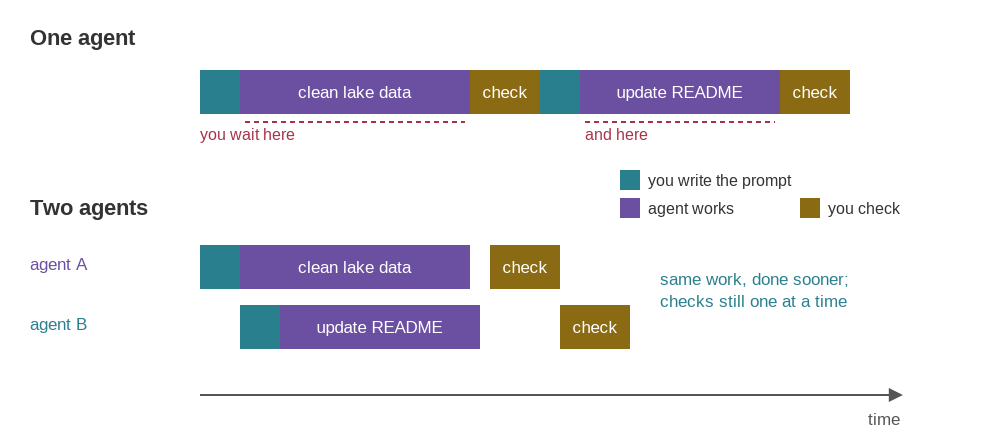
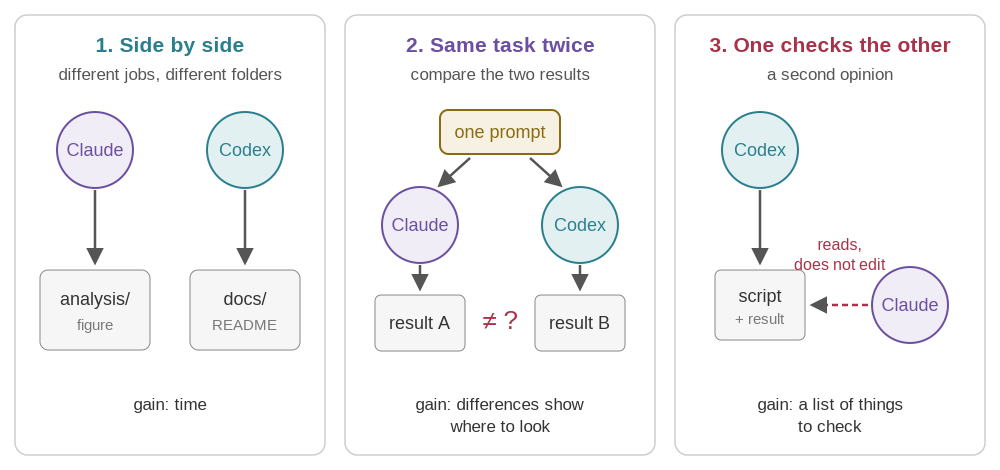
Side by side. Two agents can work at once on different jobs, as long as they never edit the same files.
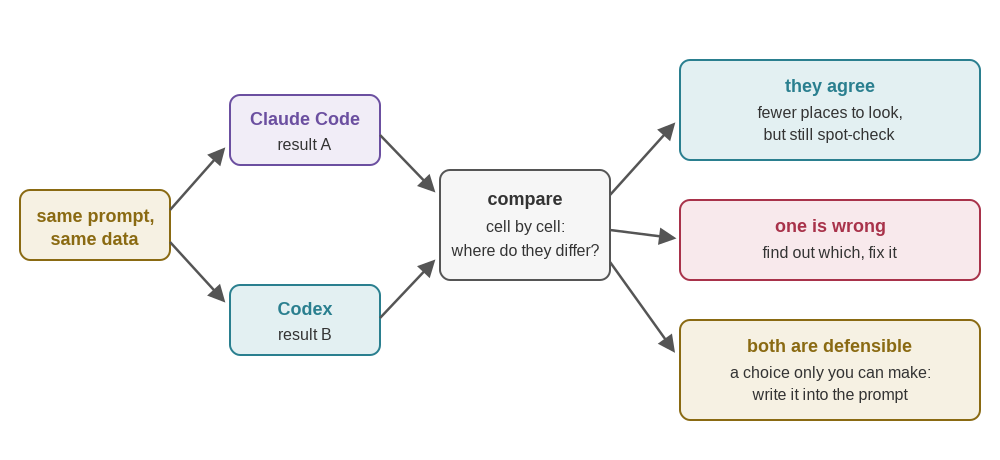
Same task twice. Give Claude Code and Codex the same prompt and data. Where their results differ is where to look.
One checks the other. A second agent reviews the first one’s script. Its findings are claims to check, not verdicts.
Helpers inside one session. An agent can start subagents of its own and run long jobs in the background.
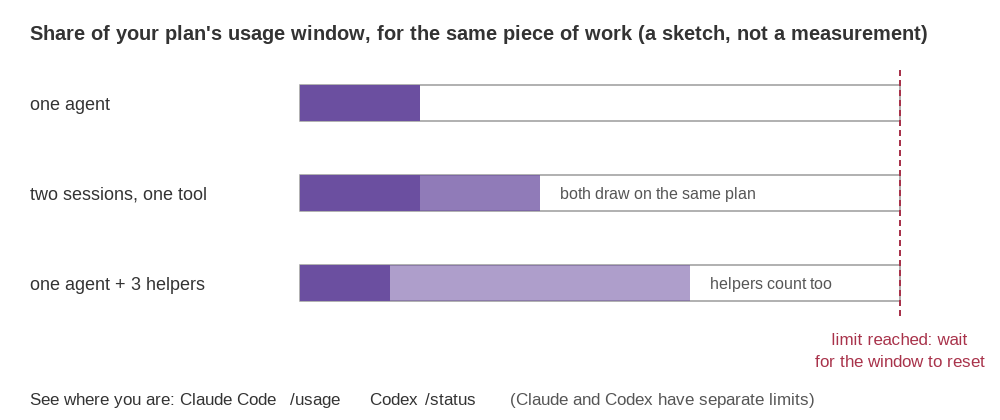
It costs. Every extra agent and helper uses your plan’s limits.
This is a hands-on unit and the only one that works best with both tools. If you have only one, you can run two sessions of it instead. Saving your own working style as skills comes next, in Making the agent yours.
A second opinion is cheap; a wrong summary table is not
Two years of lake samples need a summary table and a figure for the annual report. The README also needs updating.
With one agent you wait, then check, then wait again.
And the table looks fine. Is it right?
There are three ways to use two agents
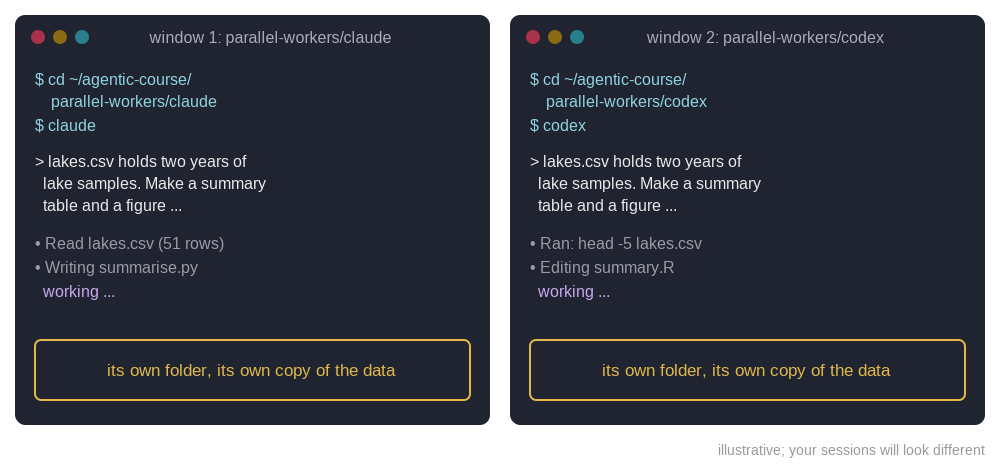
Two agents can work at the same time in two terminal windows
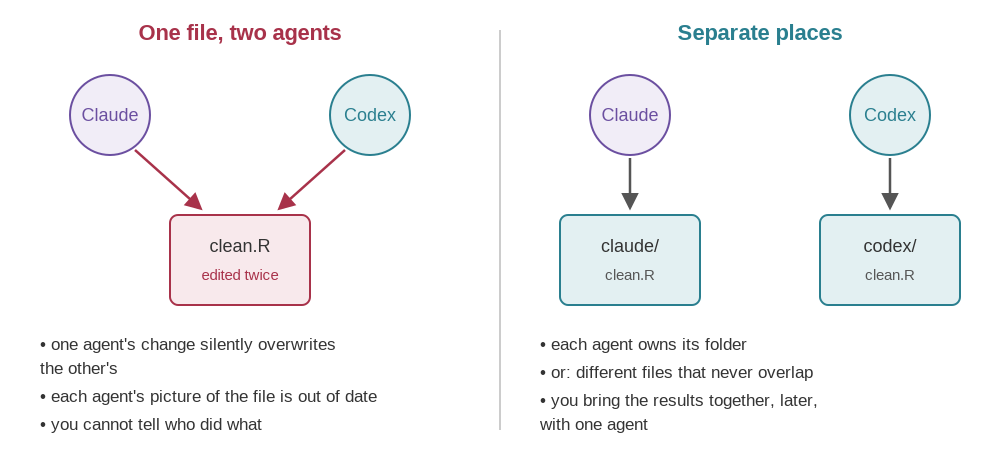
Never let two agents edit the same files
Good pairs of jobs do not touch each other’s files
Pair well
Why
A figure script in analysis/ and a README draft in docs/
different folders, different files
Cleaning data set A and data set B
separate input and output files
The same task in claude/ and codex/ copies
made for comparison
An agent working and another one reading (review, questions)
the reader changes nothing
Do not pair
Why
Two agents “improving” the same script
changes overwrite each other
One agent renaming files while another reads them
the reader sees a half-finished state
Two agents both committing to the same git repository
commits and changes interleave
Git worktrees give each agent its own copy of a repository
A worktree is a second working folder of the same git repository, on its own branch.
Each agent works in its own worktree; later you merge the branches, as in Git as undo button and lab notebook.
Claude Code can start in a new worktree: claude --worktree <name>. The Codex app can give each thread its own worktree.
For this course, separate folders or copies are enough. Worktrees are worth learning once you run parallel agents on one project often.
Your attention is the bottleneck, not the agents
Each agent stops to ask permission, asks questions and needs its result checked. You do all of that.
Two agents is plenty. With more, prompts wait unanswered and checks get skipped.
Give each window a clear name or folder, so that you approve the right thing in the right place.
Pair one long job with one short one: check the short one while the long one runs.
The same task given to two agents shows where the task was ambiguous
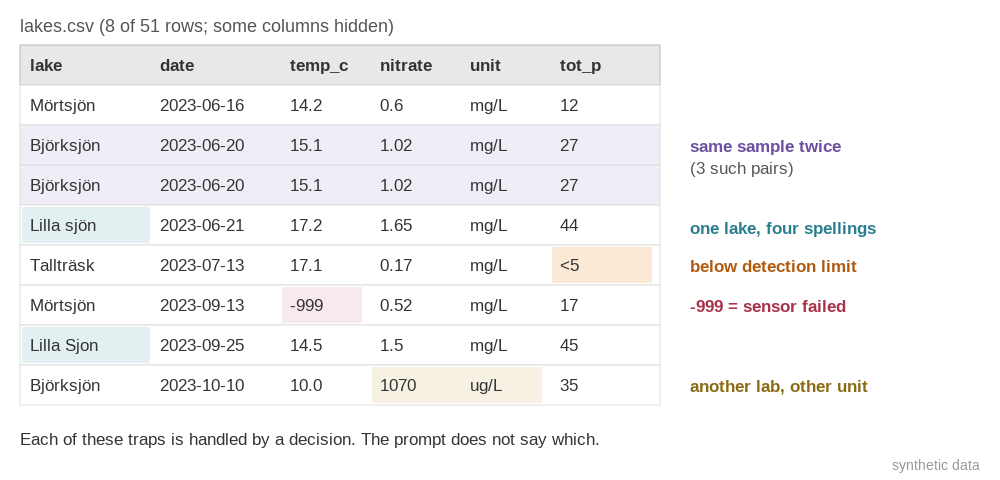
The lake data has five traps that need decisions
The prompt is short on purpose
lakes.csv holds two years of water samples from four lakes.
Make lake_summary.csv with one row per lake and year: the number of
samples and the mean temperature, nitrate (mg/L) and total phosphorus.
Also make a figure, nitrate.png, of nitrate over time for each lake.
Save the script you use, so I can rerun it, and write decisions.md:
every decision you made about the data, one line each.
Do not change lakes.csv.
The prompt does not mention any of the traps. A real first prompt rarely does.
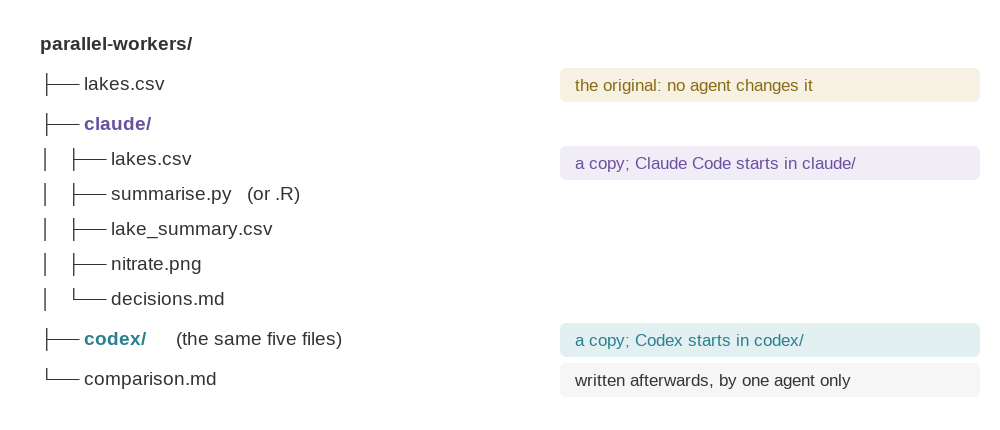
Both agents get exactly this text and their own copy of the data.
Each agent gets its own copy of the data
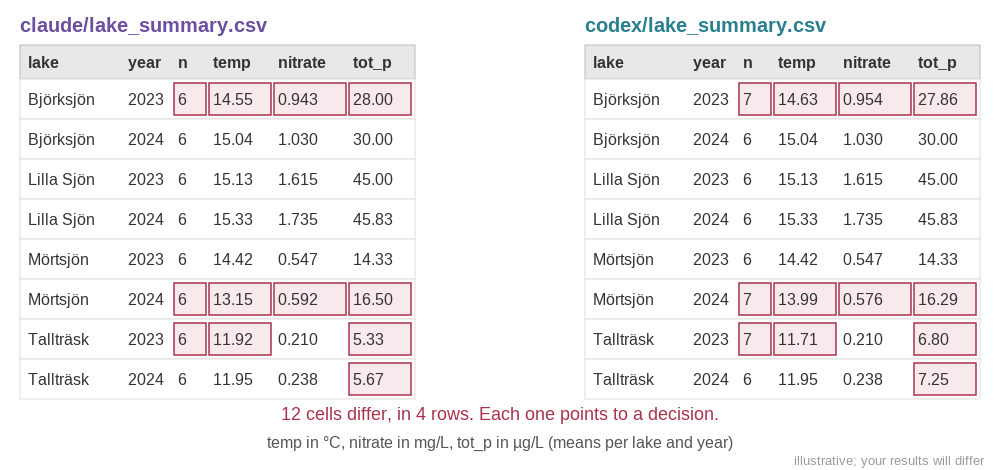
Compare results, not sessions: the two tables side by side
Each difference leads back to a decision
What differs
Cause
Who is right?
n = 7 instead of 6 in three lake-years
duplicate rows kept
an error: same sample twice
more than 8 rows, extra “lakes”
spellings not merged
an error: one lake
a temperature mean far below zero
-999 averaged as a number
an error: a missing value
a nitrate mean in the hundreds
µg/L not converted
an error: wrong unit
Tallträsk phosphorus differs
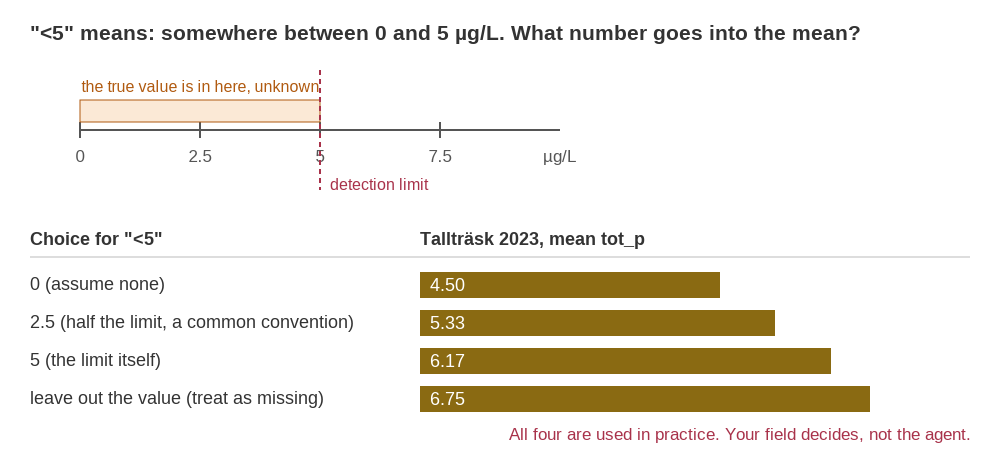
“<5” read as 0, 2.5, 5 or missing
a choice: your field decides
To find the cause, ask: “For this cell, show me the rows of lakes.csv that went into it, in both versions.”
Some differences are not errors but choices only you can make
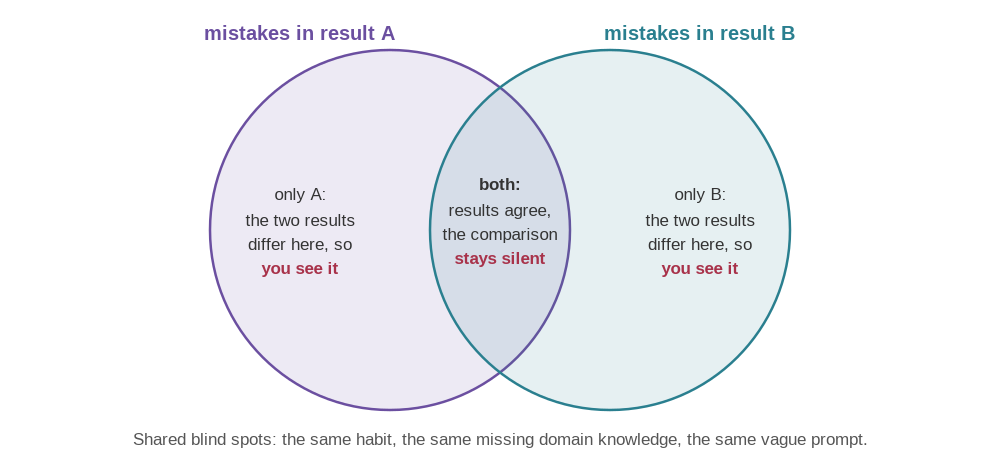
Agreement is not proof: shared mistakes stay invisible
Ask one agent to compare; then check the key cells yourself
claude/ and codex/ each hold a lake_summary.csv made from the same
lakes.csv. Do not change any file except the one you create.
Compare the two tables cell by cell. Write comparison.md with a table
of every cell that differs, and for each one: the value in each
version, and the reason, found by reading each folder's script and
decisions.md. Then list any decision that only one of the two
decisions.md files mentions.
Start this agent in the top folder, so it can read both subfolders.
Then open the differing cells yourself and check two of them against lakes.csv.
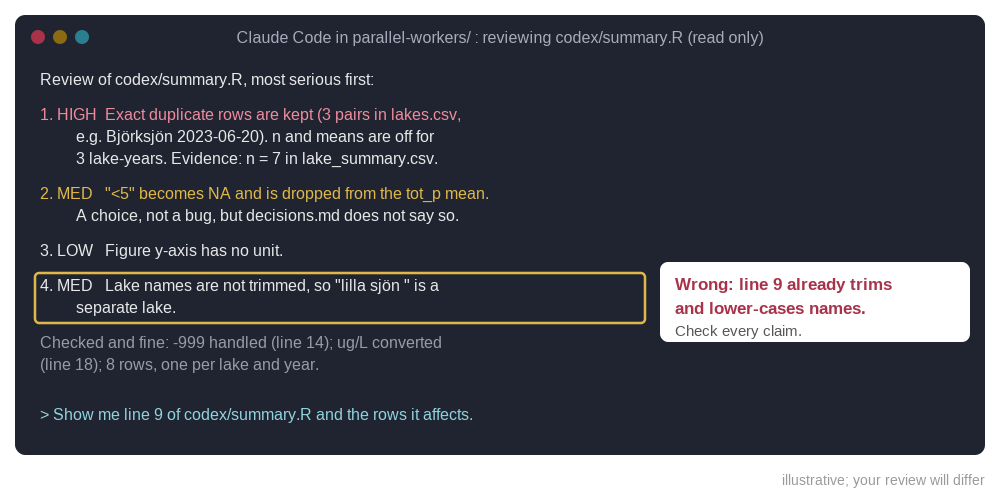
One agent can review the other’s script without changing it
Review codex/summary.R (or whichever script is in codex/).
Do not change any file. List:
1. every decision the script makes about the data,
2. anything that would give a wrong number, most serious first,
   each with the line and the rows of lakes.csv that show the problem,
3. what you checked and found to be fine.
The reviewer is the other tool: Claude Code reviews Codex’s script, and Codex reviews Claude’s.
Ask for evidence: a line number and the data rows. A claim without evidence is a guess.
A review gives you claims to check, not verdicts
Reviews share blind spots too
A reviewer finds some real problems, invents some, and misses what it would also have done itself.
It cannot see what is not in the files: your field’s convention, what the samples mean, what the report is for.
It may go easy on work it is told is good. Ask for problems, ranked, with evidence.
The strongest check is an independent recomputation: a fresh agent computes one number from the raw data without reading either script.
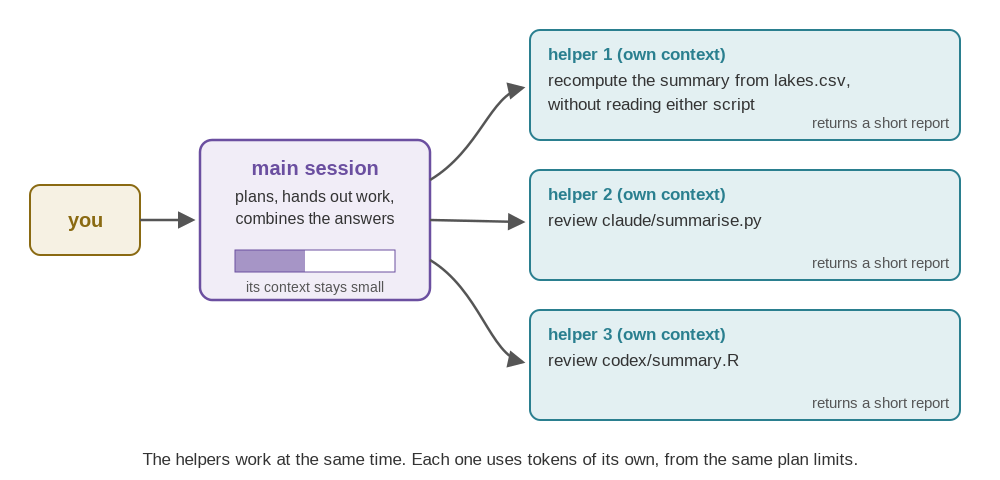
Inside one session, an agent can start helpers: subagents
You ask for subagents in plain words
Use three subagents in parallel. One recomputes the number of samples
and the mean phosphorus per lake and year straight from lakes.csv,
without reading any script. The other two review claude/ and codex/.
Then give me one table that puts the three answers side by side.
Claude Code
Codex
Subagents
Built in. The agent can use them on its own (for example to search files) or when you ask. Ready-made types include Explore (read-only search) and Plan.
Built in and on by default in current releases. Ask in plain words (“spawn agents in parallel”).
Your own helper types
Files in .claude/agents/ (project) or ~/.claude/agents/ (personal)
Files in .codex/agents/ (project) or ~/.codex/agents/ (personal)
See them
they show up in the session as they run
type / to find the command that lists agent threads
Subagents suit independent pieces of work
Good: search a large folder; check each of 12 data files the same way; review from several angles; recompute a number independently.
Poor: steps that depend on each other; anything where helpers would write to the same files.
Each helper reports back only a summary. If you need the detail, ask for it to be written to a file.
Each helper spends tokens of its own: five helpers cost roughly five times one.
Long jobs can run in the background while you keep talking
A long command (a big download, a slow analysis) can be moved to the background; the session stays free for questions.
Claude Code: press Ctrl+B while a command or helper runs; /tasks lists what runs in the background.
Codex: helpers run in their own threads, and you can switch between them.
Background work still asks for permission and still needs checking. In Claude Code it stops when you close the session.
The two tools differ more in defaults than in what they can do
Claude Code
Codex
Models
Anthropic’s Claude models
OpenAI’s models
Instruction file
CLAUDE.md (can import AGENTS.md)
AGENTS.md
Asking before acting
permission modes, cycled with Shift+Tab
approval modes and a sandbox, set with /permissions
Helpers
subagents, background tasks
subagents, threads
Plan usage
/usage
/status
Plans
paid Claude plan (Pro or higher) or API billing
any ChatGPT plan; Plus or higher is realistic
Both read your files, run commands, write scripts and search the web. Which one does a given task better changes from release to release.
Which tool is better changes with every release: test on your own task
Published comparisons age within months. Your own task is the benchmark that matters.
Run the same task to both on a small, typical piece of your work, a few times.
Look at: how many checks pass, how often you had to correct, how clear the decision list is.
One run proves little: the same agent differs from run to run. Choosing models in general comes in Choosing a model (Part 6).
Every extra agent and helper uses your plan’s limits
Spend parallel work where checking matters most
Compare and cross-review the steps whose numbers end up in a report, a paper or a grant.
Do not run two agents on routine chores you can check in a minute.
Use a small sample of the data for a first comparison; run the full job once you have settled the decisions.
Write each settled decision into CLAUDE.md/AGENTS.md, so you do not pay to rediscover it.
Where this goes wrong
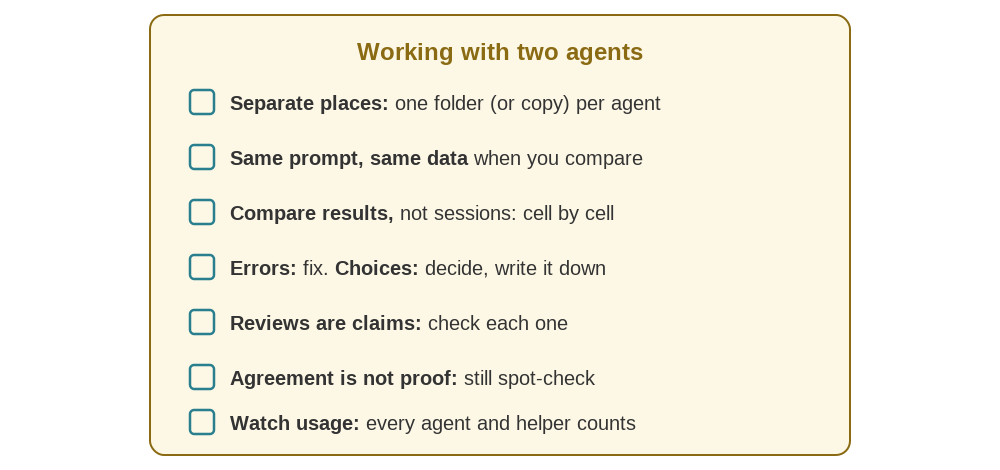
Two agents, one file. Changes overwrite each other without warning. One writer per file, always.
Comparing sessions instead of results. Different words and steps are normal; compare the tables.
Agreement taken as proof. Shared mistakes are invisible to a comparison. Still spot-check.
Review findings taken as facts. Some are invented. Ask for the line and the rows.
Letting an agent settle a choice. Detection limits, outlier rules, units: your field decides.
Too many windows. Unanswered prompts, approvals in the wrong place, skipped checks.
Running out of usage in the middle of a job. Check first; start small.
Same tool, same blind spots. Two sessions of one tool disagree less than two tools; do not read much into their agreement.
A checklist for working with two agents
Summary
Concept
Key fact
Side by side
two agents, two folders, two different jobs; one writer per file
Worktrees
a second working folder of one repository; a mention only
Same task twice
identical prompt and data; differences show where to look
Errors and choices
fix the errors; decide the choices, write them into the instruction file
Agreement
not proof: shared mistakes stay invisible
Summary (continued)
Concept
Key fact
Cross-review
the other tool reviews; findings are claims with line and rows
Independent recomputation
a fresh agent computes a number from raw data without the script
Subagents
helpers with their own context, inside one session, for independent pieces
Background tasks
long jobs run while you keep talking; Ctrl+B and /tasks in Claude Code
Usage
every agent and helper counts: /usage (Claude Code), /status (Codex)
Next (Making the agent yours): save the decisions and the style you keep repeating as skills and slash commands, and connect the agent to PubMed or Zotero.