Extracting data from PDFs
Part 4: Literature, documents and the web
About this lecture
The numbers you need are often locked in PDFs: sample sizes and effect sizes in papers, measured values in old reports, concentrations in lab protocols. Copying them by hand is slow and error-prone. An agent can pull them out in minutes, but a PDF is a picture of a page, not a table of data, and the errors it makes look exactly like correct values.
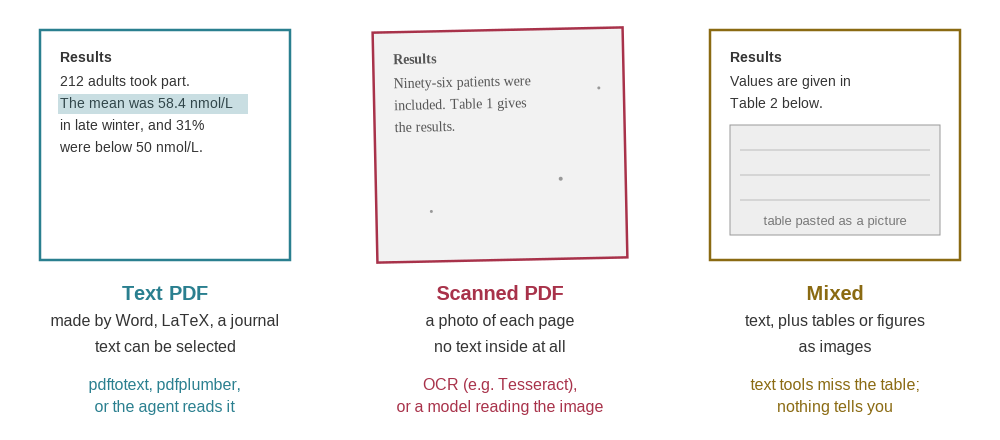
- Know what kind of PDF you have: real text, a scan, or a mix. Each needs a different tool.
- Define the quantity exactly before extracting: which number, which group, which unit.
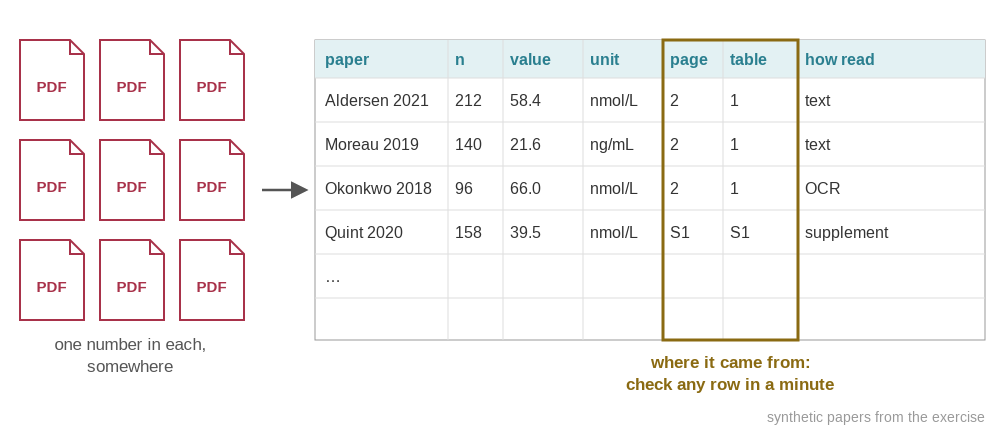
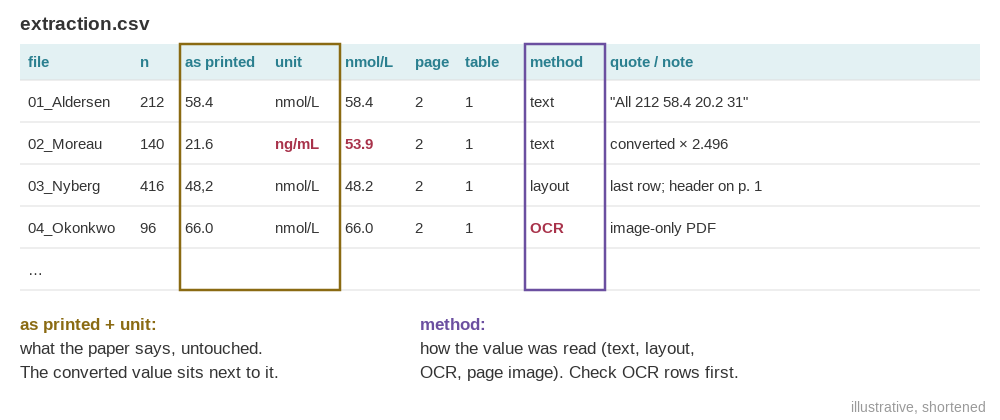
- Record where every value came from: file, page, table, the value as printed, and how it was read.
- Verify three ways: an answer key on practice data, random hand checks, and a second agent extracting independently.
- Share numbers, not PDFs, unless the licence allows it.
A hands-on unit. It uses the papers found in Literature review on a gene (or topic) set. Getting data from websites and APIs at scale comes next (Collecting and analysing grant results).
The number you need is on page 2 of forty PDFs
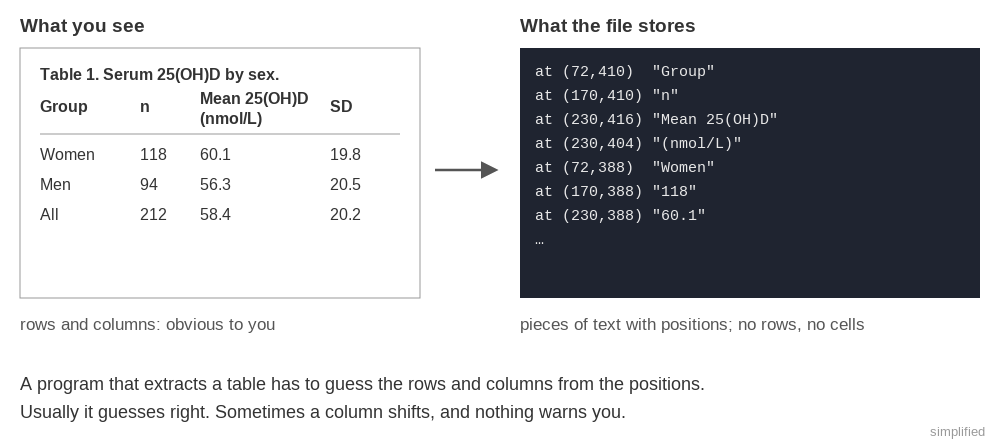
A PDF stores where letters go, not what a table is
PDFs come in three kinds, and each needs a different tool
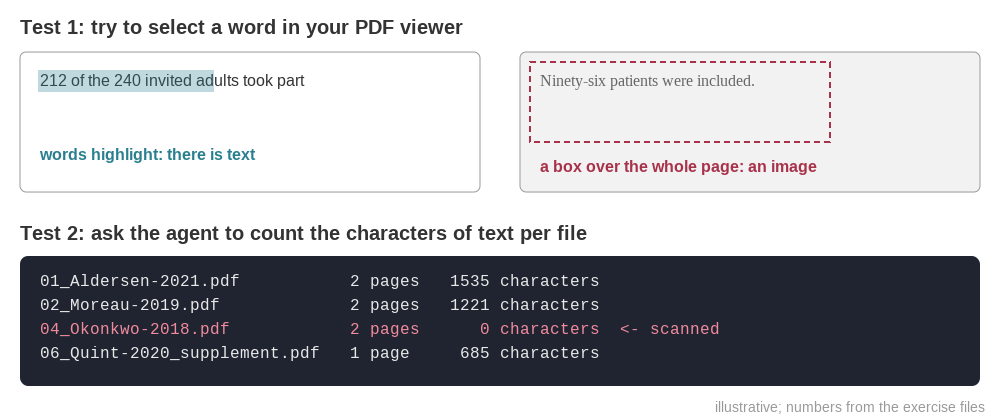
Two quick tests tell you which kind you have
Prefer a structured version of the paper when one exists
- Open-access papers in Europe PMC and PubMed Central also exist as full-text XML: tables are real tables, with rows and cells. Europe PMC’s API serves it.
- Supplementary files are often spreadsheets (CSV, XLSX). Get the numbers from there.
- Data repositories (Zenodo, Dryad, GEO, institutional archives) may hold the raw data behind the table.
- The PDF is the last resort, and the usual case for old reports, theses and your own archive.
Ask the agent: “Is there a structured version of this paper or its data?” before it opens a single PDF.
The agent has several ways to read a PDF
| Claude Code | Codex | |
|---|---|---|
| Read the PDF directly | yes: its Read tool opens PDFs; longer PDFs (over 10 pages) are read in page ranges, which needs pdftoppm from poppler |
not described in the documentation; in practice it runs a program to extract the text |
| Extract text with a program | pdftotext (poppler), Python pdfplumber, pypdf or PyMuPDF |
the same tools; it may ask to install one |
| Scanned pages | Claude models read PDF pages both as text and as images, so they can often read a scan directly; or OCR with Tesseract | renders pages to images and looks at them, or OCR with Tesseract |
| Record of how it read | ask for it | ask for it |
Installing poppler or Tesseract is a normal install: the agent asks first (Terminal survival kit). Python packages go into the project’s own environment.
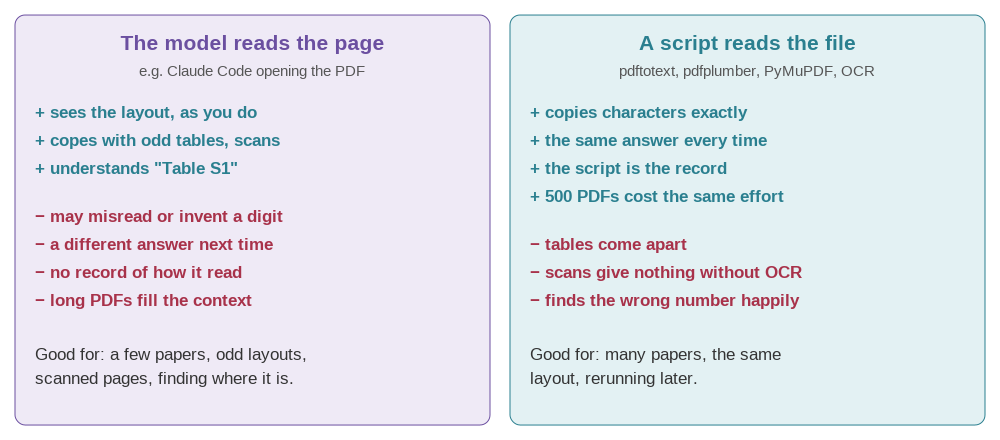
Reading the page and running a script fail in different ways
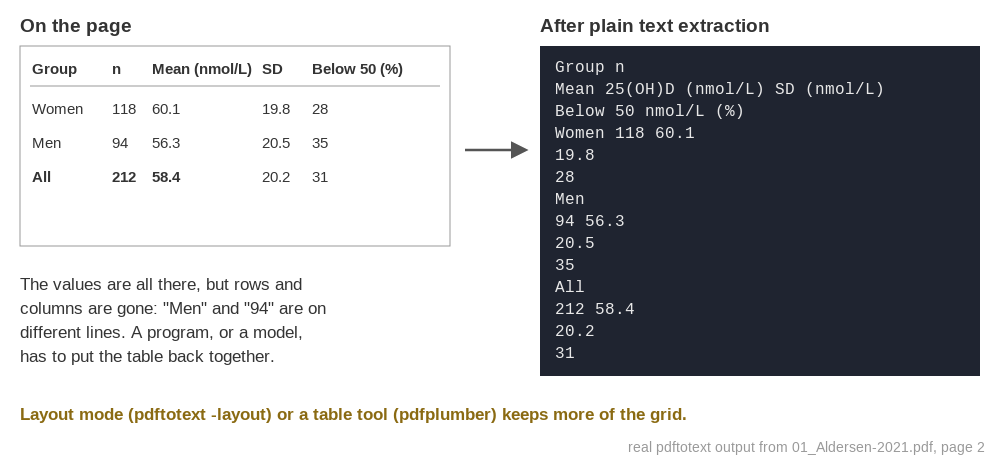
Tables come apart when the text is pulled out
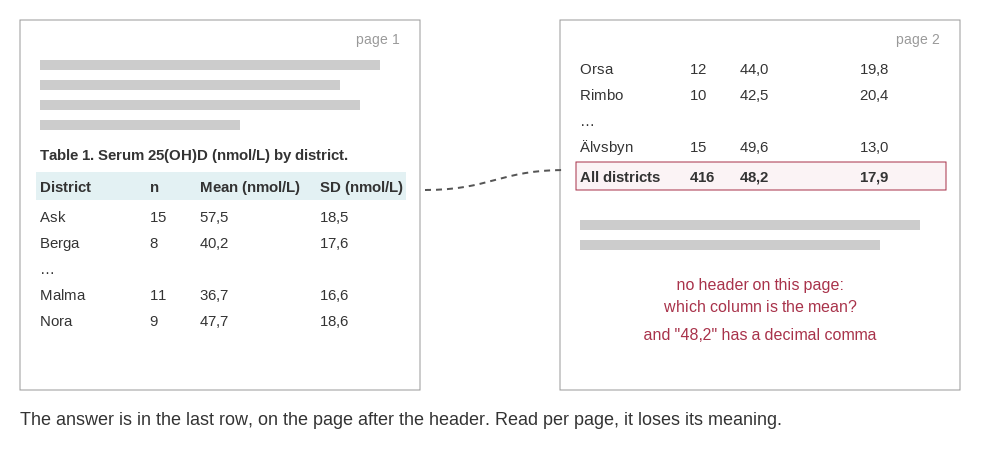
A table that runs over a page break loses its header
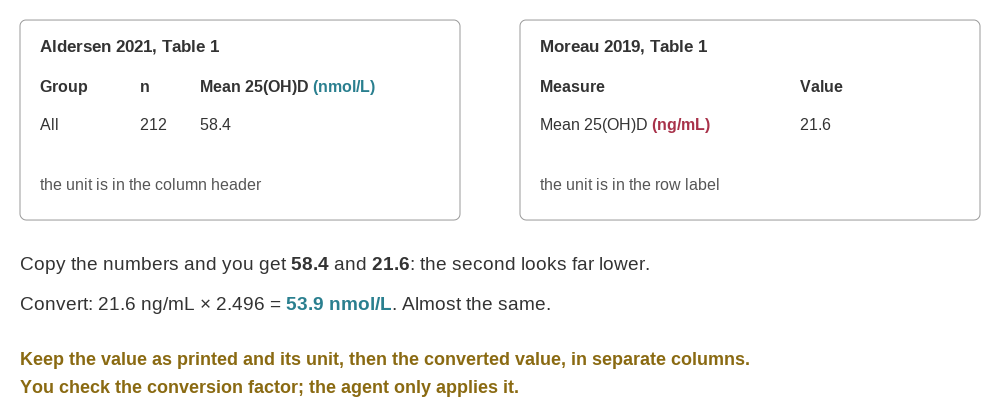
The same quantity comes in different units, and the unit hides in a header
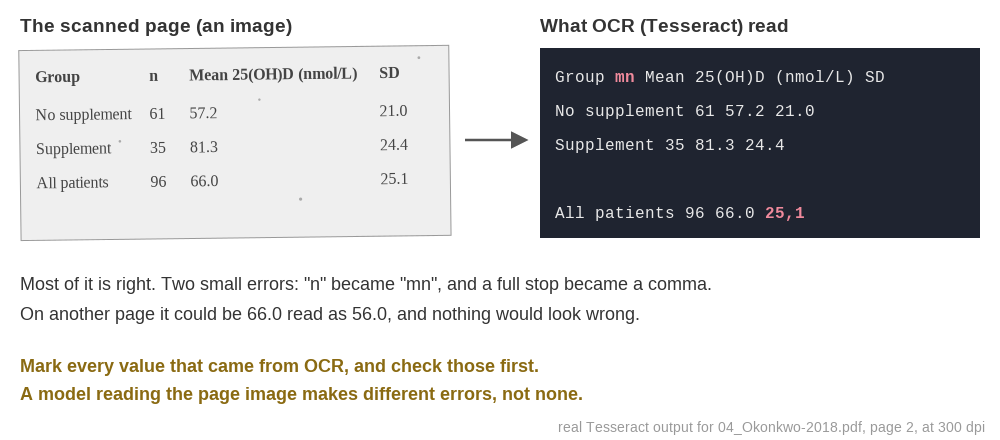
OCR turns a picture into text, with errors that look like data
Supplementary files hold the numbers more often than you think
- The main paper says “see Supplementary Table S1”, and the PDF has no numbers at all.
- Supplements are separate files: a PDF, a spreadsheet, a Word file, a zip.
- They are not always open access, even when the paper is.
- They have their own pages and table numbers: record the file name, not only “p. 1”.
Tell the agent where to look: “if the value is in a supplement, use it and name the file.” Otherwise it may give up, or fill the gap from the abstract.
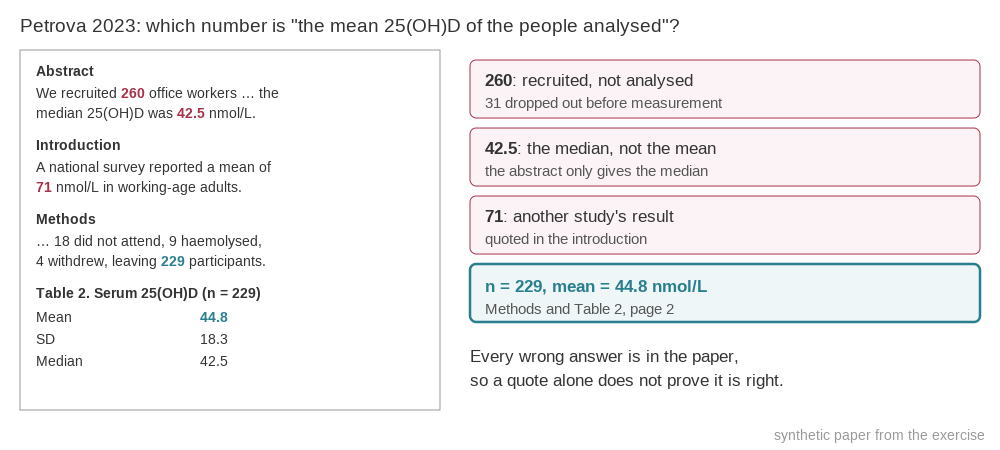
Papers contain several numbers that look like the answer
Define the quantity exactly before you extract
# extraction-definition.md
For each study, extract:
n_analysed    number of participants in the analysis of 25(OH)D
              (not invited, not recruited)
mean_value    mean serum 25(OH)D for ALL analysed participants
              (not a subgroup, not the median)
unit          as printed; then mean_nmol_per_L, converting ng/mL or
              ug/L x 2.496
source        file, page, table (or "text"), and the exact words or row
method        text / layout text / OCR / page image
If the whole-sample mean is not reported: write "not reported", do not
compute it from subgroups. If unsure: say why in a note column.
This file is the brief for both agents, and the standard you check against.
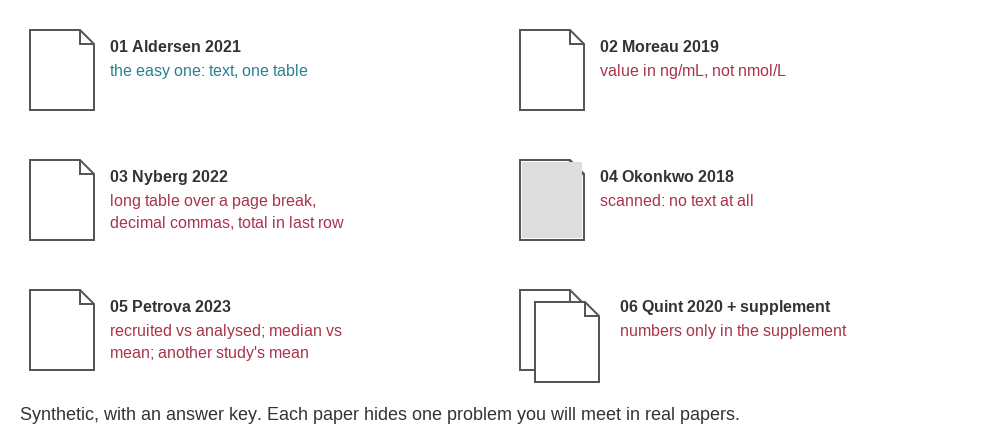
Worked example 1: six synthetic papers, each with one trap
The prompt asks for the value as printed, the unit, the page and a quote
The folder papers/ holds seven PDFs (six studies and one supplement).
Follow extraction-definition.md exactly.

1. First check each PDF: number of pages, and whether it has a text
   layer. Tell me before extracting anything.
2. Then make results/extraction_A.csv with one row per study and the
   columns in the definition, plus a quote column with the exact words
   or table row you took each value from.
3. A table that continues on the next page is one table. Decimal commas
   are decimal points. A supplement counts as a source; name the file.
4. If a value is not reported, write "not reported". Never compute,
   estimate or take a value from another study.
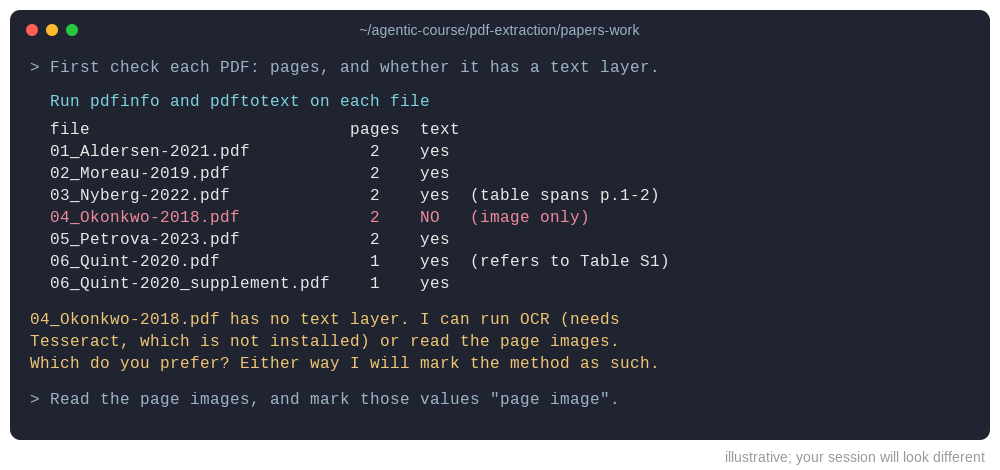
At the end, list every value you were unsure about and why.First, the agent should check what kind of PDFs it has
The extraction table keeps the raw value next to the cleaned one
Check 1: on practice data, compare with the answer key
- Count: six studies, six rows. None missing, none doubled (the supplement is not a seventh study).
- Compare each value with the key. Where it differs, which trap was it?
- Look at the doubts list: did the agent flag the values it got wrong? An agent that is wrong and sure is the case to remember.
- Then tell it what was wrong, with the page, and ask it to update the method so the mistake cannot recur.
The key exists only for practice. On real papers, checks 2 and 3 are all you have.
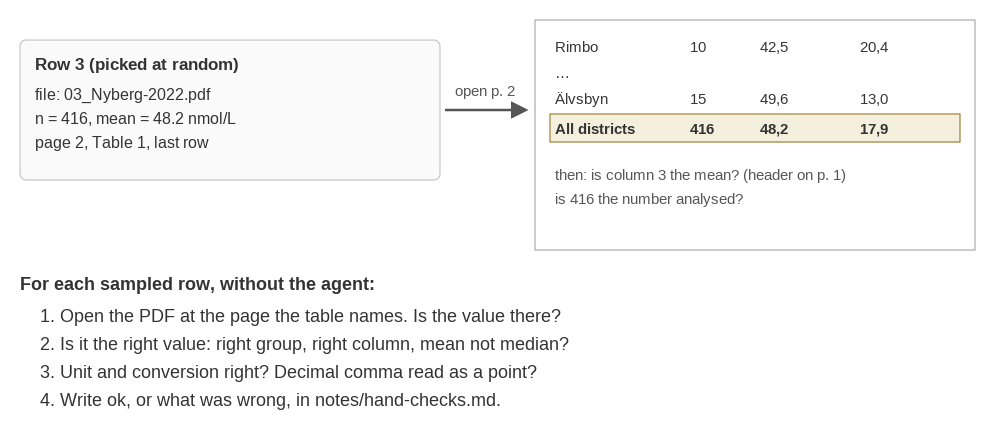
Check 2: random hand checks, with the PDF open at the named page
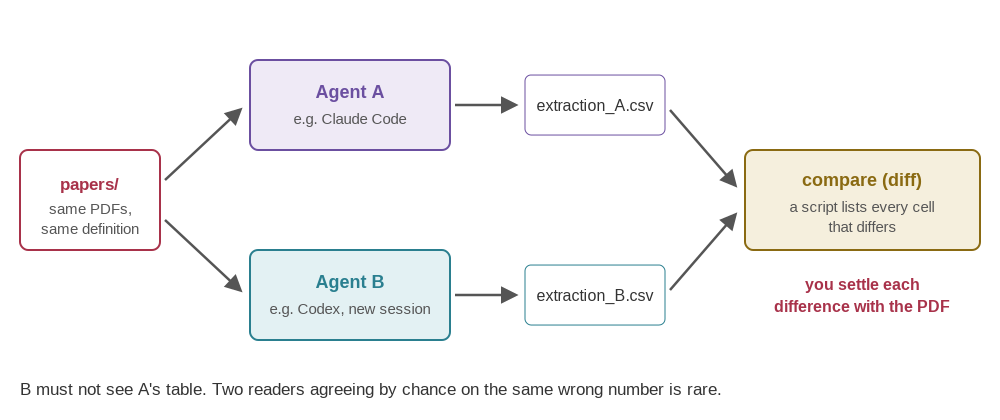
Check 3: a second agent extracts independently, and you compare
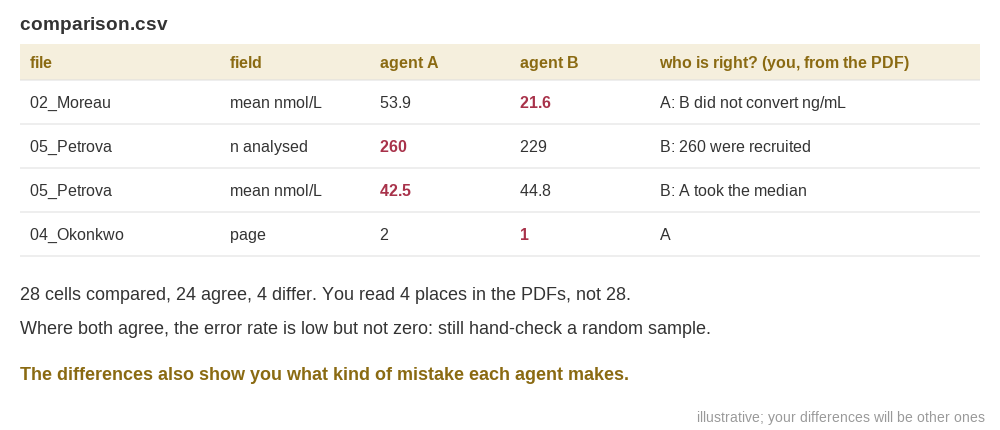
The differences show you where to look, and what each agent gets wrong
Worked example 2: real open-access papers from your literature table
- Take the papers in your literature table that are open access with a CC BY licence. Europe PMC’s API returns the licence and the PMCID.
- Choose five that report a human cohort or patient samples (Hedgehog) or a study with students (teaching methods).
- The quantity: number of patients or samples analysed (or students), with page and table, and one main result as reported.
- Write
extraction-definition.mdfor it first. Real papers are messier than the practice set: expect “not reported”. - Same checks: hand-check every row (there are only five), second agent, compare.
Get the papers through official routes, not by scraping
- A handful of papers: download the PDF yourself from the article page in Europe PMC, PMC or the journal.
- Structured full text: Europe PMC’s API serves the XML of open-access papers; no scraping needed.
- Many papers: PMC offers bulk routes for its open-access subset (its cloud service and OAI-PMH). Its terms do not allow bulk downloading from the main website.
- Paywalled papers: through your library, by hand, for your own use.
Keep the downloaded PDFs in papers/ (read-only), and their licences in a small list.
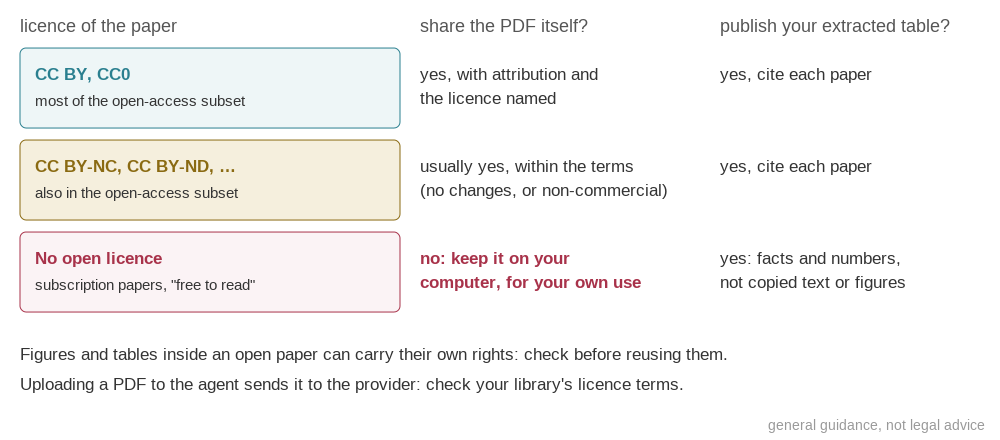
Copyright: extracted facts are yours to share; PDFs only as the licence allows
Your own PDFs: reports, protocols, theses, archives
- Old reports and protocols are often scanned. Expect OCR, and check more rows.
- Internal documents may be confidential: check the data class (Privacy, ethics and safety) before the agent opens them.
- Theses and reports with personal data (names, patient details, student results) do not go to a cloud agent.
- Start with five documents, write the definition, check by hand, then scale up.
Where this goes wrong
- Scanned pages skipped silently. The text tool returns nothing, the row says “not reported”. Check text per file first.
- Shifted columns. The SD read as the mean; the header two lines up. Check against the page.
- Units. ng/mL copied as nmol/L. Keep the value as printed and its unit.
- Decimal commas. 48,2 read as 482 or as two numbers.
- The wrong number. Recruited instead of analysed, median instead of mean, another study’s value.
- Computed values. A mean averaged from subgroups, without telling you. Forbid it.
- Missing supplements. The value was in Table S1 all along.
- Both agents wrong the same way, because the definition was unclear. Keep the hand checks.
- PDFs shared or scraped against their licence or the site’s terms.
Errors here propagate: proofread the key facts once more
- The agent can hallucinate: a plausible number that is not in the PDF at all, or a correct number from the wrong paper.
- Extraction is the first step. Every later table, figure, test and sentence in your paper inherits its errors.
- So before you build on the table, ask for a proofreading pass of the key facts: in a fresh session, re-find every value on its page and quote the sentence or table cell it came from.
- Use more than one agent. In the course author’s experience, Codex tends to be more conservative and flags more doubtful values; disagreements show you where to look.
- Agreement between agents is not proof: keep your own hand checks.
Summary
| Concept | Key fact |
|---|---|
| A PDF | text with positions on a page, not a table; extraction guesses rows and columns |
| Three kinds | text, scanned (image only), mixed; test by selecting text or counting characters |
| Structured first | full-text XML, supplementary spreadsheets, data repositories before the PDF |
| Reading methods | model reads the page (flexible, no record) or a script (exact, repeatable); OCR for scans |
| Typical traps | tables apart, page breaks, units in headers, decimal commas, supplements, the wrong number |
Summary (continued)
| Concept | Key fact |
|---|---|
| Definition | which number, which group, which unit, what if missing; the brief for both agents |
| Extraction table | value as printed + unit, converted value, file, page, table, quote, method |
| Verification | answer key (practice), random hand checks, a second agent and a diff |
| Copyright | share facts and your table; share PDFs only as the licence allows; no scraping |
Next (Collecting and analysing grant results): from documents to databases on the web: APIs versus scraping, terms of use, and storing raw downloads apart from the analysis.