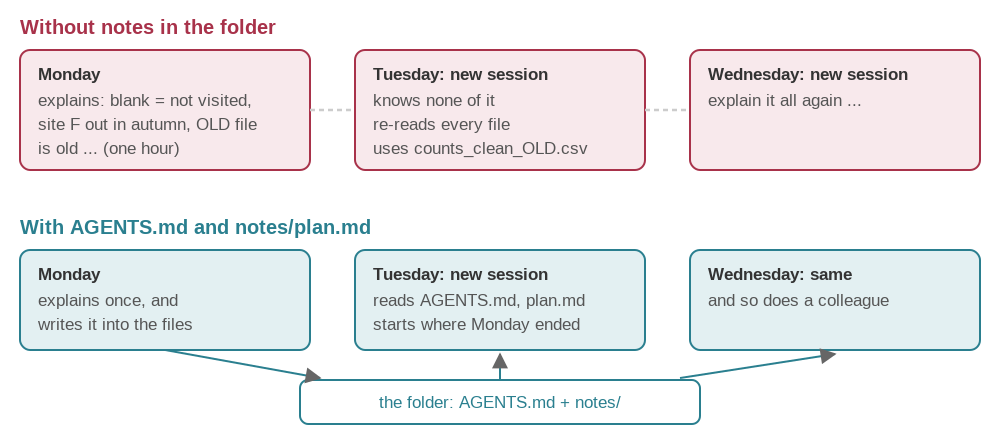
Every agent session starts from a blank slate. Whatever the agent learnt about your project yesterday is gone today, unless it is written down in the folder. A project that lasts needs a folder that explains itself: to the agent at the start of every session, to a colleague, and to you in six months.
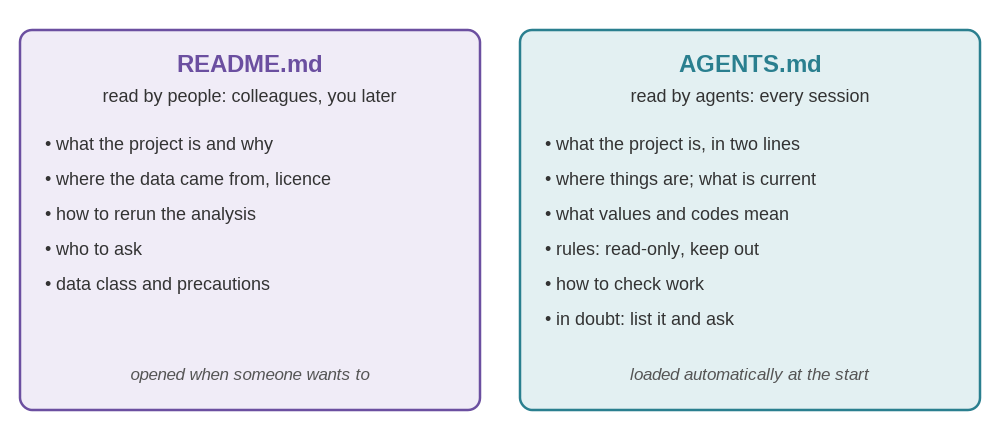
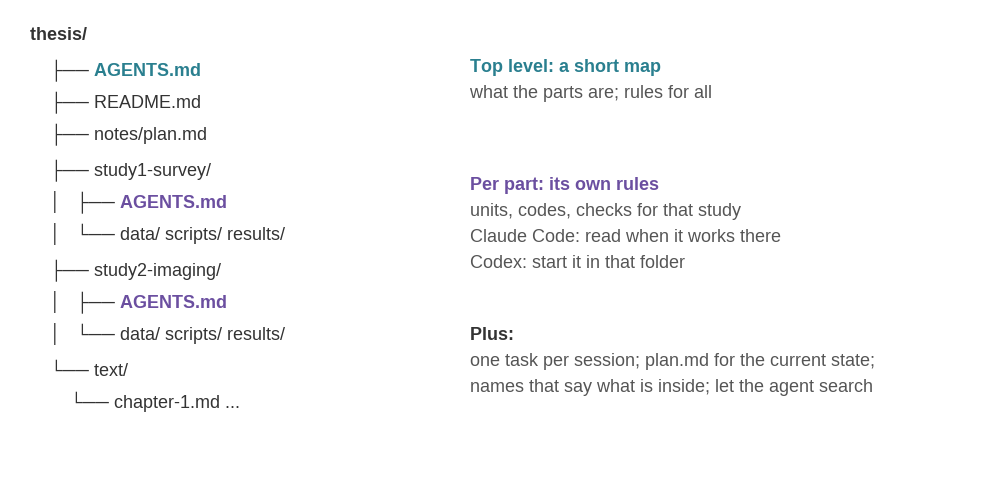
AGENTS.md tells the agent what the project is and what the rules are. One file serves Claude Code and Codex.
README.md tells people the same, in their terms.
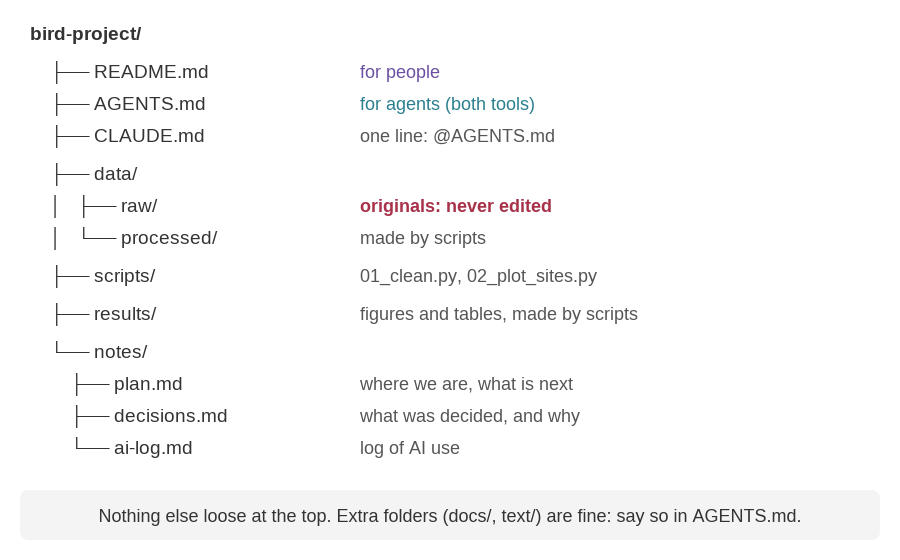
A fixed layout:data/raw (never edited), data/processed, scripts, results, notes.
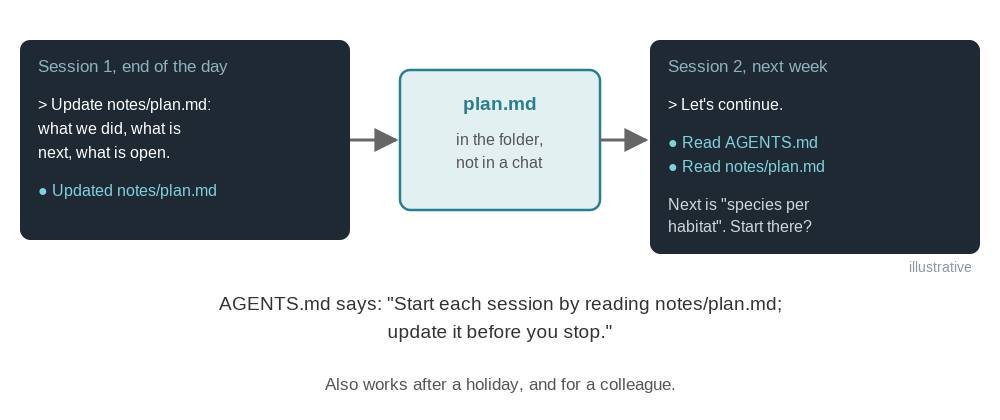
Notes files carry the project between sessions: a plan, a decision log, a log of AI use.
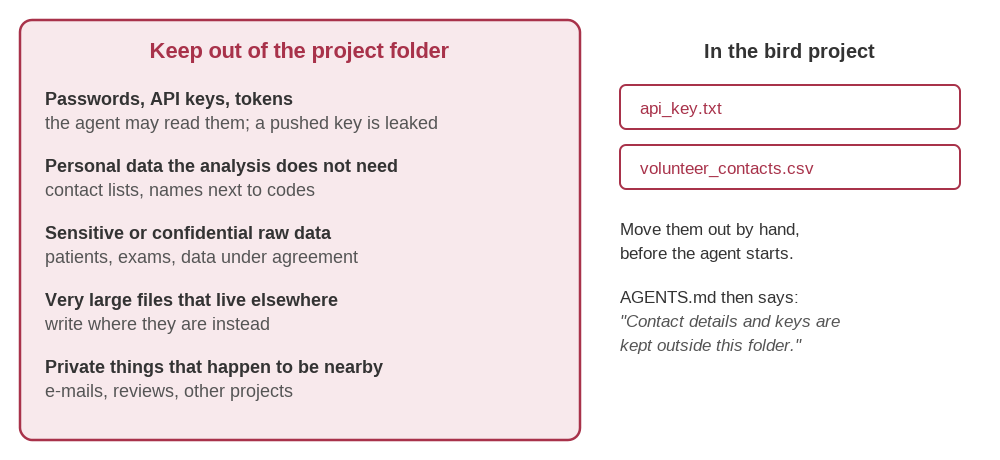
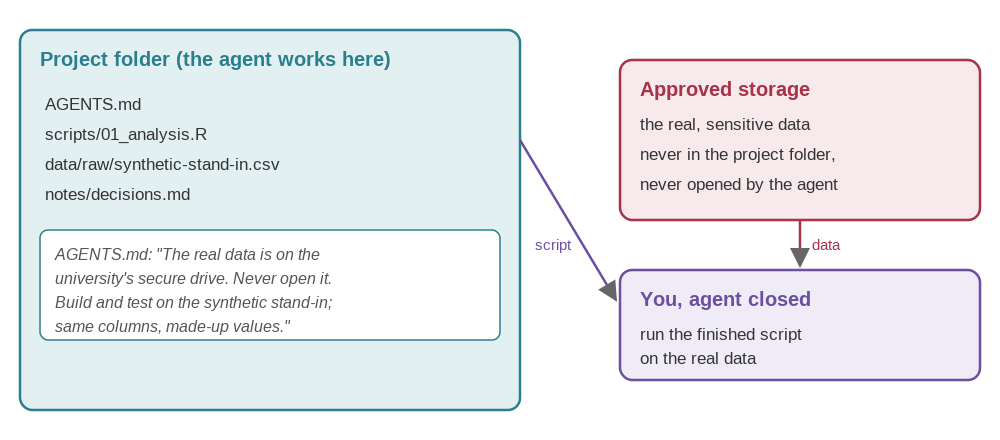
What stays out: secrets, sensitive raw data, things that belong elsewhere.
This is a hands-on unit. Your own-project folder gets this structure today. The safety net that records every change comes next, in Git as undo button and lab notebook.
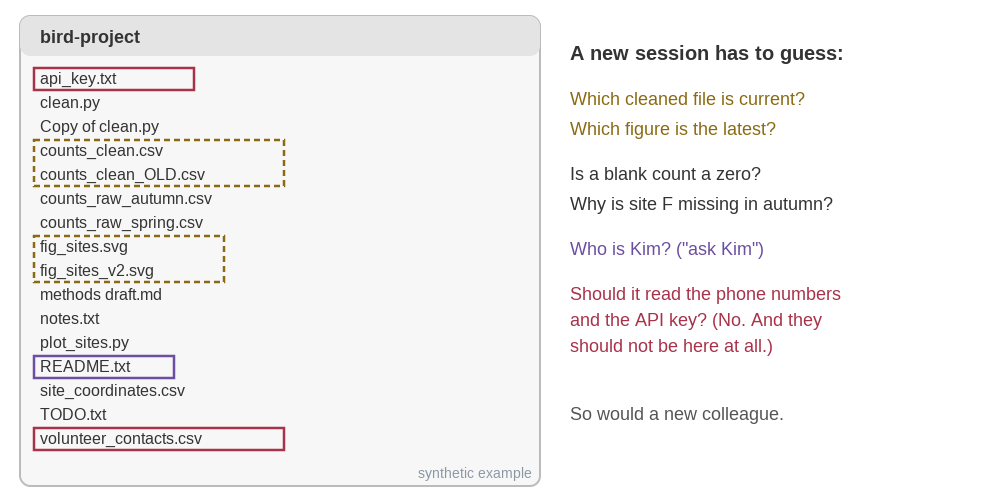
Three weeks later, nobody knows which file is the real one
A new session is a new colleague who has never seen the project
The folder has to say what the files cannot
The agent can work out by reading
Only a written note can say
which files exist and what columns they have
what the project is for
what a script does
which file is current, which is old
that a column has blanks
that blank means “not visited”, not zero
that site F is missing in autumn
why, and that it was decided on purpose
that there is a contact list
that it must not be read or shared
Two readers, two files: README.md for people, AGENTS.md for agents
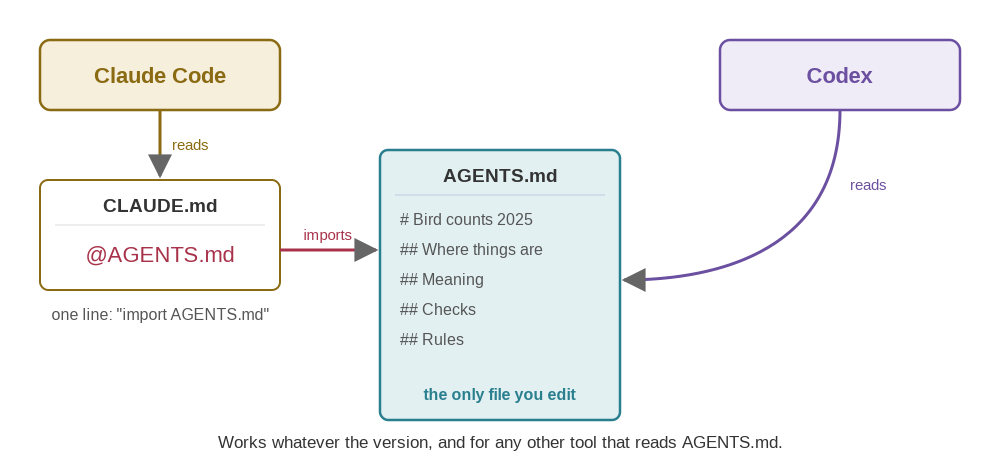
Claude Code reads CLAUDE.md; Codex reads AGENTS.md
Claude Code
Codex
Its own instruction file
CLAUDE.md
AGENTS.md
Reads the other one?
Recent versions read AGENTS.md, but only if there is no CLAUDE.md in the folder or above it
No, not by default
Can include another file
Yes: a line @AGENTS.md in CLAUDE.md imports it
No
Where it looks
The folder you start in, and the folders above it
From the project root (the git root) down to the folder you start in; outside git, only the folder you start in
Draft one for you
/init writes a CLAUDE.md
/init writes an AGENTS.md
Checked against the documentation in November 2026. Details change; the recipe on the next slide works either way.
One recipe serves both: AGENTS.md, plus a one-line CLAUDE.md
What goes into AGENTS.md: what a new colleague would ask on day one
What this project is, in two sentences, and who it is for.
Where things are: a short map, one line per folder, and which file is current.
Rules: data/raw is read-only; never open the files listed under “keep out”.
Meaning: blanks, codes, units, exclusions and why.
How to check work: the commands to rerun, the numbers that must come out.
How to work: start each session by reading notes/plan.md; log decisions in notes/decisions.md.
In doubt: list it and ask; do not guess.
Not: every file, long explanations, things the agent can see by opening a file.
An AGENTS.md for the bird project
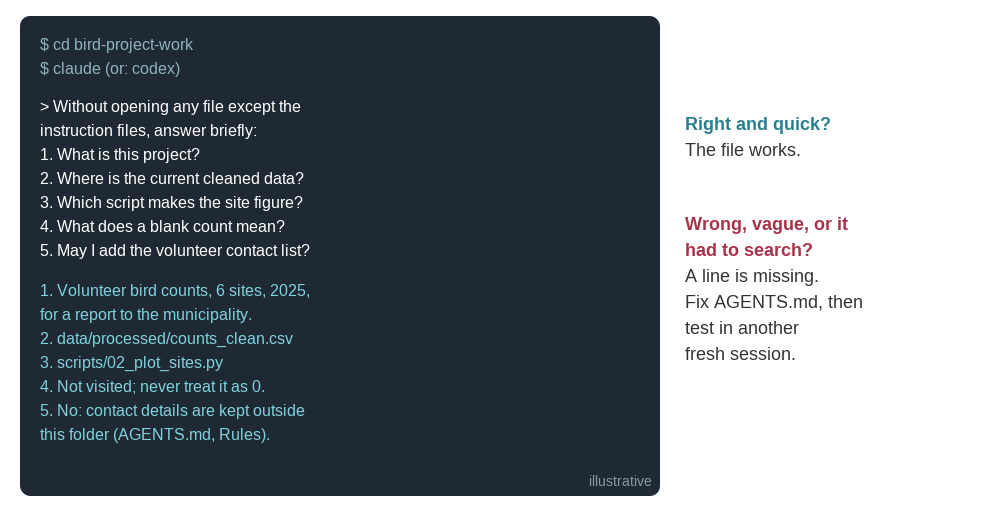
# Bird counts 2025Volunteer bird counts at six sites (A-F), spring and autumn 2025, for areport to the municipality (due 15 Dec). See README.md for background.## Where things are- data/raw/ original counts and site list. READ-ONLY: never edit.- data/processed/ made by scripts only. counts_clean.csv is current.- scripts/ 01_clean.py, then 02_plot_sites.py. Run from the project folder.- results/ figures and tables, made by scripts.- notes/ plan.md (read first), decisions.md, ai-log.md## Meaning- Blank count = site not visited. 0 = visited, none seen. Never treat blank as 0.- Site F is excluded in autumn (flooded); see notes/decisions.md.## Checks- After 01_clean.py: 160 rows, 750 birds. After 02: six bars, A to F.## Rules- Volunteer contact details and API keys are kept outside this folder.- If something is unclear, list it and ask. Log each decision in notes/decisions.md.
Keep AGENTS.md short; add a line when you correct the same thing twice
It is read at the start of every session. Every line costs a little attention on every task.
Aim for one screen; well under 200 lines.
Write rules plainly. Capitals and “IMPORTANT” do not help.
Add a line when you find yourself correcting the same thing twice.
Remove lines that are no longer true. A wrong instruction is worse than none.
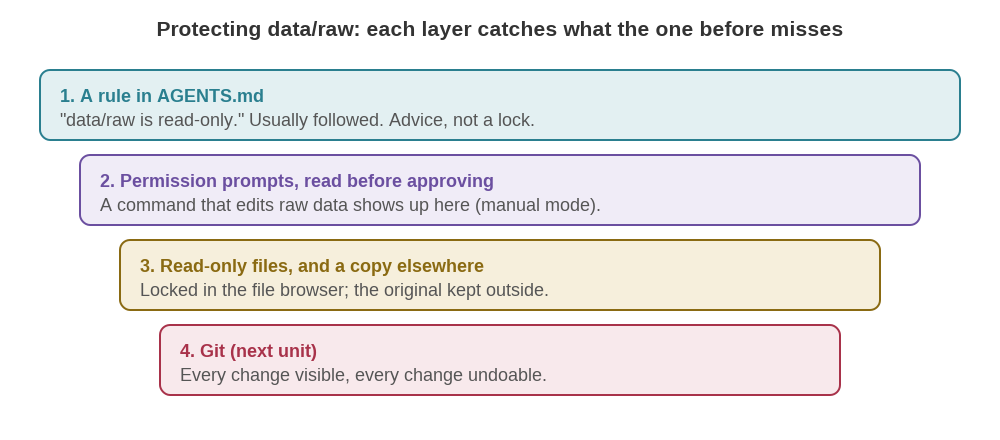
AGENTS.md is advice, not a lock
A layout that works for most projects
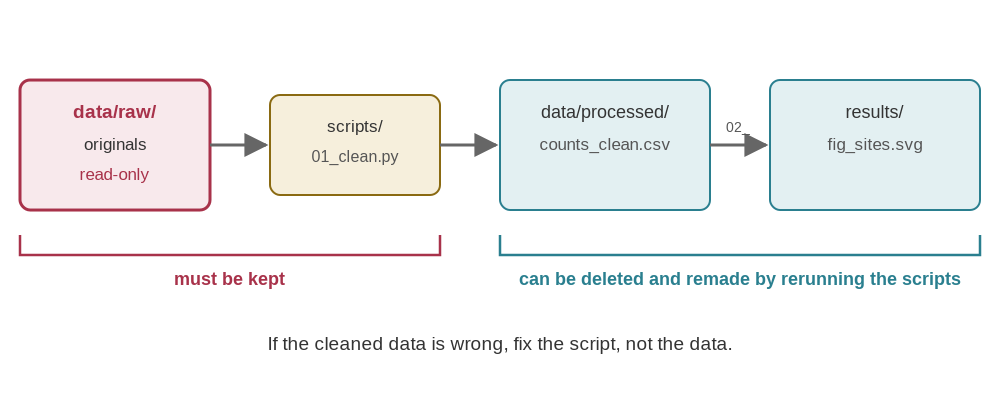
data/raw is never edited; everything else can be remade from it
Protect raw data in three layers
Layer
How
Catches
A rule in AGENTS.md
“data/raw/ is read-only: never edit, move or delete.”
most accidents
Read-only files
Mac: Get Info › Locked. Windows: Properties › Read-only.
an agent that ignores the rule
A copy elsewhere
the original download, the instrument’s export, a backup drive
everything else
From the next unit, git adds a fourth: every change can be seen and undone.
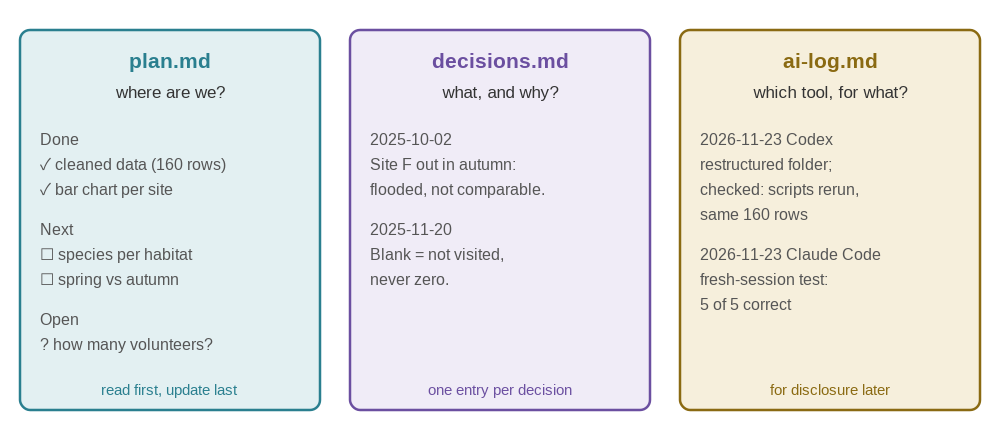
notes/ carries the project from one session to the next
plan.md lets a fresh session pick up where the last one stopped
decisions.md records why, not only what
# Decisions## 2025-10-02 Site F excluded in autumnThe meadow was flooded in September and October; counts are notcomparable with spring. Agreed with the group. clean.py drops F/autumn.## 2025-10-14 Species names lower-casedNames were typed by hand ("Great tit", "great tit", "Great Tit").clean.py lower-cases them; the raw files are unchanged.## 2025-11-20 Blank counts are "not visited", never zeroConfirmed with the volunteers. A blank row is dropped, not counted as 0.
One entry per decision: date, what, why, where it is implemented.
The log of AI use is your record for disclosure
# Log of AI use| Date | Tool | What for | Checked how ||------------|-------------|------------------------|----------------------|| 2026-11-20 | Claude Code | first brief | read, edited by me || 2026-11-23 | Codex | restructured folder | scripts rerun: same || 2026-11-23 | Claude Code | test of AGENTS.md | 5 of 5 correct |
Journals, funders and universities increasingly ask how AI was used. This answers it.
It records what you checked, which is the part that counts.
Names that sort, search and survive
Instead of
Use
Why
Final data v2 (Kim's edits).xlsx
2025-10-14_counts-clean.csv
no spaces; dates sort; one version
fig_sites_v2.svg, fig_sites_NEW.svg
results/fig_sites.svg
git keeps old versions (next unit)
clean.py, Copy of clean.py
scripts/01_clean.py
numbers say the order to run
notes.txt, TODO.txt, misc.docx
notes/decisions.md, notes/plan.md
the name says what is inside
data.csv
counts_raw_spring.csv
specific enough to search for
Lower case, hyphens or underscores, no spaces. Dates as YYYY-MM-DD.
What does not go in the folder
Sensitive data stays outside; the folder says where it is
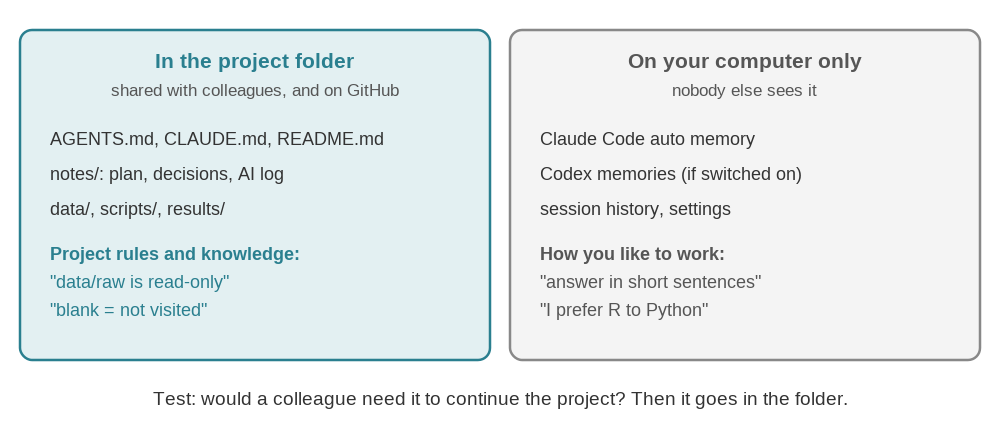
Both tools also have a memory of their own
Claude Code: auto memory
Codex: memories
On by default?
Yes, in local sessions
No, you switch it on
What it stores
notes Claude takes itself: your preferences, corrections, project facts
context extracted from earlier chats
Where
on your computer, under ~/.claude/projects/…/memory/
on your computer, under ~/.codex/
See or change it
/memory (lists files, toggles auto memory)
/memories (per chat), settings for global
Shared with a colleague?
No
No
Both vendors say the same: rules that must always apply go in the instruction file, not in memory.
Memory is personal; the project’s knowledge belongs in the folder
/init drafts the instruction file; you finish it
Claude Code
Codex
Command
/init
/init
Writes
CLAUDE.md
AGENTS.md
For our recipe
Ask by prompt instead (exercise), or run /init and then ask it to move the content to AGENTS.md and leave @AGENTS.md in CLAUDE.md
Use as is; then add the one-line CLAUDE.md
Then
Read it. Delete what the agent could have seen anyway. Add meaning, rules and checks.
the same
/init is written for software projects: expect lines about “build commands” you do not need.
Test it: a fresh session and five questions
Large projects stay navigable with maps, not with memory
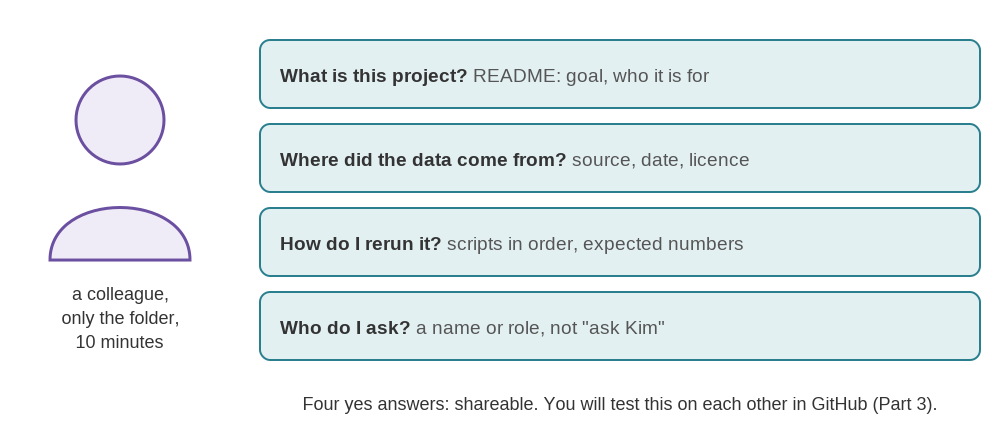
A shareable project passes the colleague test
Restructuring an existing folder is a delegation like any other
Reorganise this folder into the layout below. Do not delete anything.

data/raw/  data/processed/  scripts/  results/  notes/  archive/

- Raw data goes to data/raw. Old versions and copies go to archive/.
- Rename scripts to say the order they run in (01_, 02_) and update
  the paths inside them so they still run from the project folder.
- Write move-log.csv: old path, new path, reason.
- Done when: every file is accounted for in move-log.csv; the scripts
  run and produce the same numbers as before.
Show me your plan first.
Where this goes wrong
AGENTS.md becomes a novel. Long files are followed less well. One screen.
AGENTS.md goes stale. It still points to the old file; every session believes it.
A CLAUDE.md elsewhere hides AGENTS.md. Use the one-line @AGENTS.md recipe.
Starting the agent in the wrong folder. It reads that folder’s instructions, or none. Start in the project folder.
Trusting the rule alone. “Read-only” in a text file is advice. Keep copies; use git.
Secrets in the folder. A key that an agent has read, or that is pushed, is a leaked key.
Rules in memory only. Your colleague, and your other tool, never see them.
Restructuring without a check. Moved files break scripts silently. Rerun them.
Summary
Concept
Key fact
Blank slate
each session starts empty; the folder must say what files cannot
AGENTS.md
for agents: what, where, meaning, checks, rules; one screen
One file for both tools
AGENTS.md + a CLAUDE.md containing @AGENTS.md
README.md
for people: what, data source, how to rerun, who to ask
secrets, unneeded personal data, sensitive raw data, huge files
Memory
on your machine only; project rules go in AGENTS.md
Test
fresh session, five questions with known answers
Next (Git as undo button and lab notebook): turn the project folder into a git repository, so that every change the agent makes can be seen, explained and undone.