A course runs on material that has to be rewritten every year: quizzes, exercise sheets with new numbers, slides, rubrics. Most of it is structured, repetitive and easy to check, which makes it good work for an agent. This track builds a small teaching pipeline: a question bank in a plain file, a Canvas quiz made from it, exercise variants with answer keys, and slides made from an outline.
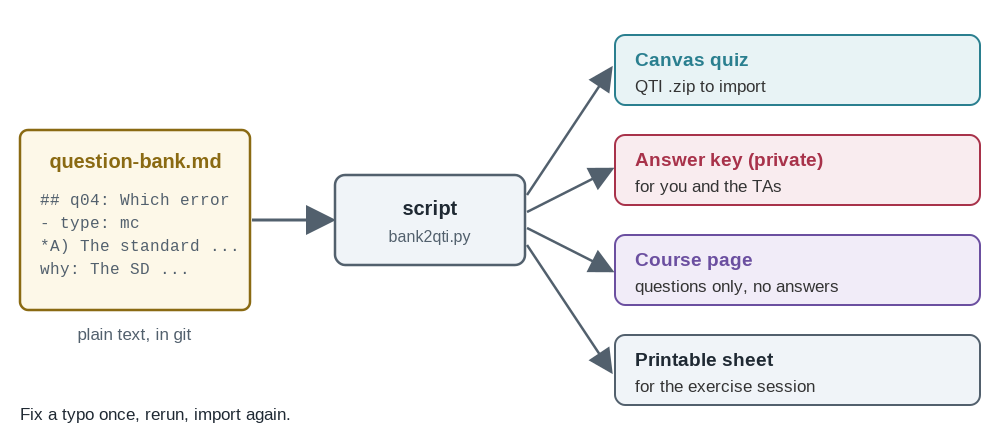
One plain source file, many outputs. The questions live in one file; the Canvas quiz, the answer key and the student page are generated from it.
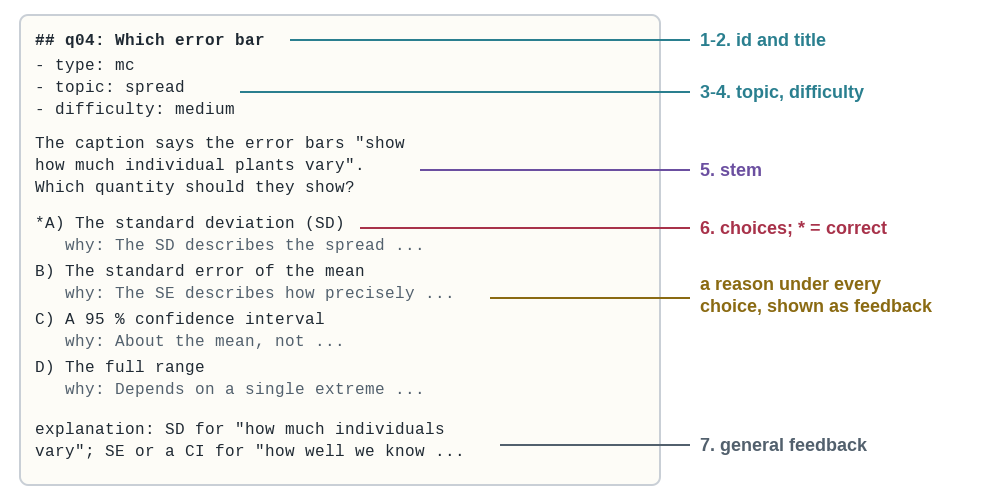
Every question has a key and a reason for each wrong answer. The reasons are what students learn from.
Keys are computed, then checked by you. For variants, a script computes the answers; you solve a sample by hand.
Accessibility from the start: alt text, captions and contrast cost little when built in.
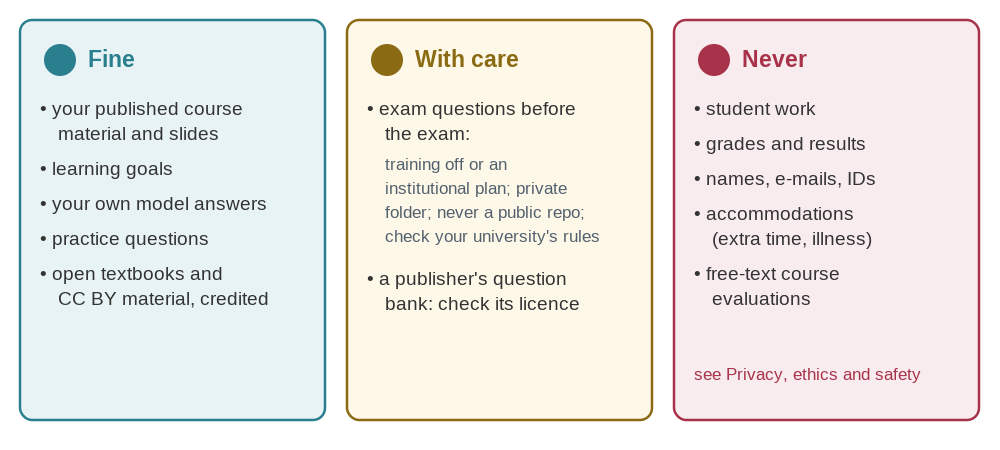
Student work, grades and unreleased exams stay out (Privacy, ethics and safety).
This is a track: the same agent skills as the rest of the course, applied to teaching. It assumes Parts 1 to 4, especially A course or project page.
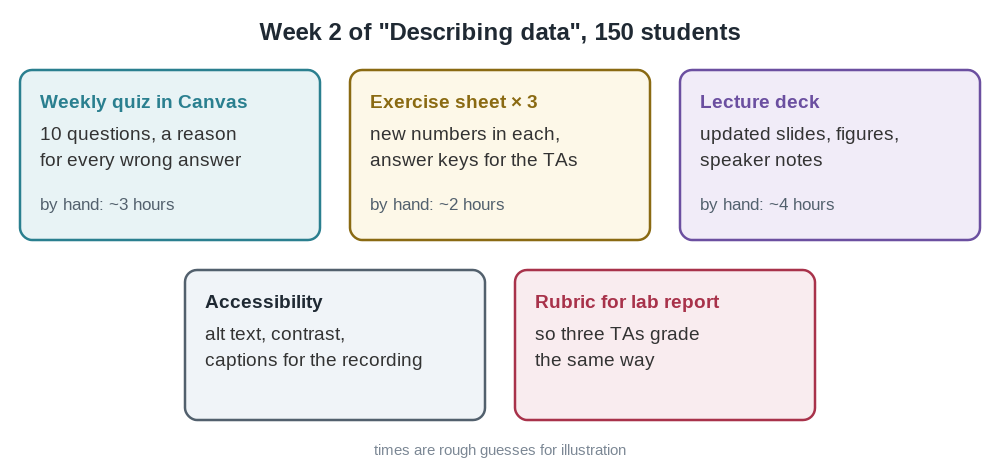
A course with 150 students needs a lot of material every week
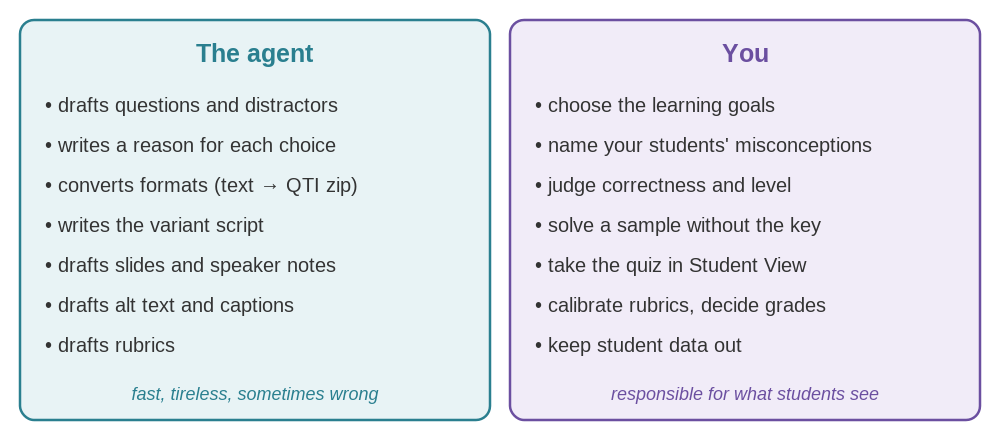
The agent drafts and converts; you decide and check
Keep the questions in one plain file and generate everything else
One good question has seven parts
Good distractors come from real mistakes, each with its reason
Stem:The caption says the error bars “show how much individual plants vary”. Which quantity should they show?
Choice
Why a student picks it
Feedback shown
The standard deviation (correct)
Describes the spread of individual values.
The standard error of the mean
SE bars look tidier, and many papers use them
Describes how precisely the mean is known; shrinks with more plants.
A 95 % confidence interval
sounds the most rigorous
About the mean, not about individual plants.
The full range
the most literal reading of “vary”
Depends on one extreme plant and grows with sample size.
Tell the agent which misconceptions you see in your students. It cannot know them; you do.
The prompt for a question bank names goals, format and checks
Write 10 questions for week 2 of my first-year course "Describing data".
Learning goals: choose mean or median; SD vs SE; read box plots and log
axes; correlation is not cause. My students often confuse SD and SE and
read r as "percentage explained".

Use exactly the format of question-bank.md in this folder: 6 multiple
choice (4 choices, exactly one correct, a "why:" line under every
choice) and 4 numeric (answer and margin). Mix easy, medium and hard.
Put the correct answer in a different position from question to
question. Numbers must be realistic for biology or medicine.
Write to week2-bank.md. Then solve every question yourself, as a
student would, and list any question where you are unsure of the key.
Generated questions fail in predictable ways
Failure
Example
How to catch it
Wrong key
the “correct” answer to a numeric question is off by a factor of 10
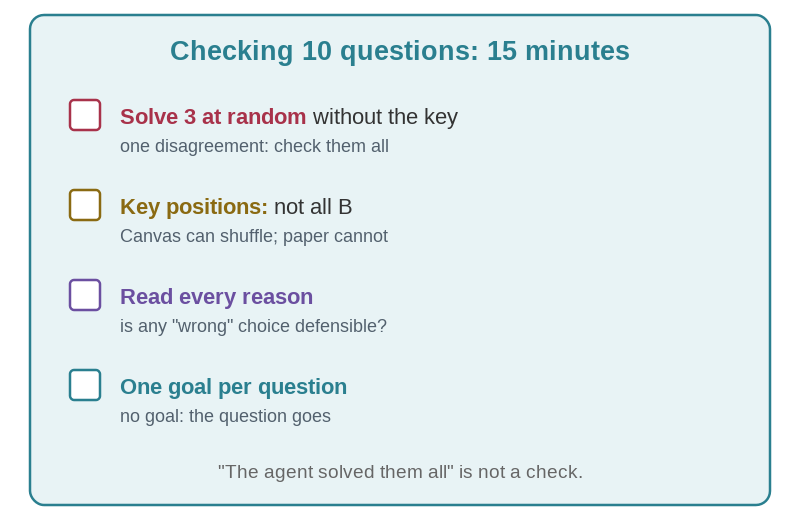
solve a sample yourself, without looking at the key
Two defensible answers
“best plot” where two choices are both fine
read each distractor and ask: could I defend this?
Cues in the wording
the correct answer is the longest, or the only one with “may”
read the choices without the stem
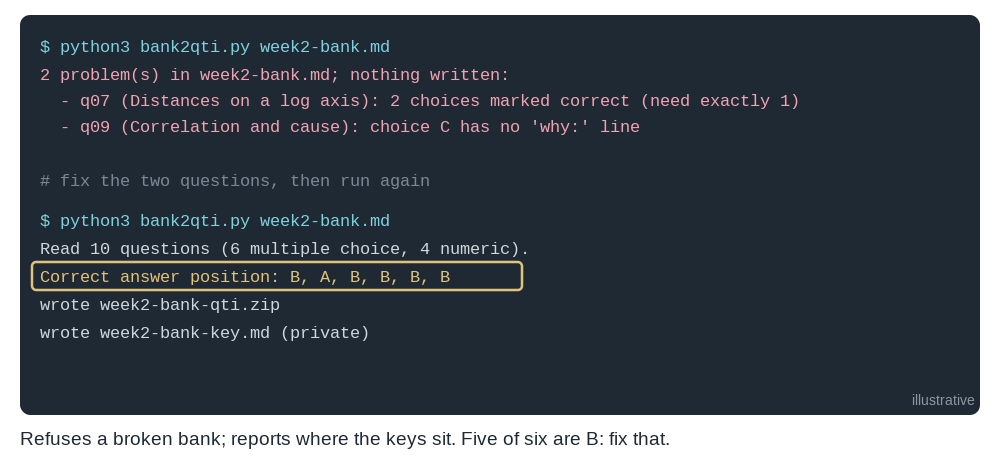
Key always in the same place
five of six correct answers are B
the script prints the positions
Trivia instead of goals
“who introduced the box plot?”
check each question against a learning goal
Invented facts
a “classic study” or a constant that does not exist
look up every fact you did not already know
Check a bank the way you would check a colleague’s
A converter script refuses a bank with mistakes
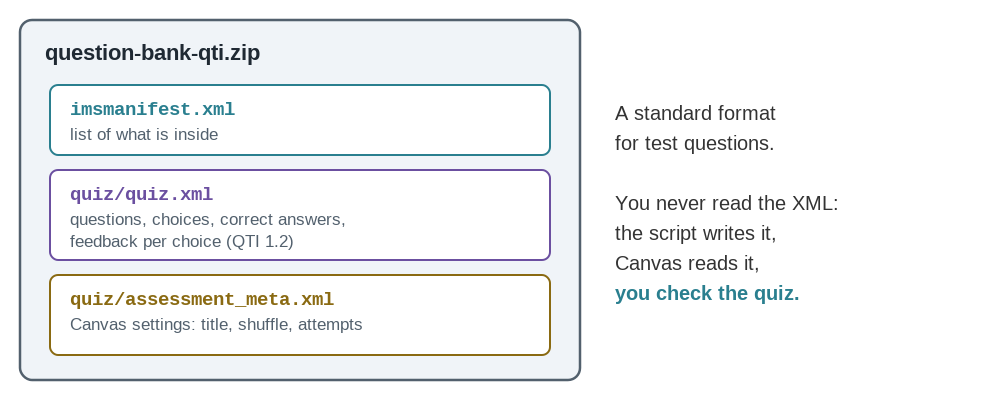
Canvas imports quizzes as a QTI zip file
QTI is a standard format for test questions. Canvas reads QTI 1.2 and 2.1 packages.
You never need to read the XML. The agent writes the converter; you check the result in Canvas.
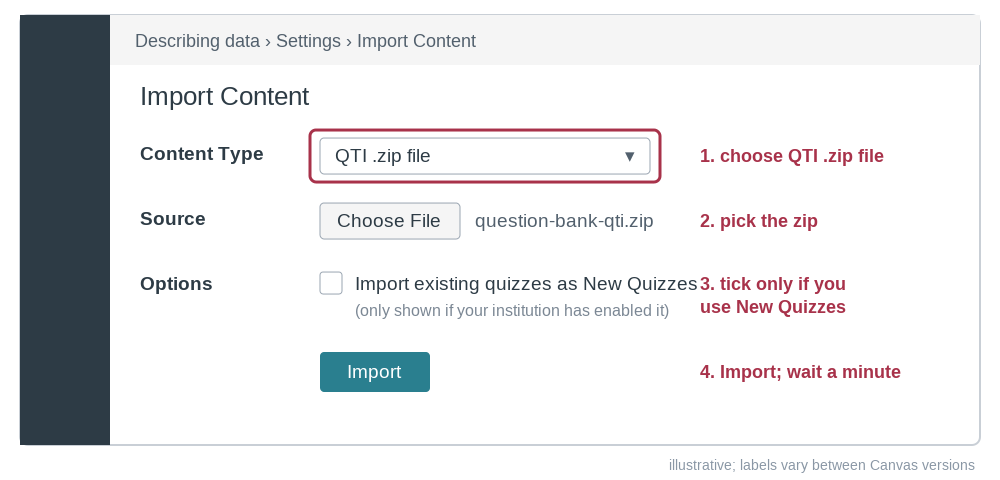
Import in Canvas: Settings, Import Course Content, QTI .zip file
Classic Quizzes and New Quizzes import differently
Classic Quizzes
New Quizzes
Import route
Settings › Import Course Content › QTI .zip file
the same route, with the box “Import existing quizzes as New Quizzes” ticked, if your institution has enabled it
What you get
a new, unpublished quiz
a new, unpublished New Quiz
Question banks
optionally into a question bank
item banks work differently; the default question bank option is not available with this box
Updating
an import always creates a new quiz; it does not update an existing one
the same
Future
Instructure is moving everyone to New Quizzes; universities set their own dates
the long-term default
Ask your Canvas support which quiz engine your university uses this term.
Always take the quiz as a student before you publish it
Open the quiz in Student View (Canvas: Settings › Student View) and take it.
Check: every question shows; numbers and symbols display correctly; the right answers score; the feedback for each wrong choice appears; the quiz settings (attempts, time, when answers show) are what you want.
Answer one question wrong on purpose and read the feedback as a student would.
Then set the dates and publish.
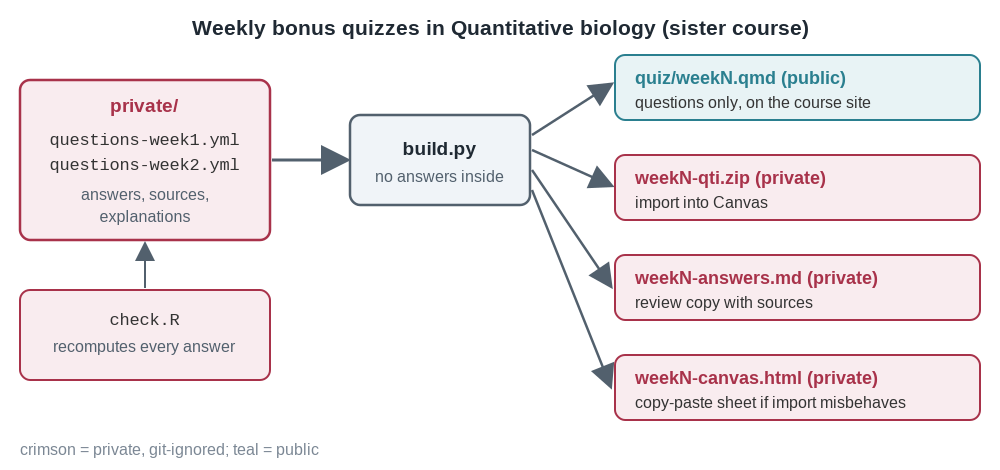
The sister course runs this pipeline every week
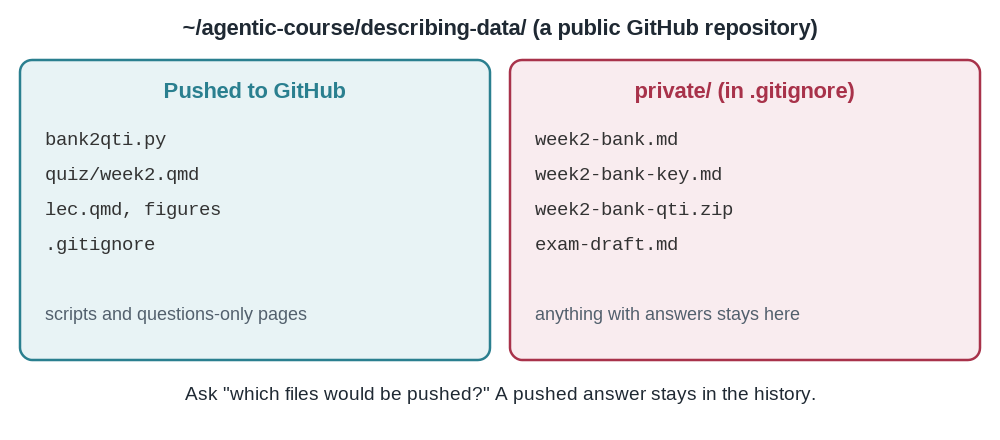
Answers live in a private folder that never reaches GitHub
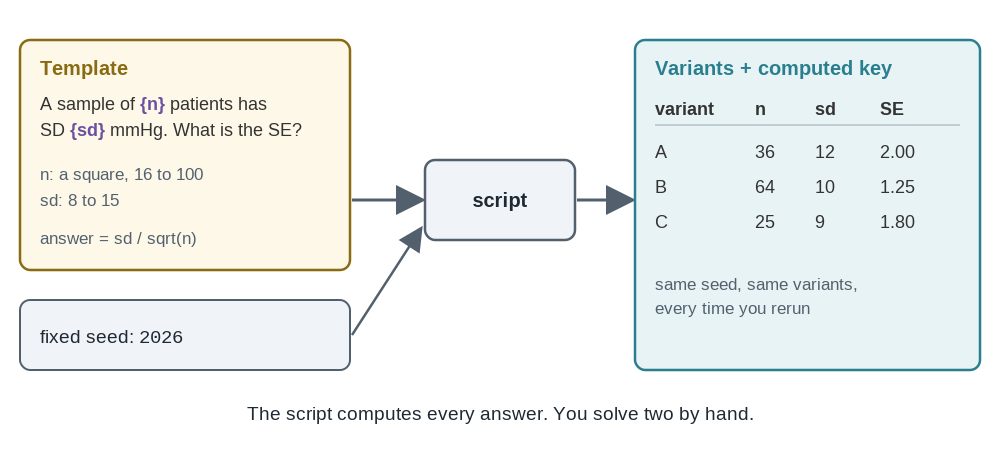
Exercise variants: a template, a seed and a computed key
The key is computed, then checked by hand
Make a script that writes 3 variants of each question in
variant-templates.md, using a fixed random seed. For each variant,
compute the answer in the script; never type an answer by hand.
Numbers must be realistic: blood pressure SD 8-15 mmHg, n a perfect
square between 16 and 100. Write the variants in the format of
question-bank.md, so bank2qti.py can convert them.
Then print a table: variant, numbers used, answer.
Solve two variants by hand and compare with the table.
Look at the extremes: the smallest and largest numbers drawn. Is the question still sensible, and still the same difficulty?
Check rounding and units against what the question asks for.
In Canvas, variants go in a question group or an item bank
Classic Quizzes: put the variants in a question group that picks one at random for each student.
New Quizzes: put them in an item bank and let the quiz draw from it.
Both engines also have formula questions, where Canvas itself draws numbers. Fine for one formula; a script is easier to check and reuse outside Canvas.
For paper exercise sheets: the same script writes one sheet per variant and a key for the teaching assistants.
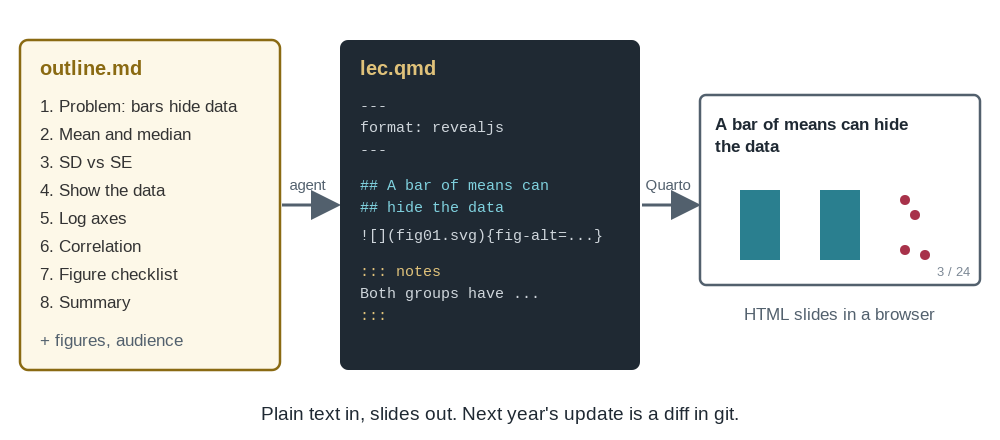
Slides from an outline: Quarto and reveal.js, like this course
A deck source is plain text: a header, then one section per slide
---
title: "Describing data before you test it"
format:
revealjs:
slide-number: true
---
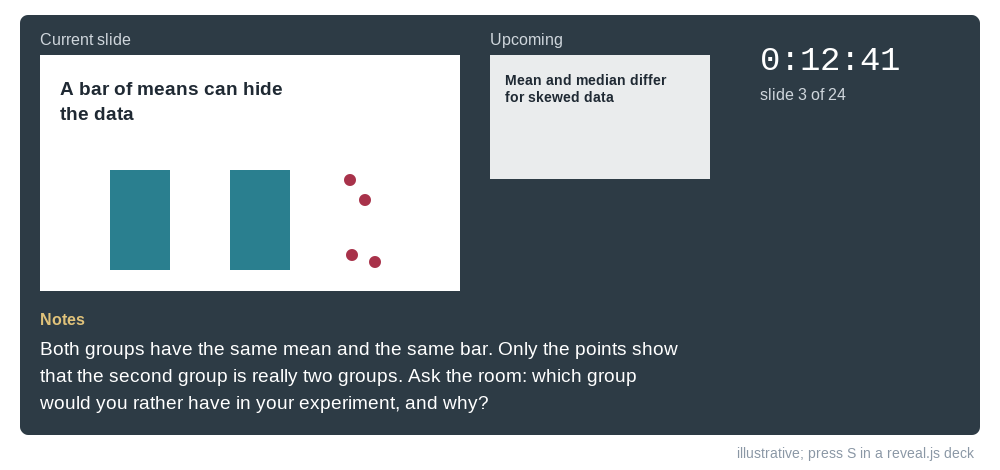
## A bar of means can hide two very different datasets
{fig-alt="Two identical bars of means.
Below each, the eight data points: one group tightly clustered, the
other split into two clusters far apart."}
::: notes
Both groups have the same mean and the same bar. Only the points show
that the second group is really two groups. ...
:::
Render with quarto render lec.qmd, or ask the agent to. Press S in the browser for the speaker view.
Speaker notes make a deck usable without you
Ask for SVG figures, then look at every one
Ask for simple concept figures as SVG: flat, two or three colours, large text. They scale on a projector and can be edited.
For data figures, use a script, as in Reproducible figures.
Look at each figure at full size: text overlapping, labels cut off, arrows pointing at the wrong thing, numbers that do not match the text.
Ask for a style once, in your project’s instruction file: colours, font, text size. Every later figure follows it (Making the agent yours).
Accessible material is part of the job, and for public universities part of the law
The EU Web Accessibility Directive applies to public-sector websites and apps, including universities and their course pages. In Sweden it is in the law on accessibility of digital public services, supervised by DIGG.
The usual yardstick is WCAG 2.1, level AA: alt text, enough contrast, captions, structure, keyboard use.
Your university has guidelines and usually a contact person. Canvas has a built-in accessibility checker in its editor.
An agent makes the basics cheap: alt text for every figure, captions checked, contrast tested, headings in order.
Alt text says what the figure shows, not what it is called
Figure
Poor alt text
Good alt text
bar chart vs dot plot
“Figure 1”
“Two identical bars of means. Below each, the data points: one group tightly clustered, the other split into two clusters far apart.”
box plot, labelled
“Box plot”
“A box plot with its parts labelled: the box spans the first to third quartile, the line inside is the median, whiskers extend to the most extreme points within 1.5 box lengths.”
decorative photo
“Photo of a lab”
empty alt text: it adds nothing, so screen readers should skip it
course logo
“logo.png”
“Course logo: Describing data”
Ask the agent for alt text with the point of the figure in it. Then read it next to the figure: is it true?
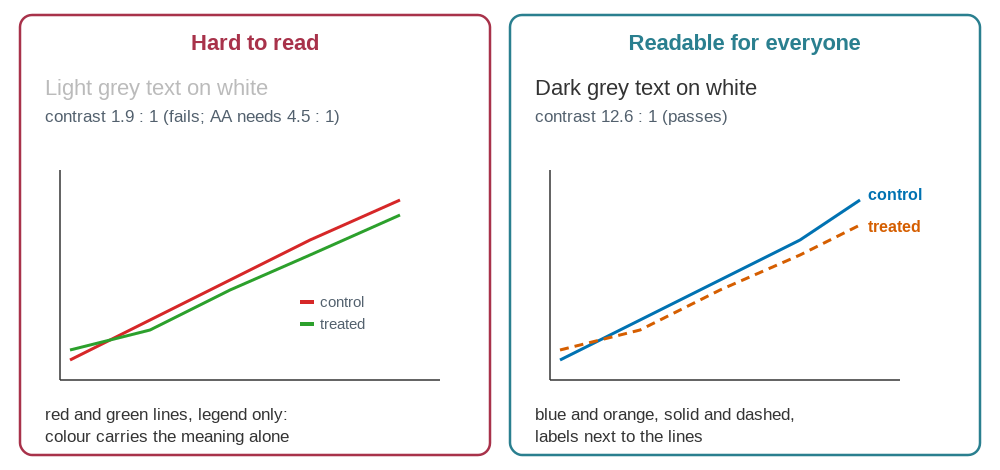
Contrast and colour: never let colour carry the meaning alone
Recordings need captions, and automatic captions need checking
Most video platforms make automatic captions. They are good at ordinary speech and bad at your field’s terms: “Michaelis–Menten”, “p-value”, Swedish place names, people’s names.
The agent can compare captions with your speaker notes and the slide text, and list likely errors with timestamps.
It can then write a corrected caption file (WebVTT or SRT) for you to upload.
Check the flagged lines by listening. The agent did not hear the recording.
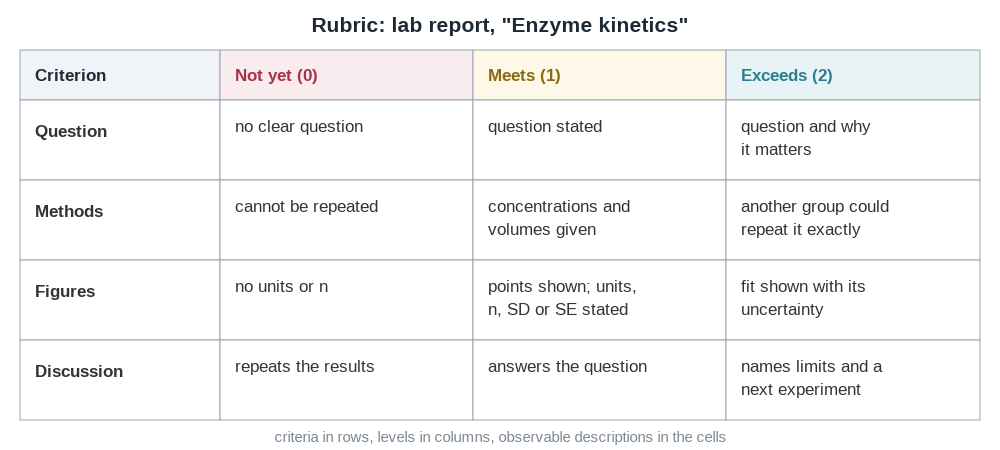
A rubric is a table of criteria and levels
The agent drafts the rubric; it does not grade
Draft from the goals: give the agent the assignment text and the learning goals, ask for 4 to 5 criteria and 3 levels with observable descriptions.
Calibrate with people: two teachers grade the same three reports with the draft rubric, compare, and sharpen the cells where they disagreed. Use your own model answers or published examples, not student work.
Never upload student work for grading. It is personal data; and AI used to evaluate learning outcomes is a high-risk use under the EU AI Act (Privacy, ethics and safety).
What never goes to the agent, and what needs care
Where this goes wrong
Publishing a quiz without solving a sample. One wrong key costs more time than the whole check.
Distractors that are also correct. Read each one and ask whether you could defend it.
Answers in a public repository. Check what git would push; deleting later does not remove it from history.
Variants written as free text, each with its own arithmetic slip. Compute keys in a script.
Editing the quiz in Canvas only. Next year the fix is lost. Fix the source file and reimport.
Skipping Student View. Missing feedback and broken symbols show up only there.
Alt text that describes the figure the agent meant to draw, not the one it drew.
Uploading student work, grades or names to get a report or a grade.
Summary
Concept
Key fact
One source file
questions in plain text, in git; quiz, key and pages generated
A good question
stem, one correct choice, a reason under every choice, feedback
Checking a bank
solve three blind, key positions, read every reason, match goals
Canvas import
QTI .zip: Settings › Import Course Content; creates a new quiz
Student View
take the quiz as a student before publishing
Summary (continued)
Concept
Key fact
Private answers
private folder in .gitignore; never in a public repo
Variants
template + seed + computed key; solve two by hand; check extremes
Slides
outline → Quarto reveal.js; speaker notes on every slide; press S
Accessibility
alt text with the point; contrast 4.5:1; captions checked
Rubrics
the agent drafts, teachers calibrate, nobody uploads student work
Next: this is the last unit of the teaching track. Return to the course overview for the other tracks (RNA-seq, simulation, image analysis, survey data), or to any earlier unit you want to apply to your teaching.