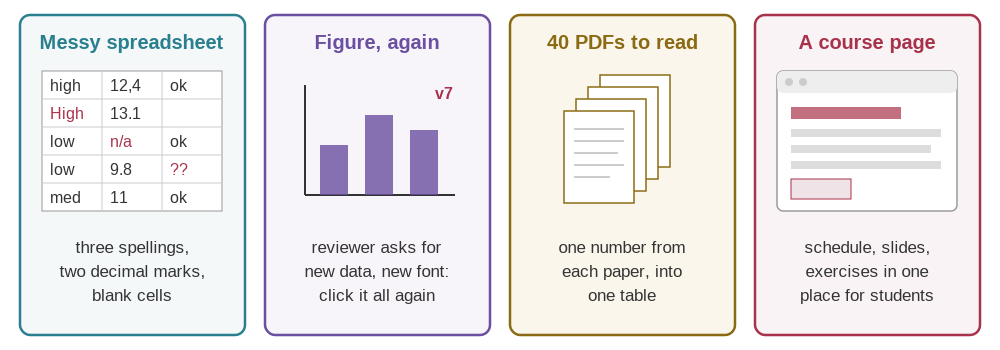
Teachers and researchers spend a large part of every week on chores that are not their real work: cleaning spreadsheets, redrawing figures, reading through stacks of PDFs, building course pages. A coding agent is a language model that can work in a folder on your computer: it reads your files, runs commands, checks its own output and leaves files you keep. This lecture shows what that looks like and why it changes what you can get done.
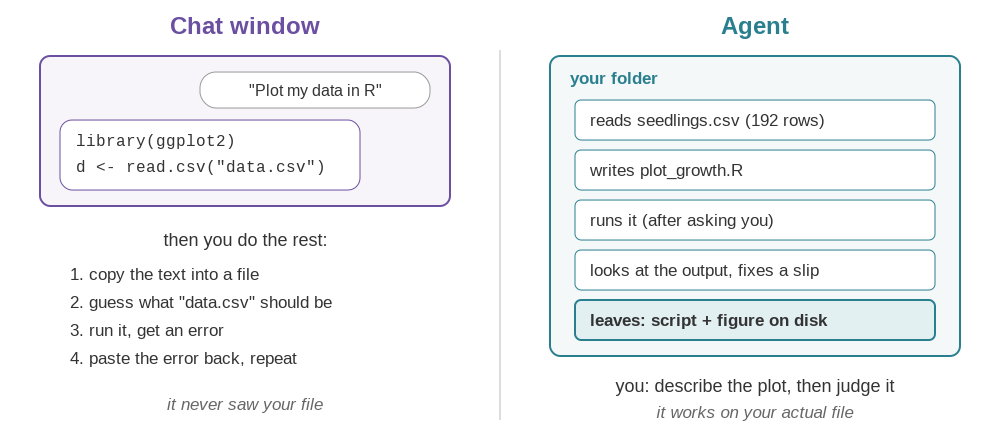
A chat window gives you text to copy and paste. An agent works on your actual files.
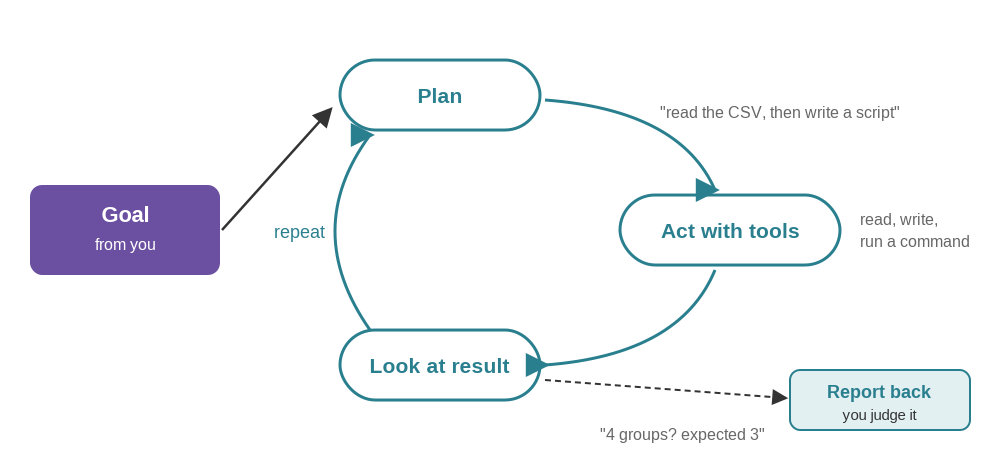
Every agent runs the same loop: goal, plan, act with tools, look at the result, repeat.
Claude Code (Anthropic) and Codex (OpenAI) are two tools built on this idea. The course teaches both.
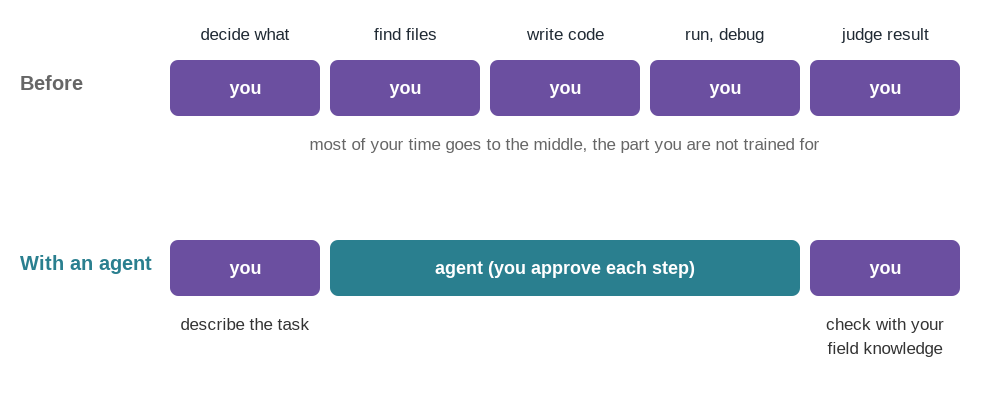
Your role changes: you describe the task and judge the result. Your field knowledge matters more, not less.
This is a motivation unit: no installation yet. Installing comes in Accounts and installation; how the model works inside comes in How LLMs and agents work, and how they fail.
You already have a pile of chores that are not “write a paragraph”
A spreadsheet from three students, typed three ways. A figure you rebuild by hand for each revision.
Forty PDFs, each holding one number you need. A course page that never gets made.
A chat window gives you text; an agent leaves you files
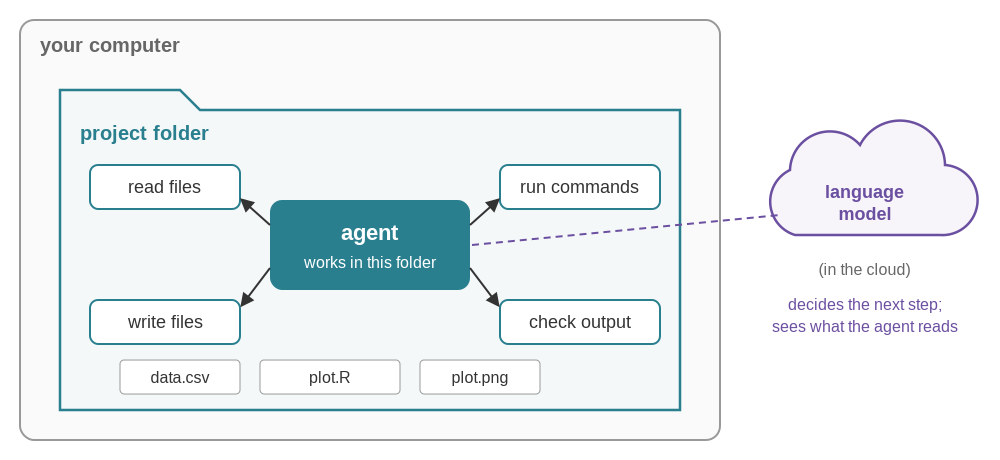
An agent is a language model that can act in a folder on your computer
The model (in the cloud) decides the next step. The agent program (on your computer) carries it out.
It has a small set of tools: read files, write files, run commands, look at the output.
The difference is where the work happens and what is left afterwards
Chat window
Coding agent
Sees your files
Only what you paste in
Reads them in your folder
Runs things
No (or in a hidden sandbox)
Runs commands on your computer, within limits you set
Checks its own output
Only if you paste it back
Looks at errors, outputs and files itself
What you get
Text in a browser tab
Files on disk: scripts, figures, tables, pages
Rerun next month
Ask again, get a different answer
Run the same script again
Your job
Copy, paste, run, debug
Describe the task, approve steps, judge the result
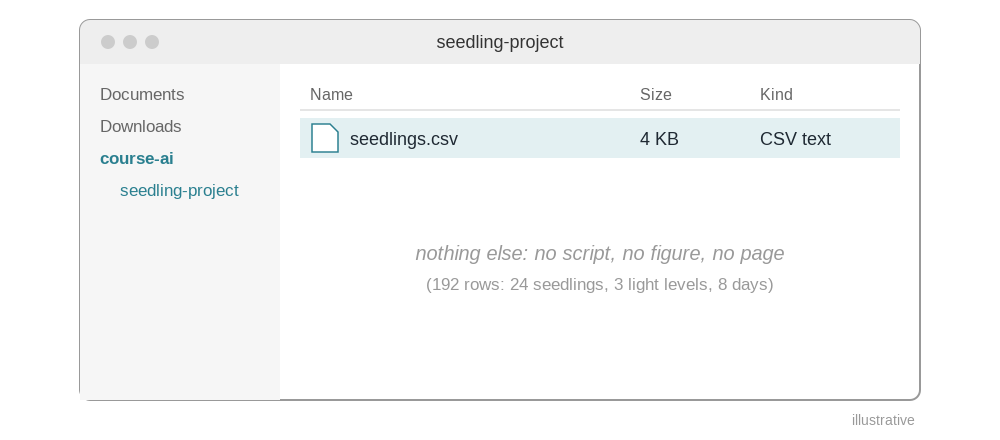
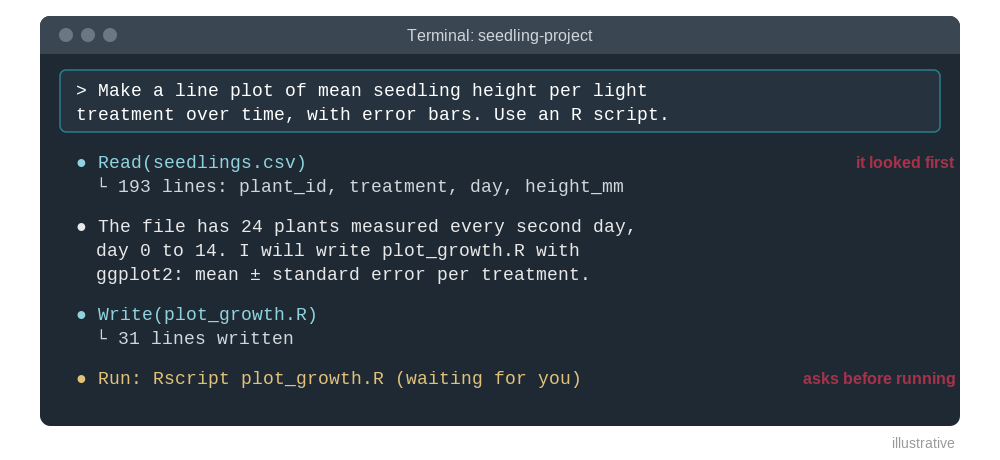
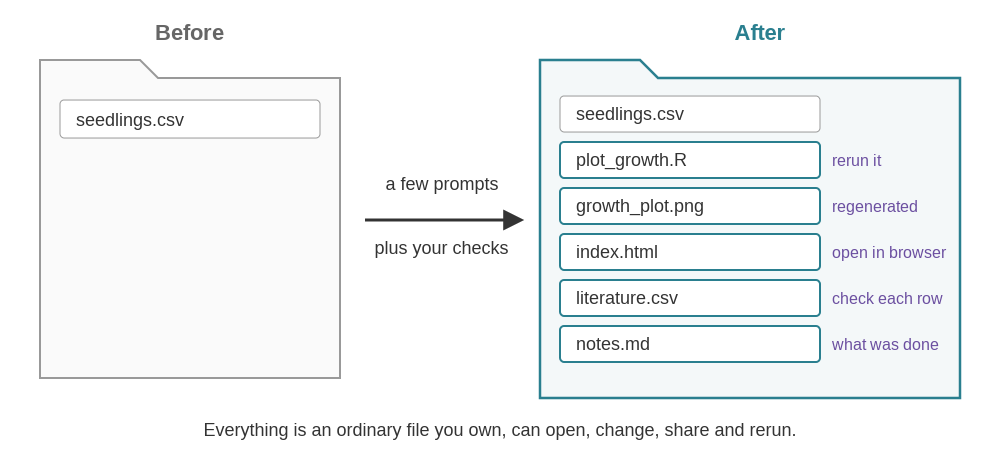
The live build starts from a folder with one CSV file
Synthetic data: 24 pea seedlings, three light levels, height measured every second day.
Goal: a plot, then a small web page, then a literature table. Three prompts.
You describe the result in plain words; the agent looks at the file first
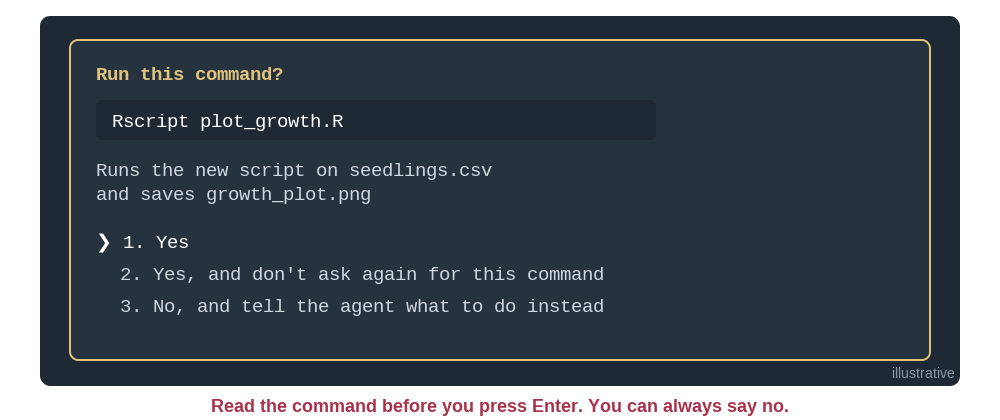
The agent asks before it runs anything, and you can say no
You set the limits; the agent asks at the edge of them. Claude Code asks before commands like this by default. Codex by default works freely inside the project folder and asks before going outside it (other folders, the internet).
Read the command first.Terminal survival kit teaches you to read these and to set the limits.
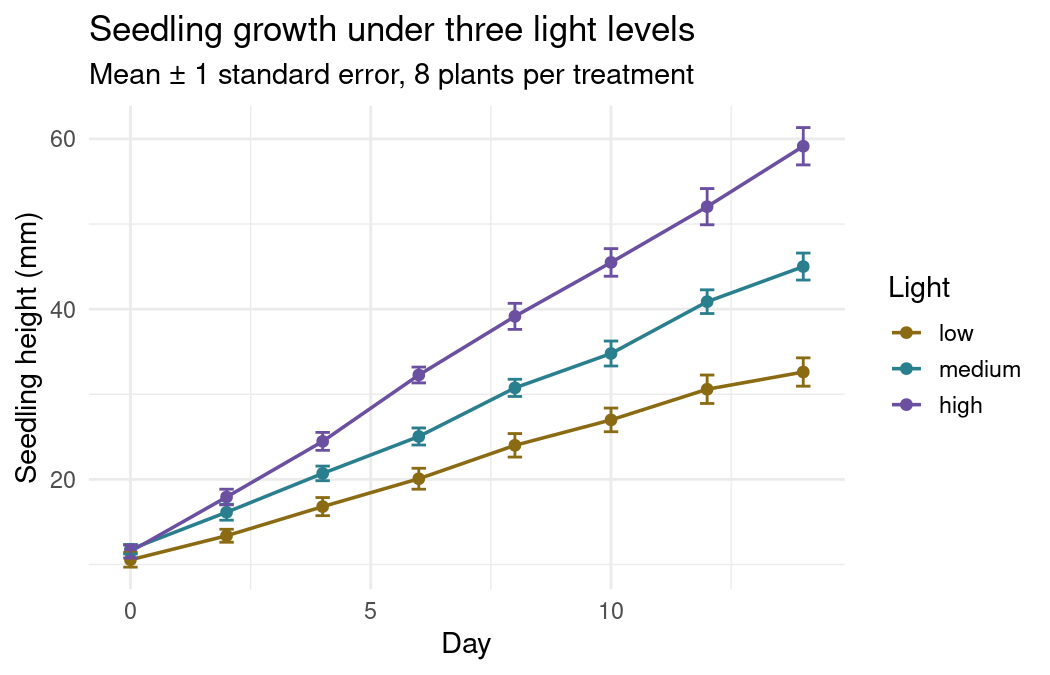
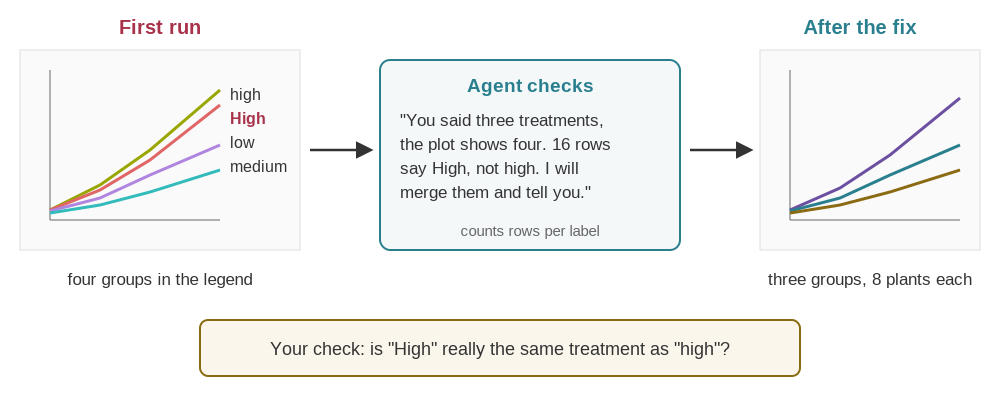
Step 1 gives you a script and a figure, both on disk
plot_growth.R: about 30 lines you can open, read and rerun.
growth_plot.png: made by the script, not drawn by hand.
The agent reported: “16 rows used the label High instead of high; I merged them. One measurement (m03, day 10) is missing and was left out.”
When the data change, you rerun the script, not the conversation
> The students added day 16. Update the plot.
The agent reruns plot_growth.R on the new file. Same code, same style, new figure.
Next year’s class: copy the folder, swap the CSV, rerun.
This is the difference between a result and a reproducible result. Reproducible figures (Part 2) builds on it.
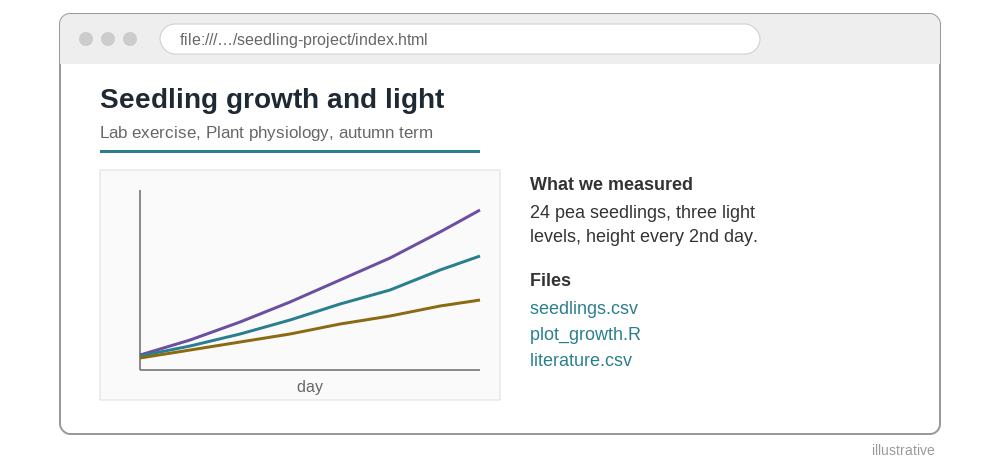
Step 2: the same folder becomes a small web page
> Make a simple one-page website (index.html) that shows the plot,
  explains the experiment in three sentences, and links to the files.
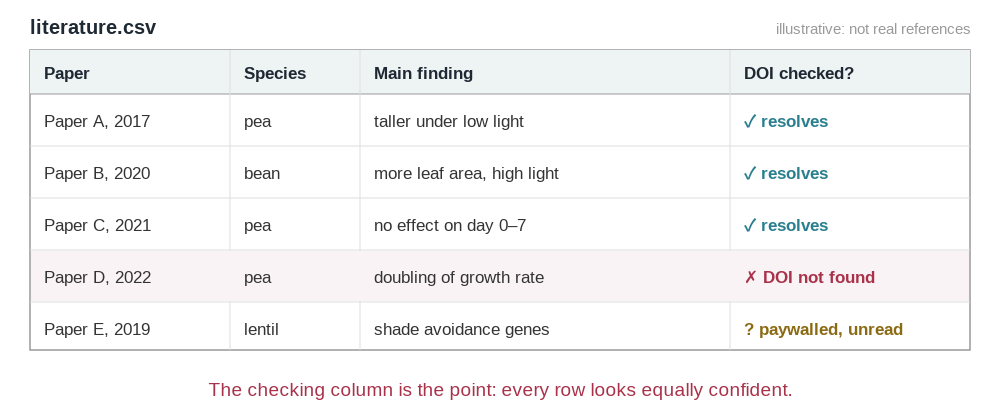
Step 3: a literature table is fast to make and slow to trust
> Find five papers on light intensity and seedling growth in legumes.
  Make literature.csv with paper, species, main finding and DOI. Check that each DOI exists.
After a few prompts the folder holds files you can keep
Your own session will look different, and that is normal
Agents are not deterministic: the same prompt gives a slightly different script, wording or order of steps each time.
Tools change monthly: screens, menus and options move.
What stays the same: the agent reads, plans, acts, checks, reports, and you judge.
So we teach habits (describe, approve, check), not keystrokes.
Every agent runs the same loop: goal, plan, act, look, repeat
The loop lets the agent catch some of its own mistakes
The tools are ordinary actions you could do yourself, only faster
Tool
What it does
Seedling example
Read
Opens a file and looks at its contents
Reads seedlings.csv, sees four columns
Write / edit
Creates or changes a file
Writes plot_growth.R, later fixes one line
Run a command
Runs a program in the folder
Rscript plot_growth.R
Search
Finds files, or searches the web if allowed
Looks up DOIs for the literature table
Ask you
Stops for permission or a question
“Run this command?”
There is no magic step: every action is visible on screen and most can be undone.
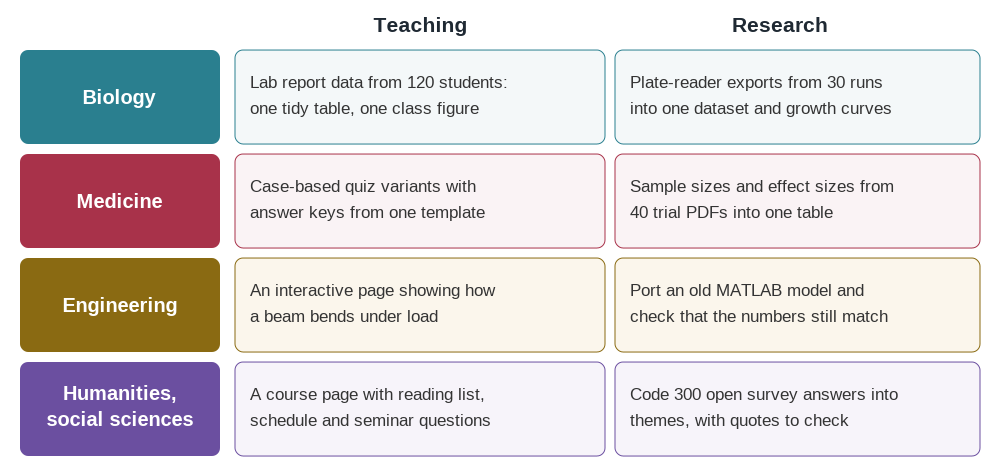
In teaching, agents take over the file work around a course
Turn last year’s slides and notes into a course page with schedule and reading list.
Make exercise variants with answer keys from one template, and check each key by running it.
Clean and merge lab report data from a whole class into one table and one class figure.
Build a small interactive demo that shows one concept from your field.
Collect course evaluation answers into a summary with the original quotes attached.
You still decide what students should learn and whether the material is correct.
The same pattern shows up in every faculty
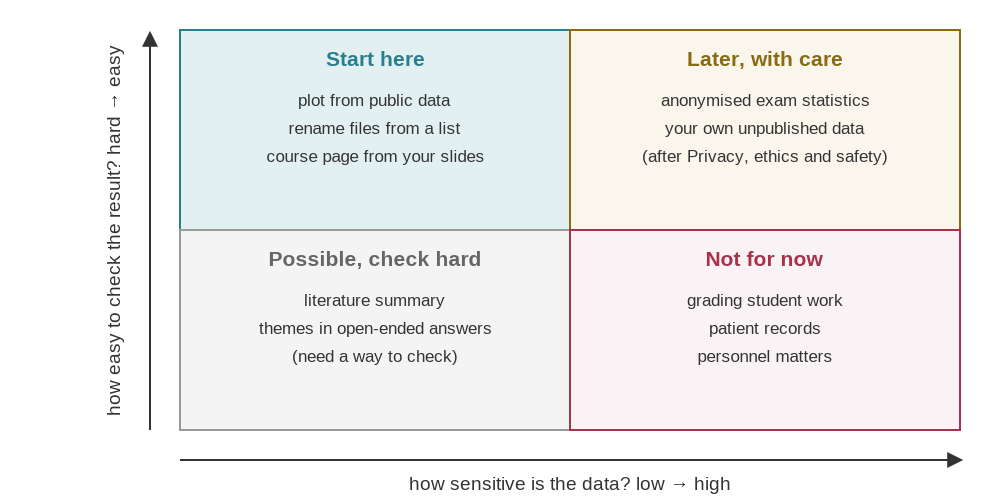
Some chores are poor candidates for an agent, and that is fine
The judgement is the job. Grading a thesis, deciding a hiring case, reviewing a manuscript.
You cannot check the result. If you could not tell a right answer from a wrong one, neither can anyone else in the room.
The data may not leave your institution. Patient records, student grades, personnel files.
It is quicker by hand. Fixing one typo does not need an agent.
Choose chores by two questions: can I check it, and may I share the data?
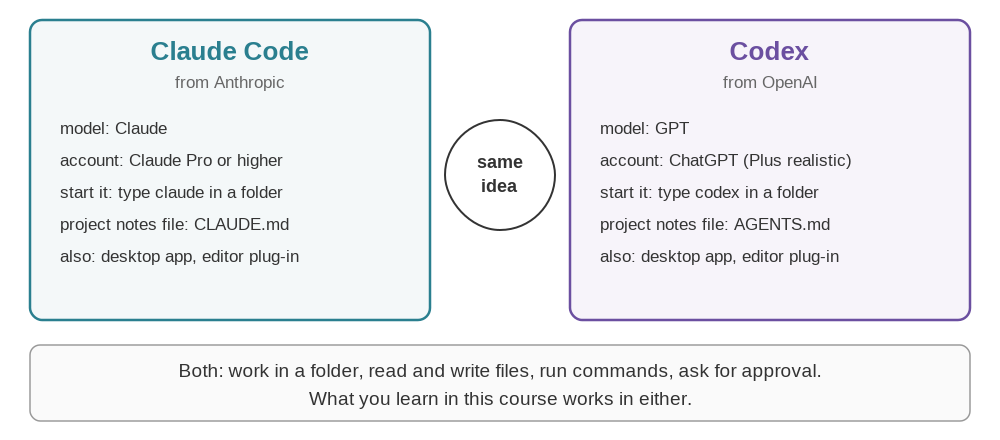
Claude Code and Codex are two versions of the same idea
The course teaches both, and what you learn transfers
Claude Code
Codex
Made by
Anthropic
OpenAI
Start it in a folder
claude
codex
Project notes file
CLAUDE.md
AGENTS.md
Account
Claude Pro or higher (or API billing)
Any ChatGPT plan; Plus or higher is realistic
You can do almost the whole course with one of them. Where they differ, every exercise has a column for each.
Having both helps later: the same task to two agents, or one checking the other (Parallel workers, Part 5).
Skills transfer: describing a task, approving steps, checking results, organising a folder.
Your role shifts from doing every step to describing and judging
Domain expertise matters more, not less
The agent can tell that a script ran. Only you can tell whether the result is right.
The agent says
What only a domain expert notices
“Merged High into high.”
Those plants were under a different lamp.
“Removed 3 outliers above 3 SD.”
The outliers are the responders, the interesting ones.
“Plotted mean expression per group.”
This assay needs a log scale; the mean hides everything.
“Summarised the survey: students liked the course.”
The question was worded so that most answered yes.
“Converted all doses to mg.”
Two papers report mg/kg; the conversion is wrong.
Describing the task well is a skill you can learn
Vague: > Make a nice plot of my data.
Better:  > Plot mean seedling height (mm) per light treatment over days,
           with ± 1 standard error. Use R and ggplot2, save the script as
           plot_growth.R. There should be exactly three treatments. If the
           data disagree, stop and tell me before changing anything.
The better prompt says what, how, what the result should look like, and when to stop and ask.
First delegations gives you practice; Delegating well (Part 2) makes it systematic.
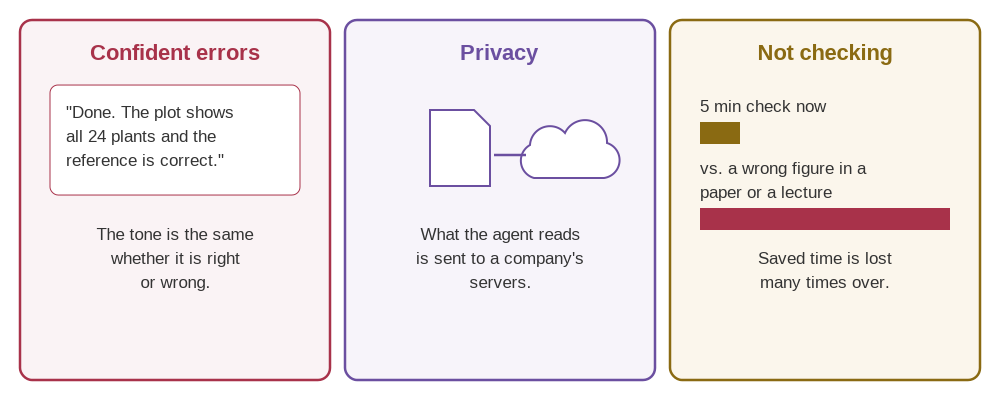
Where this goes wrong
Confident errors: invented references, silent shortcuts, a “Done” when it is not done.
Privacy: whatever the agent reads goes to the provider’s servers.
Cost of not checking: a wrong figure in a lecture or a paper costs far more than the minutes you saved.
Until the privacy unit, use only example data
Everything in Part 1 uses synthetic or public example data, supplied by the course.
Do not point an agent at your home folder, your email, or a folder with student or patient data.
Work in a dedicated project folder, ideally on a copy of the files.
Privacy, ethics and safety (end of Part 1) covers what may be sent, GDPR, university rules and AI disclosure. Only then do you choose your own project.
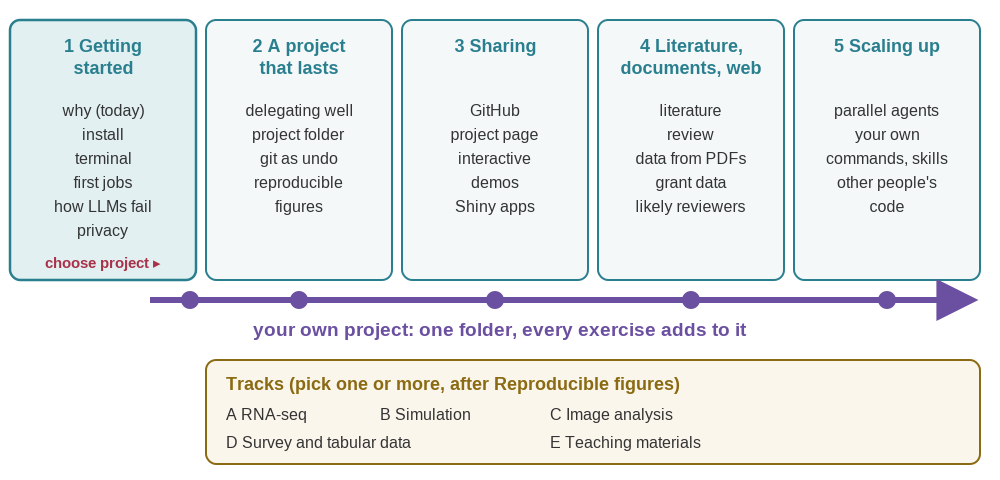
The course has five parts and one project that runs through them
You choose your own project at the end of Part 1
There is no capstone. Instead, one own project runs through every exercise from Part 2 on.
Each exercise has a worked example on shared data and an on your own project part.
Good projects: a course page, a reproducible analysis, a literature map, a cleaned dataset for deposit.
No idea yet? There is a list of example projects. You may also switch later.
Today’s second exercise task, sorting your own chores, is the first step towards choosing.
Today’s exercise: watch an agent work, then sort your own chores
Read an annotated agent session (no installation needed). The agent turns seedlings.csv into a plot, makes a mistake, notices it and asks for permission. Answer: where did it read files, where did it ask, what did it check, and what would you check?
List five chores from your own job and place them on the grid: how easy is the result to check, and how sensitive is the data?
You keep: your annotated answers and your chore grid. You need the grid at the end of Part 1.
Summary
Concept
Key fact
Chat window
Gives you text; you copy, paste, run and debug. It never sees your files.
Coding agent
A language model that works in a folder on your computer: reads, writes, runs, checks.
What you get
Ordinary files you keep: scripts, figures, tables, pages. Rerun instead of re-ask.
The loop
Goal → plan → act with tools → look at the result → repeat → report.
Permission prompts
The agent asks before steps outside the limits you set. Read them; you can say no.
Summary (continued)
Concept
Key fact
Claude Code / Codex
Two similar tools (Anthropic / OpenAI). The course teaches both; skills transfer.
Your role
Describe the task, judge the result. Domain expertise matters more, not less.
Limits
Confident errors, privacy, and the cost of not checking. Example data only until the privacy unit.
Own project
Chosen at the end of Part 1; runs through every later exercise.
Next (Accounts and installation): get a Claude or ChatGPT account that includes the agent, install Claude Code and/or Codex, and say hello to it in a terminal.