Day 11 used Burn — a tensor framework that hides the GPU
Today we go one level lower: WGSL compute shaders dispatched by hand with wgpu
Several exercises revisit problems from earlier days (GC content, reverse complement, pairwise distances) as raw GPU kernels — so you can compare side by side
A GPU in one picture
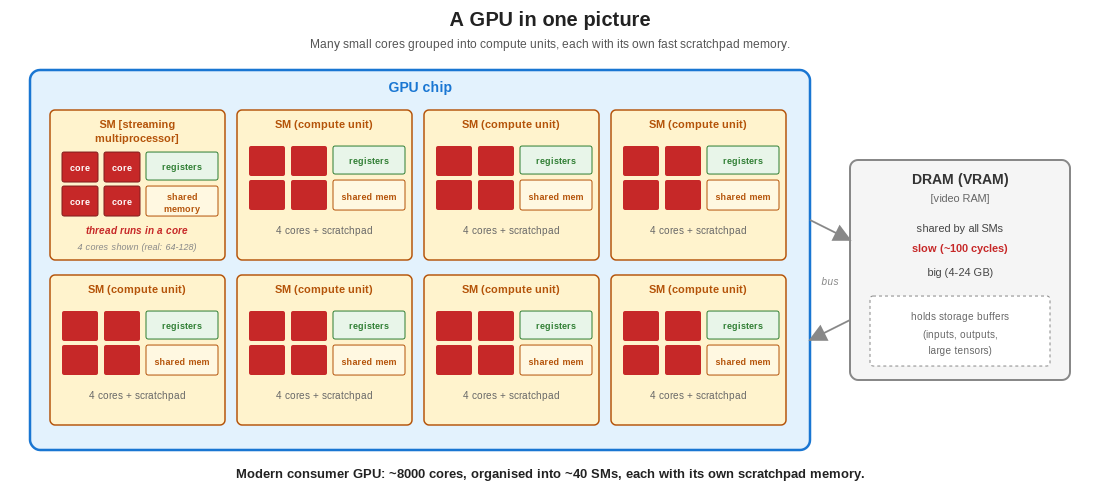
A GPU is a grid of small cores grouped into compute units, each with a tiny fast scratchpad; everything shares a large but slow VRAM.
A GPU is essentially a chip of thousands of small cores [ALUs that do one floating-point op per cycle]
Cores are grouped into SMs [streaming multiprocessors, also called “compute units”] — each SM has its own register file [per-thread fast storage] and shared memory [per-workgroup scratchpad, ~100x faster than VRAM]
A separate, much larger VRAM [video RAM] is shared by all SMs but is far slower
Why workgroups and queues exist
Workgroups = groups of threads that share fast on-chip memory and can synchronise with each other; they map to one SM
Queues [serial streams of commands from CPU to GPU] = the CPU posts uploads, dispatches and copies; the GPU pulls work off the queue when it’s ready
Why this shape? GPUs are massively parallel — you can’t tell each thread what to do one at a time, so you describe work in batches (one dispatch = one batch); and you can’t easily synchronise between batches without going back to the CPU
Why bother — Burn already works
Two reasons:
Granularity. If your problem isn’t naturally a tensor op (matmul, conv, attention) but rather “for each byte of this 4 GB DNA buffer, do X, atomically count Y”, a hand-written shader is the natural fit.
Understanding. Knowing what Burn does under the hood — kernels, workgroups, buffer transfers — turns “the GPU is faster” from magic into something you can debug and optimise.
In production most bioinformatics GPU code uses a high-level framework (PyTorch, Burn, JAX). But under the hood that framework eventually translates to exactly the same 6-step pipeline you’re going to write today.
WebGPU and the wgpu crate
WebGPU [a cross-vendor GPU standard published by the W3C; modern replacement for OpenGL/WebGL for compute] runs on Vulkan, Metal, and DX12. wgpu is the pure-Rust implementation.
Platform
Backend wgpu uses
Linux + NVIDIA / AMD / Intel GPU
Vulkan
macOS / iOS
Metal
Windows + GPU
DX12 (or Vulkan)
Browser
WebGPU directly (compiles to WASM)
No GPU
software fallback (slow)
One Rust + WGSL codebase, all of the above.
The 6-step compute pipeline
Every wgpu compute program has these six steps. Memorise the shape — every exercise today walks through them.
Instance → Adapter — pick a physical GPU
Device + Queue — logical handles for resources and commands
Buffers — GPU memory for inputs, outputs, scratch
ShaderModule + ComputePipeline — compile and ready the shader
BindGroup — bind buffers to shader bindings
CommandEncoder + dispatch + queue.submit — run, then read back
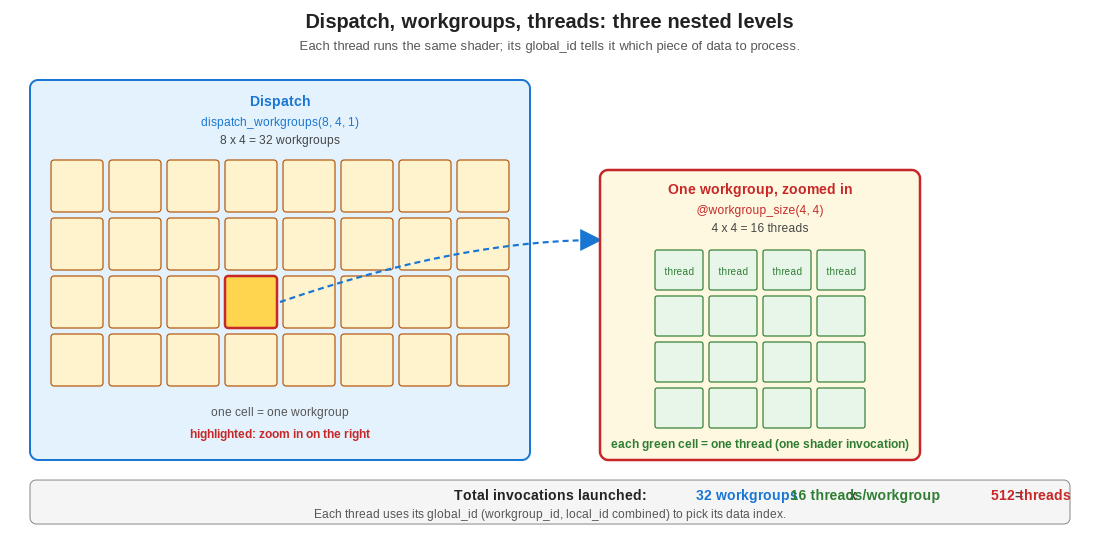
Dispatch launches a grid of workgroups; each workgroup runs a grid of threads. Total threads = workgroups x workgroup_size.
Each thread runs the same shader code; its global_id (workgroup_id combined with local_id) tells it which piece of data to process.
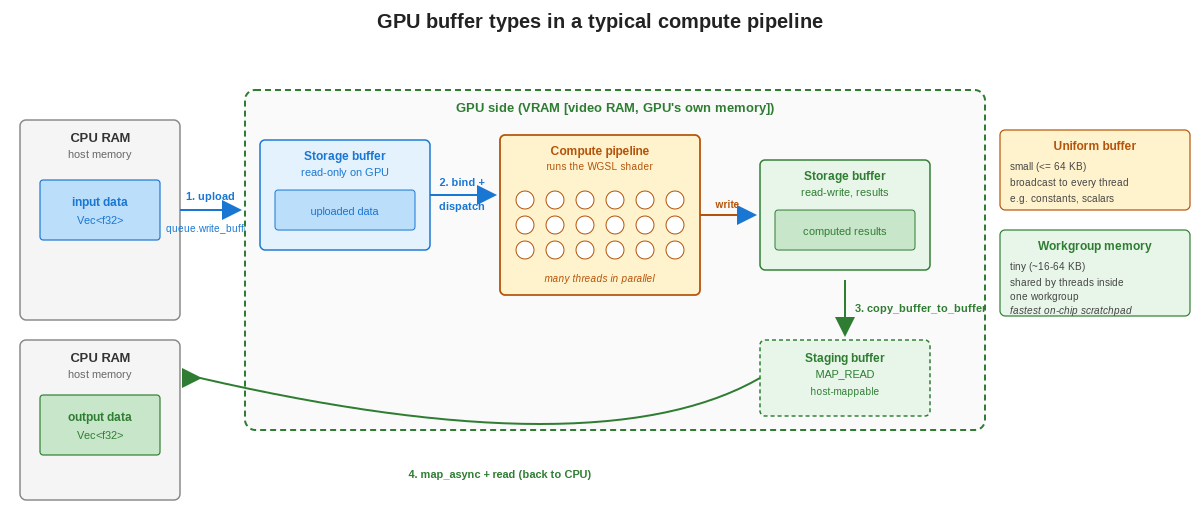
Buffer types — a cheatsheet
Kind
Rust BufferUsages
WGSL
Use for
Storage (input)
STORAGE \| COPY_DST
var<storage, read>
inputs uploaded once, read by many threads
Storage (output)
STORAGE \| COPY_SRC
var<storage, read_write>
outputs written by threads, copied back to host
Uniform
UNIFORM \| COPY_DST
var<uniform>
small constants (~64 KB), broadcast to every thread
Staging
MAP_READ \| COPY_DST
(host-only)
host-readable buffer, target of the read-back copy
Data flows CPU -> storage buffer -> compute pipeline -> results storage -> staging -> CPU; uniform and workgroup memories sit beside the pipeline.
Reading results back — the four lines
// 1. After dispatch, copy the on-GPU output into a host-mappable staging buffer.encoder.copy_buffer_to_buffer(&output,0,&staging,0, byte_size);queue.submit([encoder.finish()]);// 2. Map the staging buffer for reading.let slice = staging.slice(..);slice.map_async(wgpu::MapMode::Read,|_|{});// 3. Drive the map to completion.device.poll(wgpu::PollType::wait_indefinitely()).unwrap();// 4. Read the bytes; transmute to your element type.let data = slice.get_mapped_range();let result:Vec<f32>=bytemuck::cast_slice(&data).to_vec();staging.unmap();
Atomics — when you have a single counter
@group(0) @binding(0) var<storage, read>       seq: array<u32>;   // packed bytes
@group(0) @binding(1) var<storage, read_write> count: atomic<u32>;

@compute @workgroup_size(64)
fn main(@builtin(global_invocation_id) gid: vec3<u32>) {
    let i = gid.x;
    if (i >= arrayLength(&seq)) { return; }
    let b = seq[i];
    if (b == 0x47u || b == 0x43u) {                  // 'G' or 'C'
        atomicAdd(&count, 1u);
    }
}
atomic<u32> + atomicAdd — race-free updates.
Slow under heavy contention — every increment serialises at the atomic unit.
For large reductions, prefer the workgroup-tree reduction pattern (exercise 5) — orders of magnitude faster.
Workgroup shared memory + parallel reduction
var<workgroup> partial: array<f32, 64>;

@compute @workgroup_size(64)
fn main(
    @builtin(global_invocation_id) gid: vec3<u32>,
    @builtin(local_invocation_id)  lid: vec3<u32>,
    @builtin(workgroup_id)         wid: vec3<u32>,
) {
    let i = gid.x;
    partial[lid.x] = select(0.0, x[i], i < arrayLength(&x));
    workgroupBarrier();

    // tree reduction within the workgroup
    var stride = 32u;
    loop {
        if (stride == 0u) { break; }
        if (lid.x < stride) { partial[lid.x] = partial[lid.x] + partial[lid.x + stride]; }
        workgroupBarrier();
        stride = stride / 2u;
    }

    if (lid.x == 0u) { partial_sums[wid.x] = partial[0]; }
}
Each workgroup produces one partial sum; the host (or a second pass) reduces those. Exercise 5 is this.
Today’s exercises — six kernels, three revisits
#
Kernel
Revisits
1
Vector add
— (the hello-world)
2
SAXPY (c = a·x + y)
— (uniforms)
3
GC content on the GPU
day 1 / day 5
4
Reverse complement on the GPU
day 2
5
Parallel reduction (sum)
— (shared memory)
6
Pairwise distance matrix
day 11 exercise 4
For 3, 4, 6 — compare your wgpu version against the earlier CPU (or Burn) version. The GPU code is longer and harder to get right. At small N the CPU wins; at large N the GPU pulls away.
When to reach for wgpu vs Burn
Task
Reach for
Train a neural network
Burn — autodiff, optimisers, layers
Matrix multiply, conv, attention, FFT
Burn — battle-tested kernels
One custom byte-level kernel
wgpu — write it once, dispatch directly
Histogram with atomics
wgpu
Reading existing wgpu code
well, you’re reading it
Embedded / browser / no GPU drivers installed
wgpu — runs in WebAssembly
In production they often coexist: Burn for the bulk of the model, raw wgpu shaders for custom kernels Burn doesn’t ship.
Recap
wgpu is the Rust implementation of WebGPU — cross-vendor, runs on Vulkan / Metal / DX12 / browser.
Every compute program has the same 6 steps: adapter → device → buffers → pipeline → bind group → dispatch.
Shaders are written in WGSL — small, type-safe, Rust-ish.
Threads are organised into workgroups; you dispatch enough workgroups to cover your data and bounds-check inside.
Atomics for counters; workgroup shared memory + tree reduction for fast sums.
Day 11’s Burn does all of this under the hood — today you saw it directly.