Numbers and bits — binary, hex, and bitwise operations
Day 13, lecture 1
Rust for bioinformaticians
What this lecture is
Today we step under the floats and ints and look at what the machine actually stores: bits [single binary digits, 0 or 1]
We learn three ways to write the same number — decimal, binary, hex [hexadecimal, base 16]
We learn the handful of bitwise operations that act on individual bits: AND, OR, XOR, NOT, shifts, popcount [count of 1-bits in an integer]
Tomorrow’s lec2 spends these tools on DNA: 2-bit encoding, k-mers, single-cell barcodes
Three bases for one number
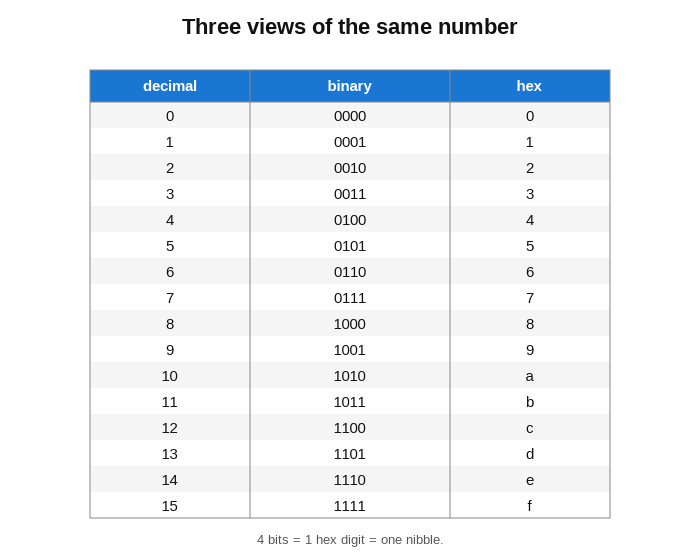
The number “thirteen” can be written three ways. The number does not change; the display does.
Decimal (base 10) — 13 — digits 0..9
Binary (base 2) — 1101 — digits 0..1
Hex (base 16) — 0xd — digits 0..9, a..f
The machine always stores binary. Humans read decimal. Programmers reach for hex when they need to see the bits clearly without writing 64 zeros and ones in a row.
Decimal 0-15 alongside the same numbers in binary and hex; every hex digit corresponds to exactly four binary digits.
Binary — positional notation
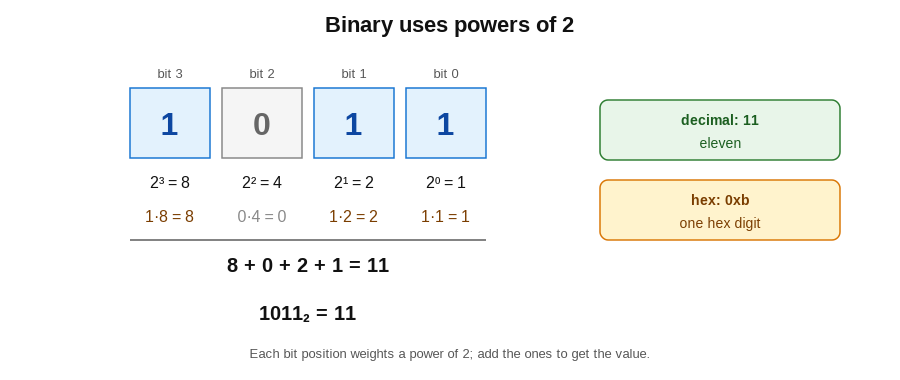
The rules are identical to decimal: each digit is multiplied by a power of the base, and the powers grow from right to left. In binary the base is 2, so the place-values are ..., 8, 4, 2, 1.
   1   0   1   1₂
 · 8 · 4 · 2 · 1
   8 + 0 + 2 + 1   =   11₁₀
So 1011₂ = 11₁₀. No new ideas — the only difference from decimal arithmetic is which multipliers you write under the digits.
1011 in binary expanded as 1·8 + 0·4 + 1·2 + 1·1 = 11, with each digit annotated by its positional weight.
Hex — a compact view of binary
Every hex digit packs exactly four binary digits. That is the whole rule.
binary:   1111_1111
hex:      f    f       →  0xff  =  255₁₀
So 0xff is one byte. 0xffff is two bytes. 0xffff_ffff is a 32-bit u32 with every bit set. Reading hex is faster than reading 32 ones — and unlike decimal, you can convert hex to binary in your head one digit at a time.
The Rust convention is 0x prefix for hex, 0b prefix for binary, no prefix for decimal: 0xff == 0b1111_1111 == 255.
Why three bases at all
Different jobs, different bases:
Binary — what the machine runs on; you read it when you care about individual bits (flags, masks, packed DNA).
Decimal — what humans think in; you read it when you care about magnitude.
Hex — what programmers read when looking at raw memory, addresses, byte patterns; the compromise.
Rust supports all three as literals: 0b1010_1010, 170, 0xaa are the same number. The _ is ignored — it’s just visual grouping.
Converting decimal → binary
Algorithm: divide by 2 repeatedly; write down each remainder; read them bottom-up.
This is the same algorithm you’d use to convert any number to any base; for base 2 the “divide” step is especially easy because you only need to ask “odd or even?”.
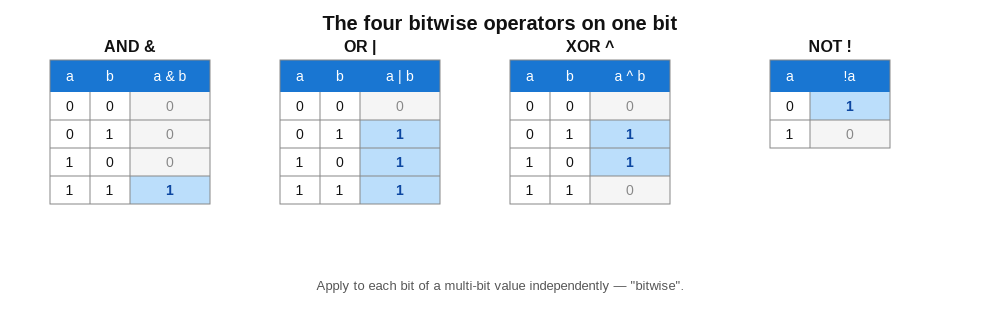
The four primitives. Each acts on a single bit position; on wide integers the same rule applies independently to all 64 (or 32, or 8) positions.
op
Rust
one-bit rule
AND
a & b
1 if both inputs are 1
OR
a \| b
1 if either input is 1
XOR
a ^ b
1 if inputs differ
NOT
!a
flip every bit (bitwise complement [each 0 becomes 1, each 1 becomes 0])
Truth tables for AND, OR, and XOR over all four one-bit input combinations; NOT shown as a single column.
On whole integers, position by position
let a:u8=0b1100;let b:u8=0b1010;assert_eq!(a & b,0b1000);// AND: only the leftmost bit is on in bothassert_eq!(a | b,0b1110);// OR : bits set in either inputassert_eq!(a ^ b,0b0110);// XOR: bits that differassert_eq!(!a,0b1111_0011);// NOT: flip all 8 bits of the u8
Two facts about XOR that we will use over and over: x ^ x == 0 and x ^ 0 == x. Combined, this makes XOR the “differ-mask” operator — a ^ b has a 1-bit exactly where a and b differ.
Shifts — multiply and divide by 2
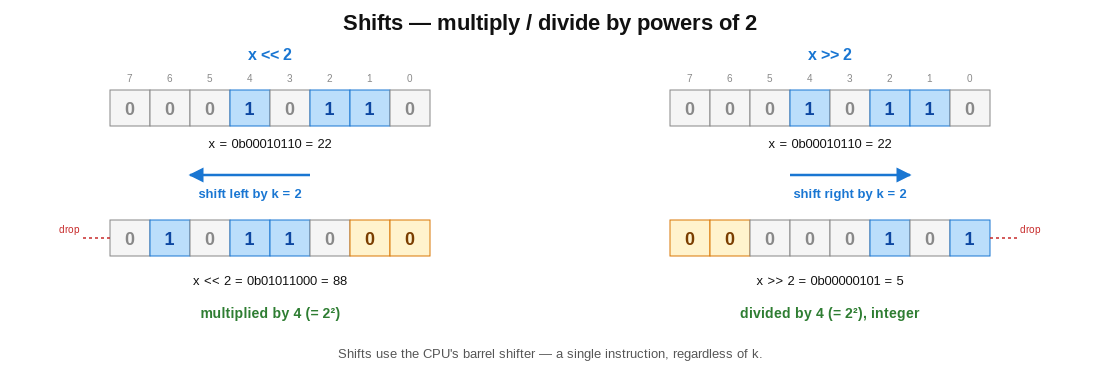
x << k shifts every bit k places to the left (zeros come in from the right). This multiplies by 2^k. x >> k shifts to the right; for unsigned types this divides by 2^k, rounding down.
Bits of 0000_1011 shifted left by 2 to give 0010_1100, and shifted right by 1 to give 0000_0101; new positions filled with zeros.
For signed types >> is an arithmetic shift right [the sign bit is copied into the new high bits, preserving the sign]; for unsigned it is a logical shift right [zeros come in from the top]. Bit-twiddling DNA code always uses unsigned integers (u8, u32, u64), so we never hit the signed case.
Bits as flags — one byte, eight booleans
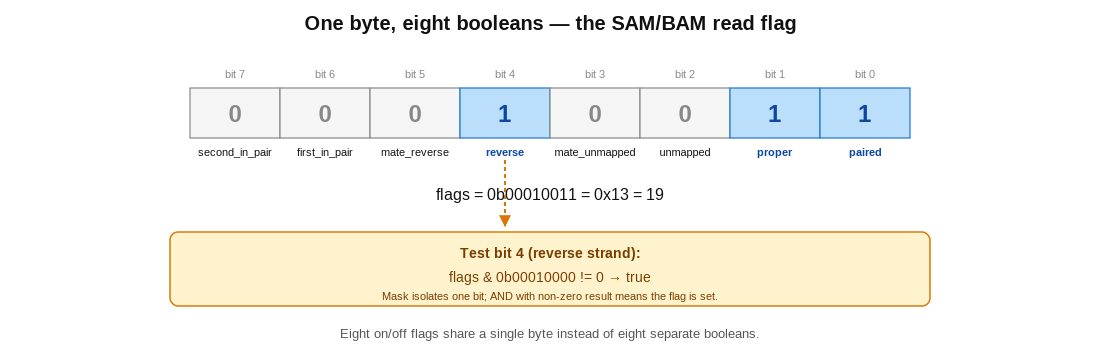
A single byte holds 8 yes/no answers. The classic bioinformatics example is the SAM/BAM FLAG field, which packs about a dozen properties of a sequenced read into one 16-bit integer.
A single byte drawn as eight numbered cells (bit 7 down to bit 0), each labelled with the name of one SAM/BAM read property such as paired, unmapped, reverse, secondary.
Combining: testing, setting, clearing one bit
Three idioms — each is one line. MASK is a value with a single bit set, e.g. 0b0001_0000.
// Test: is the masked bit on?let on = (flags & MASK) !=0;// Set: force the masked bit to 1, leave others alonelet flags2 = flags | MASK;// Clear: force the masked bit to 0, leave others alonelet flags3 = flags &!MASK;// !MASK has all bits set EXCEPT the one we want off
OR sets, AND-with-complement clears, AND tests. Three operators, three jobs.
Popcount — count the 1-bits
The population count (or popcount [number of 1-bits in an integer]) is the headline operation of bit-twiddling. Rust exposes it on every integer type:
let x:u64=0b1101_0110_1010_0011;let n = x.count_ones();// 9
On every x86 CPU since 2008 this compiles to a singlepopcnt instruction — roughly one clock cycle, independent of how many bits are set. ARM, RISC-V, and POWER have equivalents.
DNA has 4 letters: A C G T. Two bits encode four values: 00 01 10 11. So:
One base fits in 2 bits.
A 64-bit integer holds 32 bases — one short k-mer or seed.
Hamming distance between two 32-base sequences is one XOR, one fold-by-OR, one mask, and one count_ones — four CPU instructions regardless of length.
Every fast aligner (BWA, minimap2), every k-mer counter (jellyfish, KMC), every minimizer hash, every single-cell barcode matcher is built on this idea. Lec2 spells out the encoding and the math.
Recap
Three things to remember:
One number, three displays. Decimal for magnitude, binary for individual bits, hex for compact reading. 0b1101_0011 == 0xd3 == 211.
Bitwise operators act position-by-position. AND, OR, XOR, NOT, shift left, shift right. XOR is special: a ^ b has a 1 exactly where a and b differ.
u64::count_ones() is one CPU instruction — the foundation of every two-instruction Hamming-distance kernel you will write tomorrow.
To lec2 and the exercises
Next lecture — lec2-dna-2bit-and-barcodes.qmd — apply today’s tools to DNA: 2-bit encoding, packed k-mers, Hamming distance with XOR and popcount, single-cell barcode whitelist matching.
Exercise 1 — 01-numbers-and-bits.qmd — write your own conversion and bitwise-op functions in Rust; verify against format! and built-in operators.
Subsequent exercises (2-5) build the DNA-side machinery on top of today’s primitives.