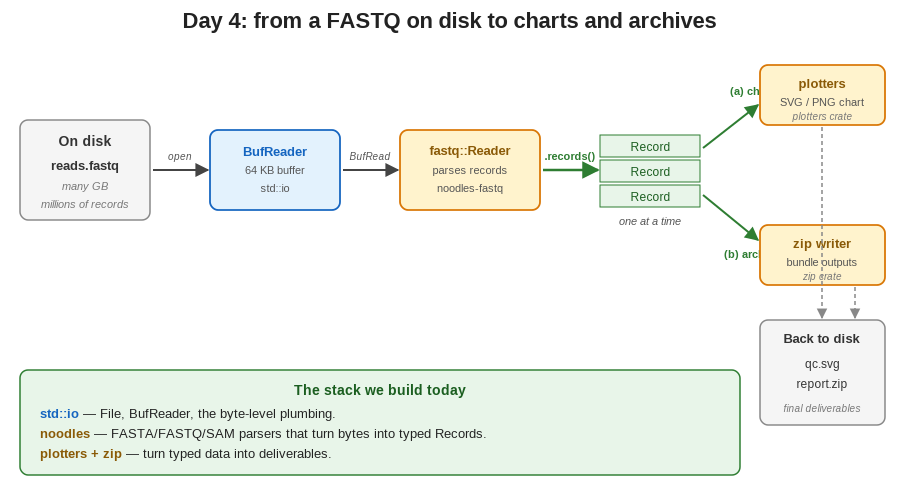
fs::read_to_string reads the entire FASTA into memory as a String. Three lines, done — the first line is the FASTA header >chr1.
There is also fs::read — returns Vec<u8> instead of a String, no UTF-8 (the modern text encoding for any character; ASCII is the older 1-byte-per-character subset) check.
The problem with whole-file reads
A FASTQ file from a single Illumina lane is 5–50 GB compressed.
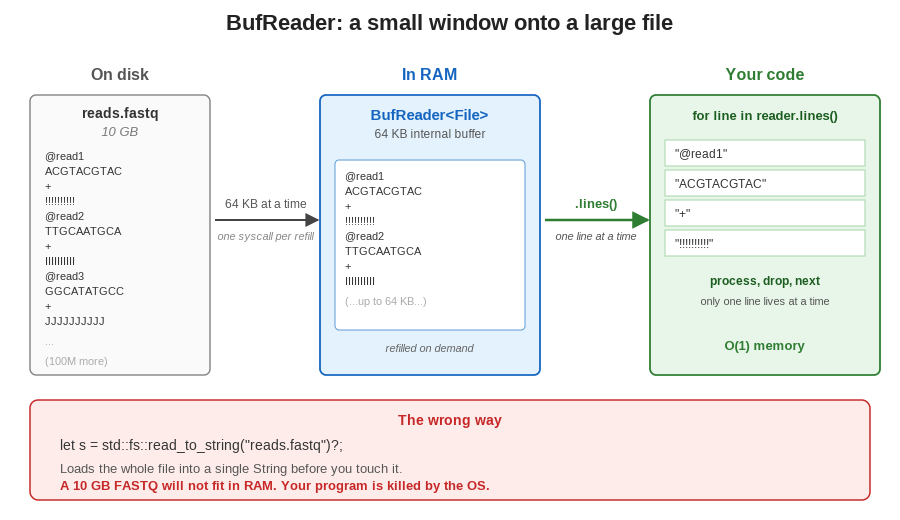
A String of that size will not fit in the RAM of your laptop.
// DON'T do this on a real FASTQlet everything =fs::read_to_string("big.fastq")?;// OOM-killed
We need to stream (process the file piece-by-piece, never holding the whole thing in RAM at once) — load a small piece, process it, drop it, load the next.
BufReader — a small window onto a large file
A buffer here is a small fixed-size byte array (~64 KB) that the standard library refills from disk in one syscall.
let file =File::open("reads.fastq")?;// open the filelet reader =BufReader::new(file);// wrap in a 64 KB bufferfor line in reader.lines() {/* one line at a time */}
BufReader visualised
Stream through a 64 KB window; file size no longer matters.
The four I/O traits you will see today
A trait (shared interface — like Python’s __iter__ lets for work over lists, files, and generators) is a set of method signatures that many types can implement. The standard library defines small traits and every readable thing implements them:
Code that takes a value implementing BufRead works with a file, an in-memory byte string, a gzip stream — anything that implements the trait. We will see the generic syntax (R: BufRead) on a later slide.
File::open and File::create
usestd::fs::File;usestd::io::{BufReader, BufWriter};let input =File::open("sample.fasta")?;// read-onlylet output =File::create("out.tsv")?;// write, truncates if existslet reader =BufReader::new(input);// wrap oncelet writer =BufWriter::new(output);// same for writes
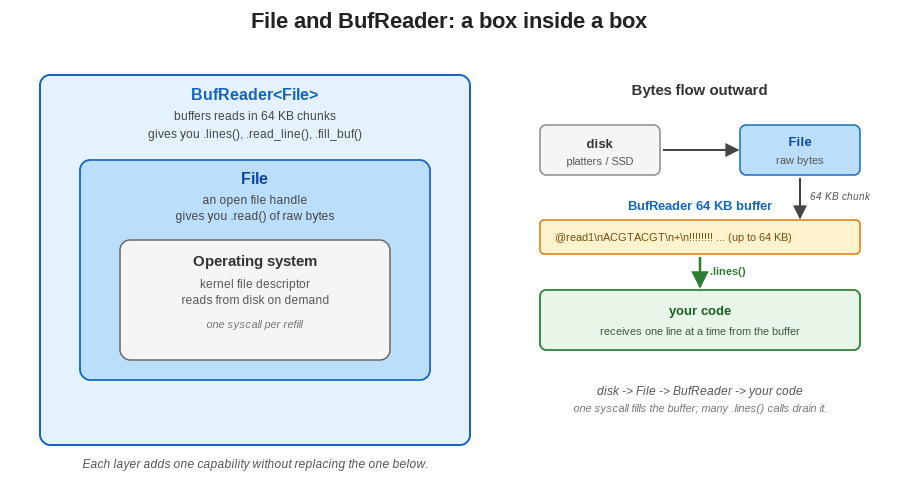
Always wrap a File in BufReader or BufWriter. The unbuffered version makes one syscall per byte.
File wrapped in BufReader
A File provides byte-level access; BufReader wraps it and reads chunks.
Lines, words, bytes — what BufRead gives you
usestd::io::{BufReader,BufRead};let f =File::open("sample.bed")?;let reader =BufReader::new(f);for line in reader.lines() {let line = line?;// Result<String, io::Error>let cols:Vec<&str>= line.split('\t').collect();println!("chrom = {}", cols[0]);}
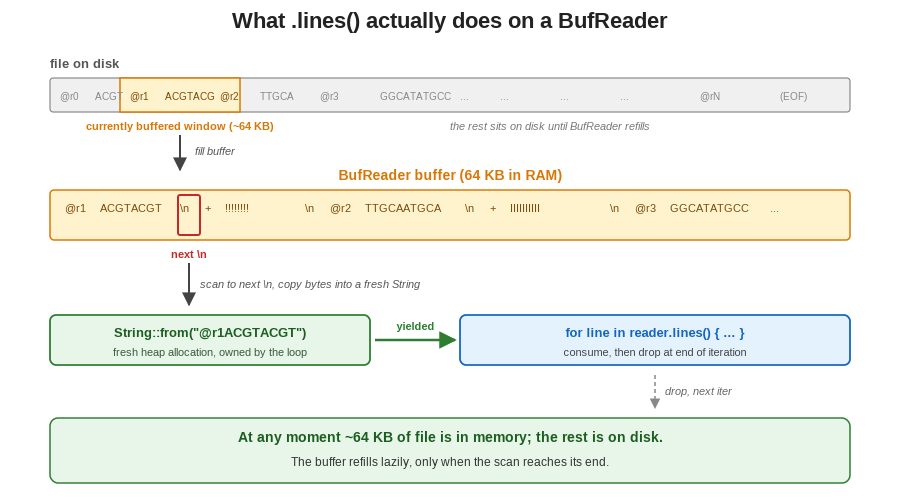
.lines() yields one Result<String> per line, lazily. Use it for BED, TSV, plain FASTA headers.
BufRead visualised
From file bytes to your loop variable: BufRead fills a buffer, splits at newlines, hands you one line at a time.
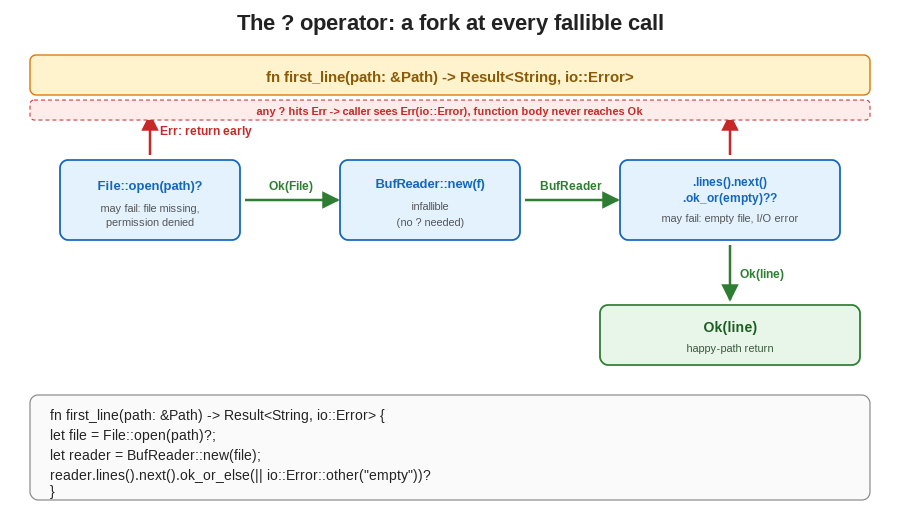
ok_or_else takes a closure (anonymous function — the || ... bit) that builds the error only if the Option is None.
? is a fork at every fallible call
Every ? routes Err out; the happy path reads top to bottom.
Writing files — BufWriter and writeln!
usestd::io::{BufWriter,Write};let out =File::create("contigs.tsv")?;letmut writer =BufWriter::new(out);writeln!(writer,"name\tlength\tgc")?;writeln!(writer,"{}\t{}\t{:.3}", name, length, gc)?;writer.flush()?;// optional: drop also flushes
writeln! is println! but writes to any Write. The trailing ? catches I/O failures.
Where the heavy work goes — external crates
The standard library gives you bytes and lines. Bioinformatics formats are more than bytes:
FASTA / FASTQ — multi-line records, quality scores, line wrapping rules
BAM / VCF — binary, indexed, compressed
Plots — pixels, axes, scales, colours
Archives — zip, tar, gzip
Writing each by hand is a lot of work. We use crates instead.
What [dependencies] actually does
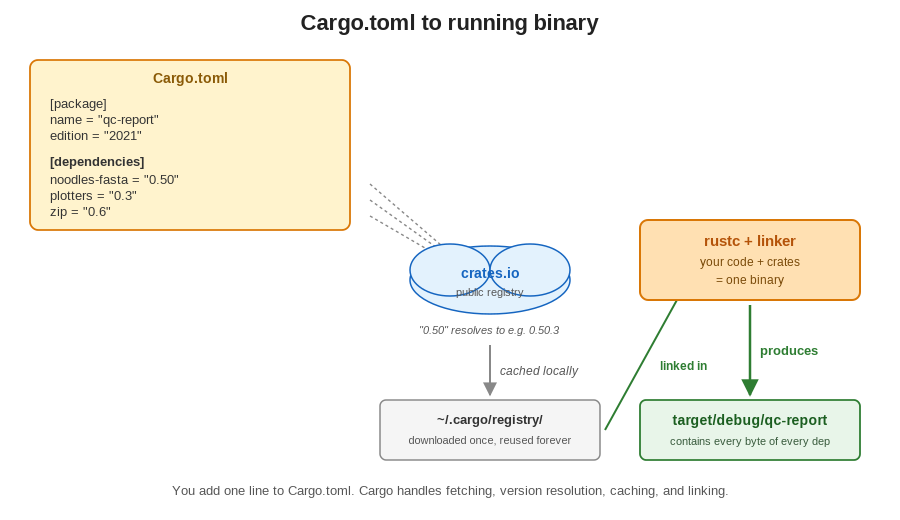
For each line in [dependencies], Cargo:
downloads the dep from crates.io
caches it in ~/.cargo (shared across all your projects)
links it statically into your binary (the single compiled program file)
Cargo.toml to running binary
One line of TOML, and Cargo does the rest — fetch, resolve, cache, link.
A real Cargo.toml for day 4
[package]name="qc-report"edition="2021"[dependencies]noodles-fasta="0.50"noodles-fastq="0.20"plotters="0.3"zip="0.6"serde={ version ="1", features =["derive"] }
One line per crate. Optionally a version, optionally a list of features.
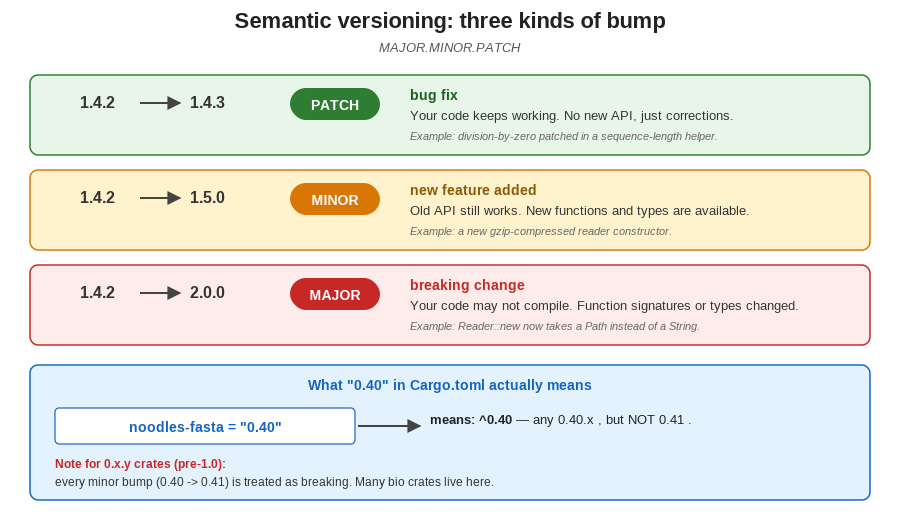
Semver — what "0.50" means
You write
Cargo accepts
Cargo rejects
"0.50"
0.50.0, 0.50.3, 0.50.99
0.51.0, 0.49.0
"1"
1.0.0, 1.5.3, 1.99.0
2.0.0, 0.99.0
"=0.50.1"
exactly 0.50.1
anything else
The exact resolved version goes into Cargo.lock — commit that file for applications.
Semver visualised
Semver: major.minor.patch — break, add, fix.
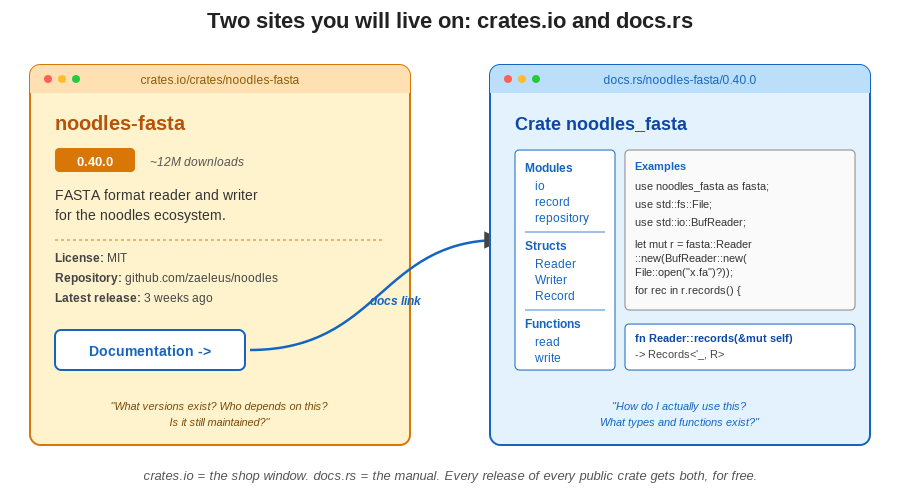
crates.io and docs.rs
crates.io — the public registry. Search, browse, see download counts.
docs.rs — every published crate is auto-documented here.
cargo doc --open — build and view docs for your own deps, offline.
https://docs.rs/noodles-fasta/             -> latest version
https://docs.rs/noodles-fasta/0.50.3/      -> a specific version
crates.io hosts the packages; docs.rs renders the docs.
How to learn a new crate — five steps
Search crates.io. Downloads count is a rough proxy for community trust.
Read the package page. Check license, last-updated date, repository link.
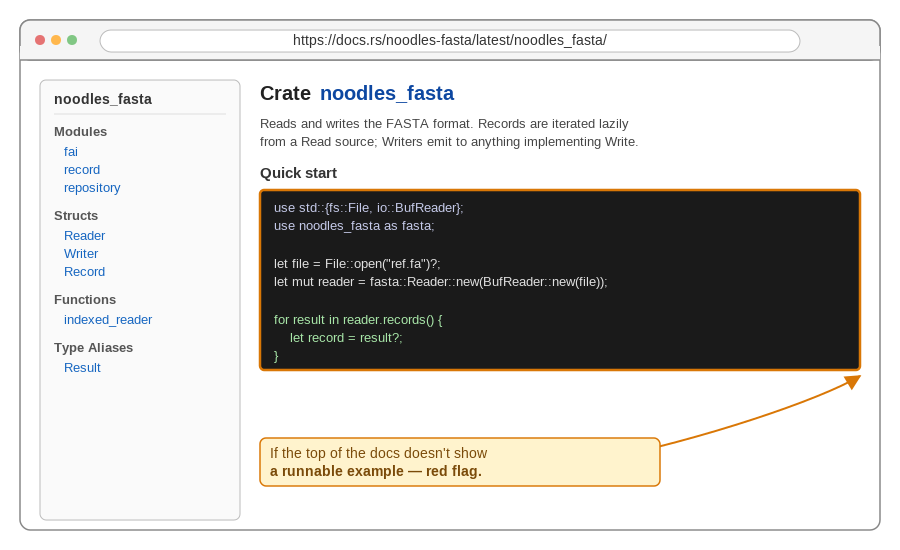
Open docs.rs. Top-of-page module docs usually show a runnable example.
Paste the example into your project. Get the canonical example working before customising.
Add it to Cargo.toml and run cargo build.
A docs.rs landing page
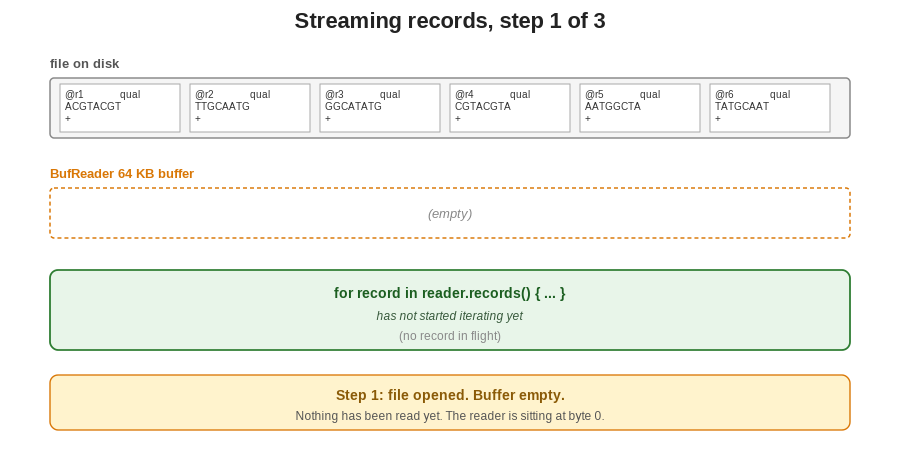
noodles — streaming records, step 1
The reader holds a window into the file; you process one record at a time.
Step 1: open the file, the reader allocates a small buffer.
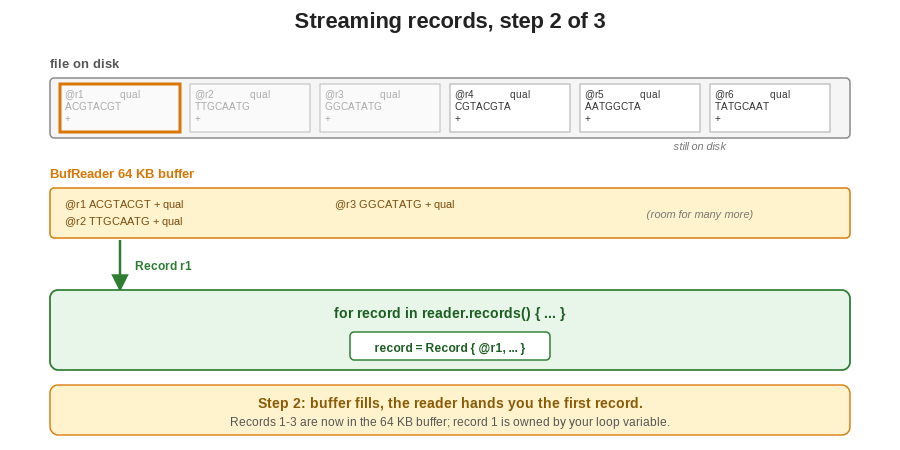
noodles — streaming records, step 2
Step 2: reader fills the buffer with the first record, hands it to you.
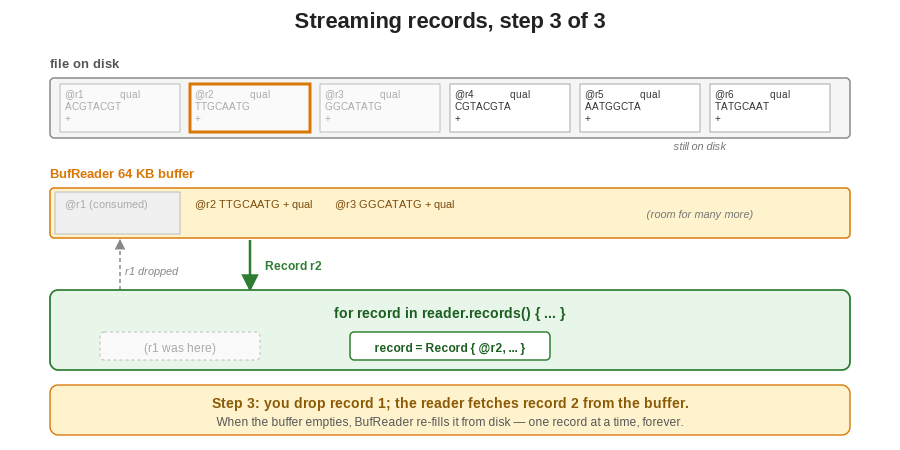
noodles — streaming records, step 3
Step 3: you drop the record, the reader fetches the next.
Memory stays roughly constant — independent of file size.
noodles-fasta in eight lines
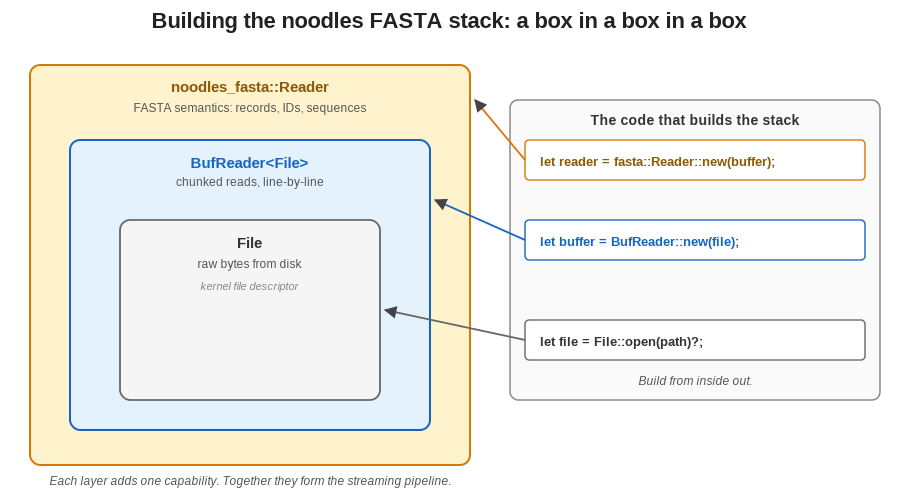
use noodles_fasta as fasta;usestd::fs::File;usestd::io::BufReader;fn count_records(reader: BufReader<File>) ->std::io::Result<usize>{letmut reader =fasta::io::Reader::new(reader);letmut n =0;for result in reader.records() {let _record = result?; n +=1;}Ok(n)}
Layered abstractions: BufReader wraps a File; noodles Reader wraps a BufReader; the records iterator wraps the Reader.
Same function, generic over the reader
A generic function is one that works for any type that meets a stated requirement. The requirement here — R: BufRead — is called a trait bound.
fn count_records<R:BufRead>(reader: R) ->std::io::Result<usize>{letmut reader =fasta::io::Reader::new(reader);letmut n =0;for result in reader.records() {let _record = result?; n +=1;}Ok(n)}
Same body. Now both calls compile:
count_records(BufReader::new(File::open("sample.fa")?))?;// real filecount_records(Cursor::new(b">chr1\nACGT\n>chr2\nTTGCAA\n"))?;// test bytes
Reading a Record — name and sequence
for result in reader.records() {let record = result?;let name:&[u8] = record.name();let seq:&[u8] = record.sequence().as_ref();let length = seq.len();letmut gc_count =0u64;for&base in seq {// &base = give me the byteif base ==b'G'|| base ==b'C'|| base ==b'g'|| base ==b'c'{ gc_count +=1;}}let gc = gc_count asf64/ length asf64;}
Accessors return borrowed slices — no copying.
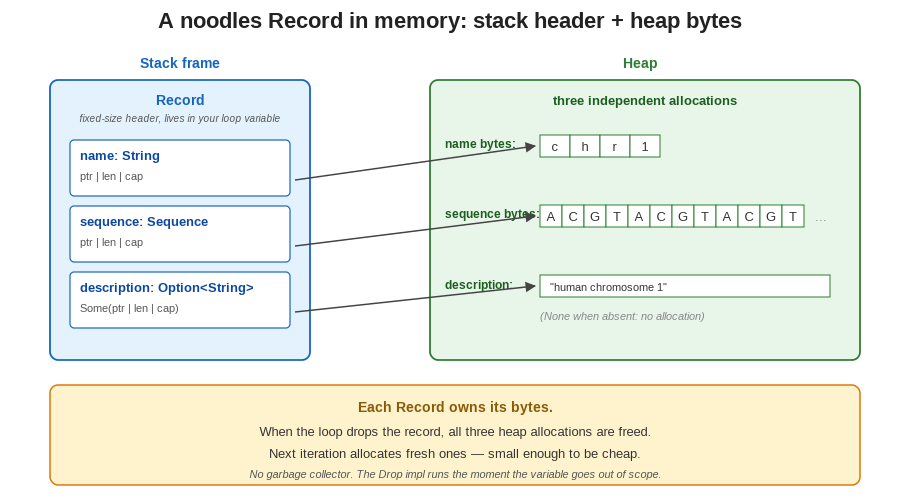
Record in memory
A noodles Record in memory: a struct holding owned String fields for name and sequence.
noodles-fastq — read, filter, write
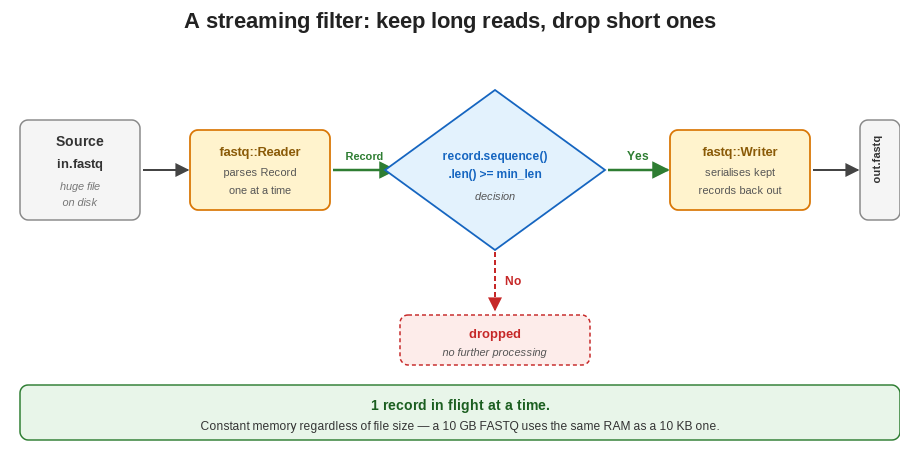
use noodles_fastq as fastq;fn filter<R:BufRead, W:Write>(reader: R, writer: W, min_len:usize)->std::io::Result<(usize,usize)>{letmut reader =fastq::io::Reader::new(reader);letmut writer =fastq::io::Writer::new(writer);let (mut total,mut kept) = (0,0);for result in reader.records() {let record = result?; total +=1;if record.sequence().len() >= min_len { writer.write_record(&record)?; kept +=1;}}Ok((kept, total))}
The filter pipeline
Streaming filter pipeline: reader produces records, filter keeps the good ones, writer emits them.
Modules — splitting one crate across files
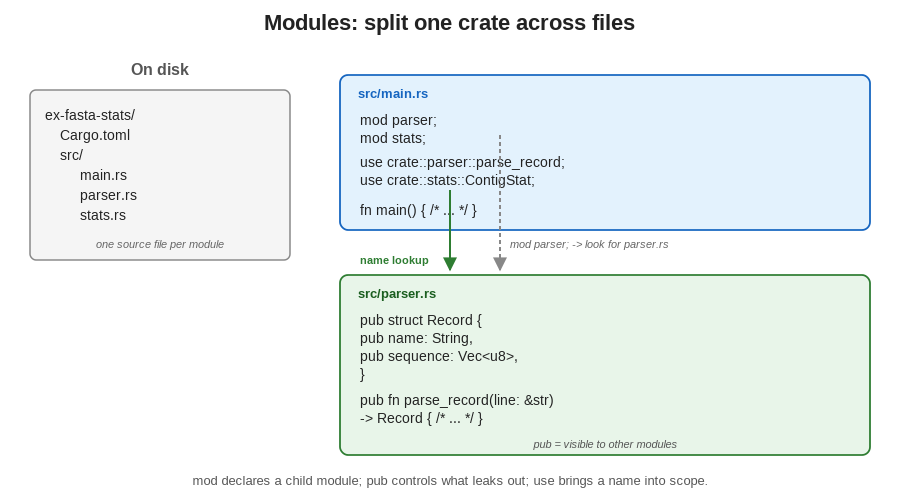
A real project does not live in one main.rs. Three keywords carry the system:
mod declares a child module — mod parser; tells the compiler “look for parser.rs”
pub controls visibility — without pub, items are private to the module
use brings names into scope so you can write parse_record(...) instead of crate::parser::parse_record(...)
Modules visualised
mod declares, pub exposes, use brings names into scope.