An archive is one file that bundles many — e.g. .zip, .tar. Compression (e.g. gzip) is a separate concern, often combined with archiving.
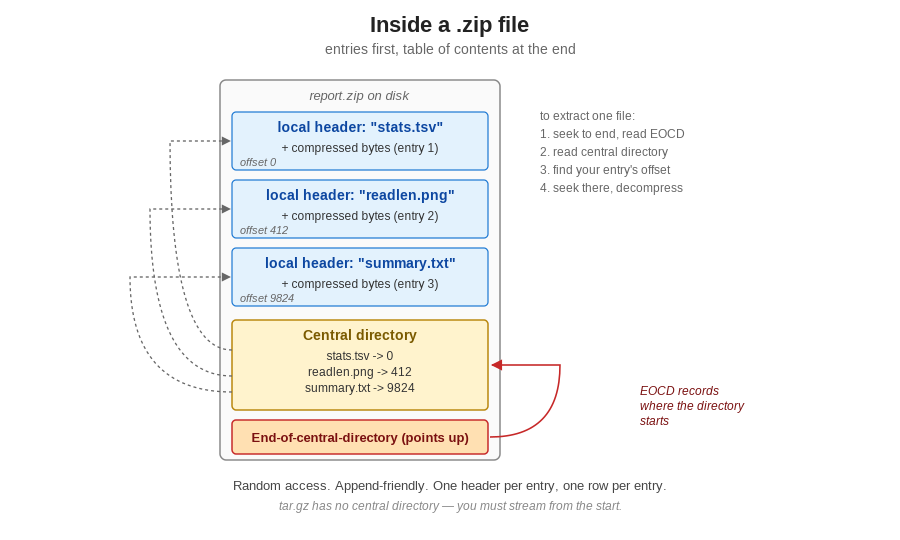
How a .zip file is actually laid out on disk
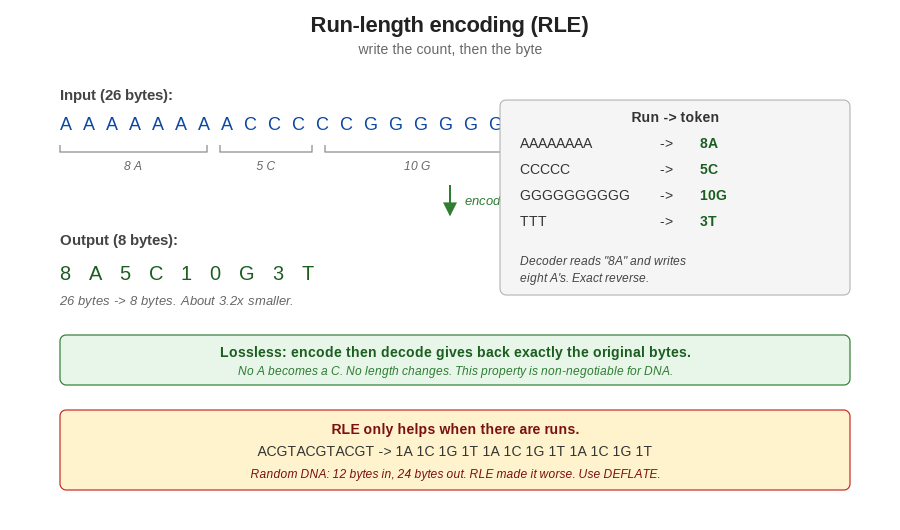
What “lossless compression” means and one tiny example you can do by hand
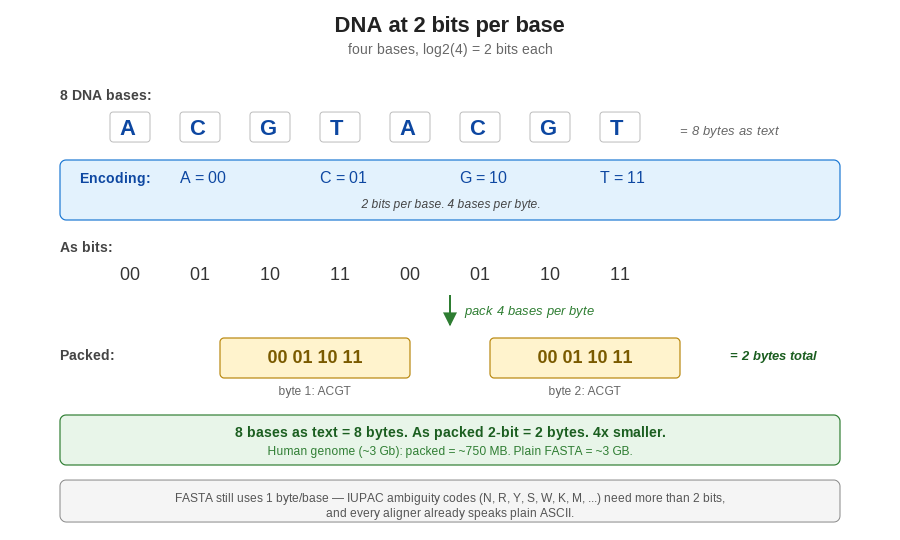
Why DNA can be stored at 2 bits per base, and why FASTA still uses 1 byte
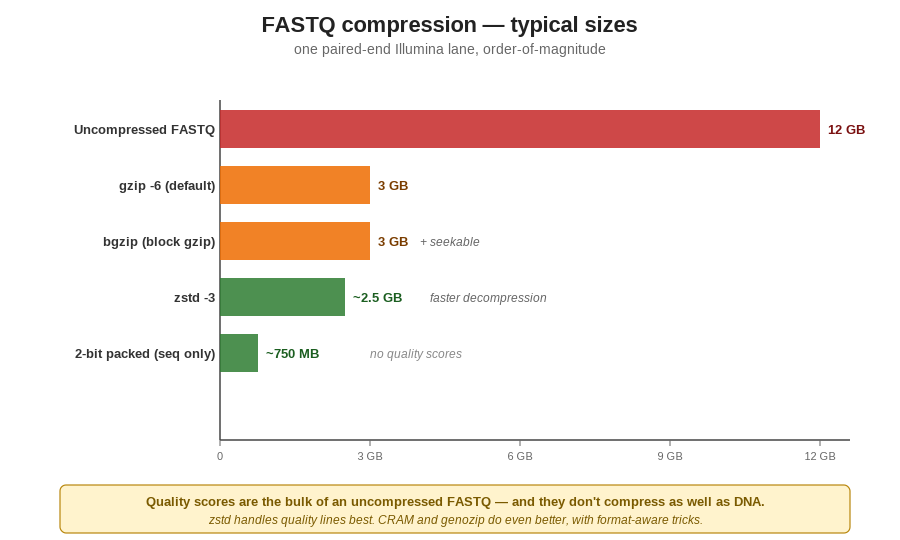
Real numbers for FASTQ compression — gzip, bgzip (block-gzip — seekable gzip used in bioinformatics for BAM/VCF), zstd (Zstandard — modern compressor, often faster and smaller than gzip)
How to read and write .zip and .gz from Rust
What’s inside a ZIP file
A ZIP is a list of entries, with a small table of contents at the end.
Lossless compression — the idea
Lossless = decoded output equals input, byte for byte. Lossy = decoded output is close but not identical (information thrown away).
Two principles every lossless compressor follows:
Common patterns become shorter codes. If the byte A shows up half the time, give it a 1-bit code instead of 8 bits.
The decoder reproduces the original exactly. Byte-for-byte. No approximation.
Lossy compression — and why not for DNA
Lossy compression — JPEG, MP3, MP4 — gives back something close to the original. Throws away detail the eye or ear will not notice. Wonderful for photos, forbidden for DNA:
original: ACCT
decoded : ACGT   <- one base flipped C -> G
One byte changed in a quality-controlled FASTQ = one false variant call downstream. Variant callers cannot tell sequencing error from compressor error.
Run-length encoding — the simplest example
RLE replaces a run of identical bytes with count letter.
Real genomes have long low-complexity regions where RLE does win:
Poly-A tails: hundreds of A’s in a row
Centromeric and telomeric repeats: TTAGGG TTAGGG TTAGGG ...
Simple satellite DNA
General-purpose compressors (gzip, zstd) handle both — they are what you use in practice.
DEFLATE — what zip / gzip actually use
The algorithm inside .zip and .gz is DEFLATE. Two plain-English ideas, each with a fancy name:
find repeats (LZ77) — when a substring already appeared in the recent window, write a back-reference (offset + length) instead of the bytes
give common letters shorter codes (Huffman coding) — frequent bytes get short bit-codes, rare ones longer
When you write Cargo.toml with flate2 = "1", this is the algorithm doing the work.
LZ77 — a worked example
input  : ACGTACGT ACGT ACGT
              ^^^^ ^^^^ this substring already appeared 8 bytes ago

encoded: ACGTACGT <go back 8, copy 4> <go back 8, copy 4>
After the first ACGTACGT, every subsequent occurrence is replaced by a short “go back N, copy M” instruction.
DNA only needs 2 bits per base
Four bases, log2(4) = 2 bits each. 8 bases fit into 2 bytes instead of 8.
2-bit DNA in practice — .2bit files and beyond
IUPAC codes are single letters that stand for ambiguity: R = “A or G”, Y = “C or T”, S = “G or C”, N = “any / unknown”, and so on — 15 codes in total.
The UCSC .2bit format stores the human reference at literally 2 bits per base. It is small (~750 MB for hg38) and supports random access by coordinate.
But FASTA stays at 1 byte per base in practice. Three reasons:
Tools. Every aligner, variant caller, and parser reads FASTA. The ecosystem assumes ASCII.
Ambiguity codes.N, R, Y, S, W, K, M, … — 15 IUPAC codes, more than 2 bits can encode.
“Good enough”. A FASTA.gz is roughly the same size as a 2-bit file (around 3-4x compression) with simpler tooling.
A FASTQ file — what gzip does to it
Typical compression of a paired-end Illumina lane.
Why FASTQ compression matters
Three real costs at scale:
Storage. A sequencing core producing 50 lanes a week saves 450 GB/week by gzipping. Over a year that is 23 TB — real money.
Network. Moving 12 GB across a slow link takes hours. Moving 3 GB takes a quarter as long.
IO bandwidth. A pipeline that streams gzip on the fly often runs as fast as one that reads uncompressed files — the bottleneck is disk read, not CPU.
Disk-read time, 12 GB lane
200 MB/s disk, 300 MB/s gzip decode:
raw 12 GB  : ##############################  ~60 s
gz   3 GB  : ########                        ~15 s  (read + decompress in parallel)
The compressed file is read and decoded in less time than the uncompressed file is read.
Standard practice in bioinformatics: never store uncompressed FASTQ on disk.
Gotcha: you can only hold one entry open at a time — the archive has a single internal cursor.
flate2 — gzip alone, no archive layer
usestd::fs::File;usestd::io::{BufReader, BufWriter,Write};useflate2::write::GzEncoder;useflate2::Compression;let raw =File::create("reads.fastq.gz")?;let buf =BufWriter::new(raw);letmut gz =GzEncoder::new(buf,Compression::default());gz.write_all(b"@read1\nACGT\n+\n!!!!\n")?;gz.finish()?;
.gz is just compressed bytes. .zip is multiple compressed files plus a directory. Use flate2 when you only need single-stream compression — FASTQ.gz, BAM internal compression, …
Picking a format
Format
What it is
Good for
.zip
Multiple files, random access
Bundle outputs for handover
.tar.gz
Multiple files, streamed start-to-end
Source distributions, backups
.gz
Single compressed stream
.fastq.gz, .fa.gz, .vcf.gz
.bgz / bgzip
Like gzip but seekable in 64 KB blocks
Indexed BAM, VCF, tabix
.zst / zstd
Modern, faster, often smaller
Increasingly used in new tools
Choose .zip for bundles. Choose .gz (or .bgz) for single streams. Choose .zst if your toolchain supports it.