Exercise: --release is a 50× free lunch
Goal
Measure how much faster a Rust program runs when compiled with cargo build --release (or cargo run --release) compared to the default debug profile. This is the single most important Rust-specific flag for bioinformatics — debug code is slow, release code is competitive with C.
There is no function to write today. The program is provided and computes a real workload (counting all k-mers across many random sequences); your job is to measure.
Background
cargo build defaults to --debug: minimal optimisations, bounds-check assertions on, fast to compile, slow to run. The output goes to target/debug/. This is what cargo test and cargo run use unless you say otherwise.
cargo build --release enables opt-level = 3 (full LLVM optimisations: vectorisation, inlining, loop unrolling), strips overflow checks, and produces an output in target/release/. Slow to compile, fast to run. On the workloads in this course, expect 10×–100× speedup over debug.
Students who skip this flag and then complain about “Rust being slow” haunt the language’s reputation. Don’t be that student.
The exercise
cd day5/ex-release-modeThe program counts every 7-mer across N random sequences of length 1000 and reports the running time. No coding required — just run it both ways and write down the numbers.
How to run
# Debug build:
time cargo run -- 1000

# Release build:
time cargo run --release -- 1000
Both forms also print their own elapsed time, measured with std::time::Instant, so you don’t need a separate stopwatch.
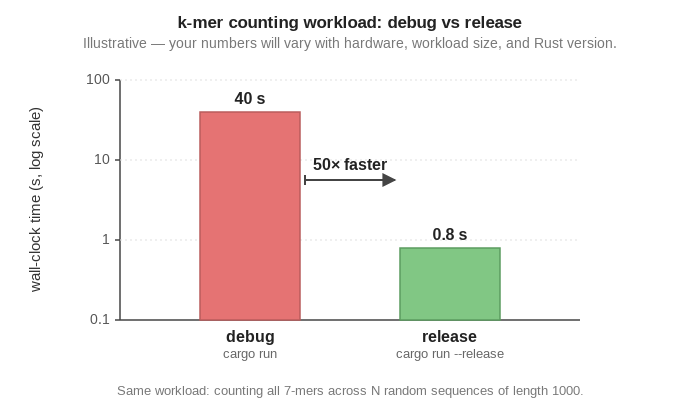
Increase the count (e.g. 1000 → 5000) until the release build takes around 1 second. The debug build will take much longer for the same workload.
What to observe
- Release speedup factor. On a modern laptop you should see at least 20×. Speedups of 50× are normal for tight loops over byte slices.
- Compile time. The first release build is much slower than the first debug build, because LLVM is doing real optimisation work. After that, incremental compiles are similar.
- Output size.
ls -lah target/debug/ex-release-mode target/release/ex-release-mode— debug binaries are usually larger because they include debug info; release binaries are smaller and faster.
What you do NOT need to do
- Add the
#[bench]attribute or use any benchmarking framework today. The simpleInstant::now() ... elapsed()pattern in the provided code is the right tool for “show me the order of magnitude”. For statistically rigorous benchmarks,criterionis the standard choice — but we will not need it.
Where this leads
- The same
--releaseflag underlies every real Rust bioinformatics tool you have heard of. When you publish your own, distribute the release binary. - The other knob worth knowing about: link-time optimisation (LTO). Add
lto = "thin"to your[profile.release]for a few extra percent of speed at the cost of more compile time. - Exercise 03: parallelise the same workload across CPU cores with
rayon.