Exercise: Fetch sequences from the backend
Goal
Wire the frontend to the axum backend that has been running in the background all day. On mount, fetch the list of samples from /api/samples and show one button per record. Clicking a button fetches the full record from /api/samples/{id} and drops its sequence into the textarea, so all the statistics from exercise 2 light up automatically.
This is the first time you will use async/await in this course. We will teach it as a single, narrowly-scoped pattern: “this is how you do a fetch in WASM”. The deep dive into Future, executors, and Tokio is explicitly not in scope today.
Background
A .wasm blob has no threads. It cannot block on a synchronous network call — there is nowhere for it to “wait”. Instead, the browser runs your WASM code in cooperative chunks: every call to await is a yield point where your function pauses, the browser runs other tasks, and your function later resumes when the awaited thing is ready.
wasm_bindgen_futures::spawn_local is the bridge: it takes an async block and hands it to the browser’s event loop. Inside the block, anything ending with .await is fair game.
gloo_net::http::Request is the WASM-side fetch wrapper. The pattern is the same as JavaScript’s fetch().then(r => r.json()), but in Rust:
let resp = Request::get(url).send().await?;
let data: T = resp.json().await?;
Two awaits: one to wait for the HTTP response headers and status; one to wait for the body to be fully received and deserialised by serde_json. The T you deserialise into has to live in the shared crate (or be re-defined identically here) — but we already have SampleSummary and SampleRecord there, ready to use.
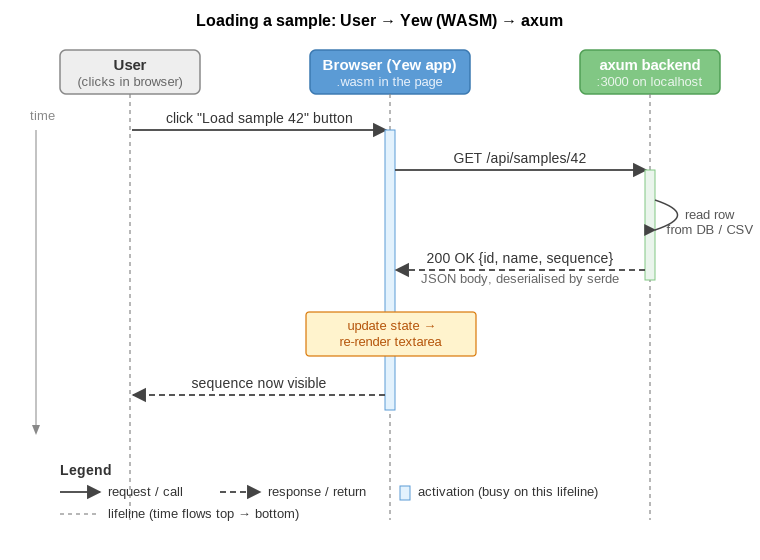
GET /api/samples/42 from inside an async block scheduled by spawn_local. axum looks the record up, returns a JSON body {id, name, sequence}, and the Yew component writes the sequence into the same typed state that the textarea is bound to — so the stats panel from exercise 2 re-renders for free. Open the browser devtools’ Network panel and you should see exactly one row per click, matching the solid request arrow above.
The exercise
cd day6/ex-sequence-inspectorYou are still editing frontend/src/main.rs. Trunk should still be running; the backend should still be running in the other terminal (from exercise 1).
By the end of this exercise, the page should show a list of sample names as buttons; clicking one populates the textarea with the matching DNA and updates the statistics live, plus shows a “Loaded: {name}” panel below the table.
Step by step
Step 2 — add state for the sample list and the selected record
Inside app(), before typed, add two new pieces of state:
let samples = use_state(Vec::<SampleSummary>::new);
let selected = use_state(|| None::<SampleRecord>);
Vec::<SampleSummary>::new is passed as a function (no parentheses) — use_state calls it once to produce the initial value. Same for the closure || None::<SampleRecord> which builds the initial None.
Step 3 — load the sample list on mount
Right after the state declarations, add an effect that runs once when the component first appears on screen:
{
    let samples = samples.clone();
    use_effect_with((), move |_| {
        wasm_bindgen_futures::spawn_local(async move {
            if let Ok(resp) = Request::get("/api/samples").send().await {
                if let Ok(data) = resp.json::<Vec<SampleSummary>>().await {
                    samples.set(data);
                }
            }
        });
        || ()
    });
}
A lot is happening here. Read it bottom-up:
- The outer block
{ ... }exists only to keep this temporarylet samples = samples.clone();out of the surrounding scope. Yew components are full of these tiny scopes. use_effect_with(deps, body)runsbodywheneverdepschange. We pass()so the deps never change — i.e. the body runs exactly once on first render.spawn_localschedules the innerasync move { ... }on the browser’s event loop. The future runs asynchronously while React-style rendering continues.- Inside the async block, the two
if let Ok(...)patterns are a compact way to swallow errors (network failure, bad JSON, …). For a real app you would surface them in the UI; for the course exercise it is enough to display nothing in the failure case. - The
|| ()at the end is the cleanup closure thatuse_effect_withrequires. We have nothing to clean up, so it just returns the unit type.
Step 5 — add the on_pick callback
Below the on_input callback you already have, add on_pick. It takes the sample’s id, fetches the full record, and pushes the sequence into the textarea state:
let on_pick = {
    let selected = selected.clone();
    let typed = typed.clone();
    Callback::from(move |id: String| {
        let selected = selected.clone();
        let typed = typed.clone();
        wasm_bindgen_futures::spawn_local(async move {
            let url = format!("/api/samples/{}", id);
            if let Ok(resp) = Request::get(&url).send().await {
                if let Ok(data) = resp.json::<SampleRecord>().await {
                    typed.set(data.sequence.clone());
                    selected.set(Some(data));
                }
            }
        });
    })
};
The double-clone (let selected = selected.clone(); outside the closure, then again inside) is annoying but necessary: the outer Callback::from itself moves selected once, and then each invocation of the callback needs its own clone to move into the inner async block.
Step 7 — show the loaded record
Below the statistics table in the html! block, add a panel that displays the loaded record (if any):
{
    if let Some(rec) = &*selected {
        html! {
            <>
                <h2>{ format!("Loaded: {}", rec.name) }</h2>
                <div class="sequence">{ &rec.sequence }</div>
            </>
        }
    } else {
        html! {}
    }
}
&*selected dereferences the UseStateHandle<Option<SampleRecord>> and then borrows the inner value. The <></> fragment wraps two siblings (<h2> and <div>) without adding an extra DOM element.
Save. Click a sample. The textarea fills, the stats update, the “Loaded: …” panel appears.
Hints
if let Ok(...) rather than ?
We are inside an async block passed to spawn_local. That block has return type () — there is no place for the ? operator to bail out to. For a teaching example we just nest the success cases. In a real app you would extract the fetch into a function returning Result<T, E> so ? works:
async fn load_samples() -> Result<Vec<SampleSummary>, gloo_net::Error> {
    let resp = Request::get("/api/samples").send().await?;
    let data = resp.json::<Vec<SampleSummary>>().await?;
    Ok(data)
}
…then the spawn_local callsite calls load_samples().await and inspects the Result once.
First place to look: the browser DevTools network panel (F12, “Network” tab). You should see two requests:
/api/samples— fires on page load, returns the JSON list with HTTP 200./api/samples/{id}— fires when you click a button.
If neither fires: trunk is not running, or your on_pick callback was never wired to the button’s onclick. If only the first fires but the second does not, the click handler is wrong.
If a request fires but the response is HTTP 404 or 500: check the backend terminal — axum prints requests as they come in. If the request never reached the backend, your Trunk proxy config is wrong; re-read frontend/Trunk.toml.
Yew’s reactive model copies and clones a lot of small state handles, and the borrow checker takes a while to get used to. Two rules of thumb:
- Clone state handles freely.
UseStateHandle<T>is internally anRc, so.clone()bumps a counter — it is cheap and idiomatic. - The pattern
let x = x.clone();immediately before amoveclosure that needs its ownxis so common it has its own informal name (the “rebinding shuffle”). Embrace it.
Solution
frontend/src/main.rs at the end of this exercise
The fully wired-up version (after exercise 4) is in day6/ex-sequence-inspector-solution/frontend/src/main.rs. The state at the end of this exercise is the same minus the SVG plot block — everything else is in place.
Where this leads
- Exercise 4, the capstone: add an inline SVG plot of GC content over a sliding window. The same
typedstate is the input; the plot updates live for both pasted sequences and fetched samples. - Sharing types via the
sharedcrate is the same pattern you will see in real Rust full-stack stacks like Leptos + axum or Dioxus + axum. The exact crates change; the wire-format argument does not.