Exercise: Reactive sequence statistics
Goal
Make the page interactive. Add a <textarea> where the user can paste DNA, and display the live length, GC content, and per-base counts as they type. Every statistic should update on every keystroke.
The entire computation runs in the browser, in WebAssembly compiled from the same gc_content and base_counts functions you wrote on days 1 and 2. No server round-trip per keystroke. This is exactly what makes a Rust WASM frontend interesting in bioinformatics: you ship one binary and the heavy lifting happens on the user’s machine.
Background
Yew is built around two ideas that React users will recognise immediately:
- Function components: a Rust function decorated with
#[function_component(Name)]that returnsHtml. Re-runs from scratch on every render. - Hooks: functions called inside a component to persist state across renders. The one we need today is
use_state, which returns a handle that the component can read and that you can write to viaset(...).
The pattern for a controlled input — a textarea whose content lives in component state — is the textbook example for both.
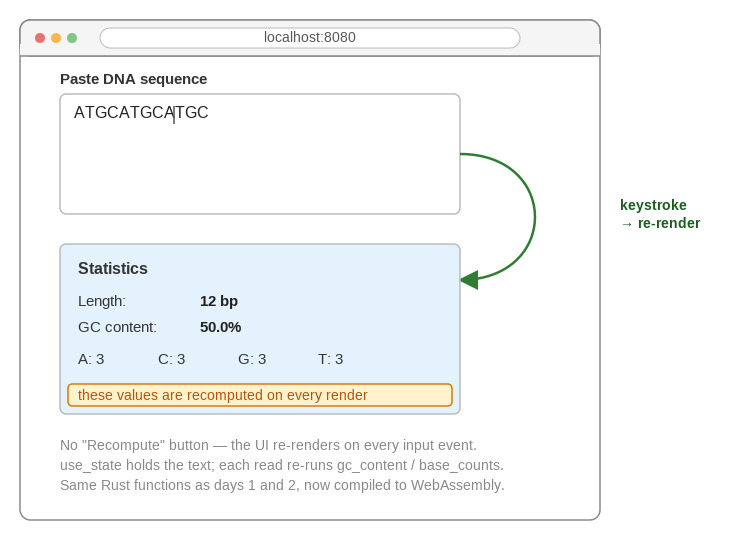
use_state, which causes the component function to re-run, which recomputes gc_content and base_counts from days 1 and 2 and re-renders the stats panel. There is no explicit “Recompute” step — the same pattern as useState / useEffect in React, with the entire reactive loop running inside the WebAssembly bundle.
The exercise
cd day6/ex-sequence-inspectorYou will edit frontend/src/main.rs. Trunk is presumably still running from exercise 1 (otherwise: trunk serve in frontend/). Save after each step and watch the browser.
When you are done, pasting ACGTACGT into the textarea should produce:
GC content | 50.00% |
A | 2 |
C | 2 |
G | 2 |
T | 2 |
other | 0 |
Step by step
Step 1 — add the pure functions
Above the #[function_component(App)] line, add the two functions from days 1 and 2:
fn gc_content(seq: &[u8]) -> f64 {
    if seq.is_empty() {
        return 0.0;
    }
    let gc = seq
        .iter()
        .filter(|&&b| matches!(b, b'G' | b'C' | b'g' | b'c'))
        .count();
    gc as f64 / seq.len() as f64
}

fn base_counts(seq: &[u8]) -> (usize, usize, usize, usize, usize) {
    let mut a = 0usize;
    let mut c = 0usize;
    let mut g = 0usize;
    let mut t = 0usize;
    let mut other = 0usize;
    for &b in seq {
        match b {
            b'A' | b'a' => a += 1,
            b'C' | b'c' => c += 1,
            b'G' | b'g' => g += 1,
            b'T' | b't' => t += 1,
            _ => other += 1,
        }
    }
    (a, c, g, t, other)
}
These are the exact functions from day 1 exercise 1 and day 1 exercise 3 — the WASM target compiles them the same way the native target does.
Step 2 — add the state
Inside the app() function, before the html! macro, declare a piece of state for the textarea content:
let typed = use_state(String::new);use_state(String::new) initialises the state to an empty String on first render. typed is now a UseStateHandle<String>. You can dereference it with *typed to read the current String, and you can write to it with typed.set(new_value).
Step 3 — add a textarea bound to the state
We need two things: the textarea’s value attribute reflects the state, and its oninput callback writes back to the state on every keystroke. Add a callback above the html! macro:
let on_input = {
    let typed = typed.clone();
    Callback::from(move |e: InputEvent| {
        let target = e.target_unchecked_into::<web_sys::HtmlTextAreaElement>();
        typed.set(target.value());
    })
};
Then in the html! block, replace the placeholder paragraphs with a textarea element:
<textarea
    value={(*typed).clone()}
    oninput={on_input}
    placeholder="paste DNA here (ACGT)"
/>
Save the file. Type something into the textarea — visually nothing else changes yet, but the state is now tracking your input.
Step 4 — display the statistics
Still inside app(), just before the html! macro, compute everything that depends on the current text:
let seq_bytes = typed.as_bytes();
let length = seq_bytes.len();
let gc = gc_content(seq_bytes);
let (a, c, g, t, other) = base_counts(seq_bytes);
Then add a table to the html! block, below the textarea:
<h2>{ "Statistics" }</h2>
<table>
    <tr><th>{ "length" }</th><td>{ length }</td></tr>
    <tr><th>{ "GC content" }</th><td>{ format!("{:.2}%", gc * 100.0) }</td></tr>
    <tr><th>{ "A" }</th><td>{ a }</td></tr>
    <tr><th>{ "C" }</th><td>{ c }</td></tr>
    <tr><th>{ "G" }</th><td>{ g }</td></tr>
    <tr><th>{ "T" }</th><td>{ t }</td></tr>
    <tr><th>{ "other" }</th><td>{ other }</td></tr>
</table>
Save. Type into the textarea. The table should update on every keystroke.
Hints
use_state and why .clone() everywhere
use_state returns a UseStateHandle<T>, which is essentially an Rc (reference-counted pointer) under the hood. Cloning it is cheap — it bumps a counter, it does not copy the underlying String.
You clone it before moving it into a closure because the closure outlives the function call (it gets stored inside Yew’s runtime), so it cannot borrow typed from the surrounding scope. The clone is the closure’s own handle to the same shared state.
target_unchecked_into and web-sys
web-sys exposes every DOM type as a Rust struct: HtmlTextAreaElement, HtmlInputElement, Document, and so on. The features in frontend/Cargo.toml decide which types you can use without a compile error — we have enabled HtmlTextAreaElement and HtmlInputElement.
e.target_unchecked_into::<T>() is a Yew helper that does what JavaScript’s event.target as HTMLTextAreaElement does: down-cast the event’s target to a specific DOM type without a runtime check. We promise the compiler the textarea really is a textarea; if we lied, the browser would throw at runtime. For controlled inputs this is always safe.
html!
Every { ... } inside html! is one Rust expression that must produce something Yew can render. That means:
- Numbers (
{ length }) work becauseusizeimplementsToHtml. Stringand&stralso work.- A formatted string is just an expression:
{ format!("{:.2}%", gc * 100.0) }. - If you have a
Vec<Html>you can render it with{ for vec.into_iter() }— we will use this in exercise 3.
Solution
frontend/src/main.rs at the end of this exercise
use yew::prelude::*;

fn gc_content(seq: &[u8]) -> f64 {
    if seq.is_empty() {
        return 0.0;
    }
    let gc = seq
        .iter()
        .filter(|&&b| matches!(b, b'G' | b'C' | b'g' | b'c'))
        .count();
    gc as f64 / seq.len() as f64
}

fn base_counts(seq: &[u8]) -> (usize, usize, usize, usize, usize) {
    let mut a = 0usize;
    let mut c = 0usize;
    let mut g = 0usize;
    let mut t = 0usize;
    let mut other = 0usize;
    for &b in seq {
        match b {
            b'A' | b'a' => a += 1,
            b'C' | b'c' => c += 1,
            b'G' | b'g' => g += 1,
            b'T' | b't' => t += 1,
            _ => other += 1,
        }
    }
    (a, c, g, t, other)
}

#[function_component(App)]
fn app() -> Html {
    let typed = use_state(String::new);

    let on_input = {
        let typed = typed.clone();
        Callback::from(move |e: InputEvent| {
            let target = e.target_unchecked_into::<web_sys::HtmlTextAreaElement>();
            typed.set(target.value());
        })
    };

    let seq_bytes = typed.as_bytes();
    let length = seq_bytes.len();
    let gc = gc_content(seq_bytes);
    let (a, c, g, t, other) = base_counts(seq_bytes);

    html! {
        <div>
            <h1>{ "Sequence inspector" }</h1>

            <textarea
                value={(*typed).clone()}
                oninput={on_input}
                placeholder="paste DNA here (ACGT)"
            />

            <h2>{ "Statistics" }</h2>
            <table>
                <tr><th>{ "length" }</th><td>{ length }</td></tr>
                <tr><th>{ "GC content" }</th><td>{ format!("{:.2}%", gc * 100.0) }</td></tr>
                <tr><th>{ "A" }</th><td>{ a }</td></tr>
                <tr><th>{ "C" }</th><td>{ c }</td></tr>
                <tr><th>{ "G" }</th><td>{ g }</td></tr>
                <tr><th>{ "T" }</th><td>{ t }</td></tr>
                <tr><th>{ "other" }</th><td>{ other }</td></tr>
            </table>
        </div>
    }
}

fn main() {
    yew::Renderer::<App>::new().render();
}
Where this leads
- Exercise 3 — add a list of sample sequences fetched from the backend with
gloo_net::http::Request. This is whereasync/awaitenters the picture. - The capstone in exercise 4 — combine everything plus an inline SVG visualisation of GC content over a sliding window.