Exercise: Your first SQLite database
Goal
Open the sqlite3 CLI, create a strain table, load 10 microbial strains into it from a CSV, and run a handful of SELECT queries. By the end of this exercise you will have used CREATE TABLE, INSERT, SELECT with WHERE, ORDER BY, LIMIT, GROUP BY and COUNT(*) — the parts of SQL you will use ten times a week for the rest of your career.
If you have never written SQL before, this is the right starting point. We do not assume any prior database experience.
If you have not yet installed sqlite3, do that first — see Installing SQLite.
Background
A microbial strain collection is a natural fit for a relational database. We want one row per strain with columns:
| Column | Type | Notes |
|---|---|---|
strain_id |
INTEGER | unique identifier — the primary key |
strain_name |
TEXT | the common laboratory name |
species |
TEXT | binomial name |
isolation_source |
TEXT | where it was originally isolated from |
year_isolated |
INTEGER | year the strain was first described |
The starter ships with 10 strains in data/strains.csv. Take a moment to look at the file — it is plain CSV, header line on top.
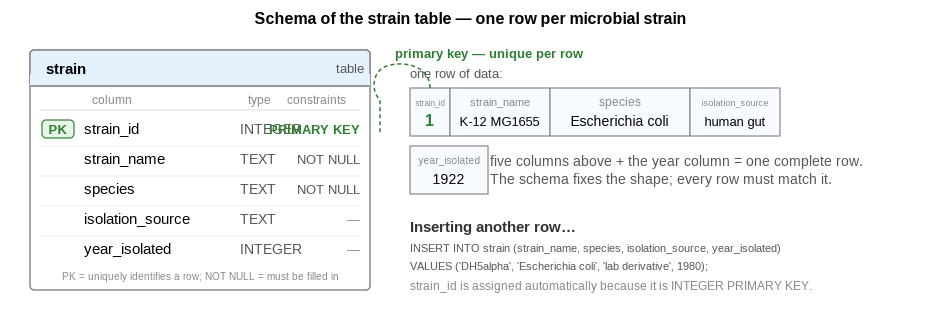
strain table — the column names, types, and which constraints apply. The primary key (strain_id) uniquely identifies each row and is assigned automatically when a row is inserted. The card on the right shows what one actual row looks like once that schema is filled in.
The exercise
cd day7/ex-sqlite-strains
sqlite3 strains.db
sqlite3 opens (creating strains.db because it does not exist yet) and gives you a sqlite> prompt. Everything below happens at that prompt unless noted.
Step 1 — settings
Set two display options so output is actually readable:
.headers on
.mode column
These are dot-commands (no leading SELECT, no trailing ;) interpreted by the CLI itself — see sqlite3 docs.
Step 2 — create the table
Run the CREATE TABLE statement from the Background table above. The syntax:
CREATE TABLE strain (
    strain_id        INTEGER PRIMARY KEY,
    strain_name      TEXT    NOT NULL,
    species          TEXT    NOT NULL,
    isolation_source TEXT,
    year_isolated    INTEGER
);
Then verify with two dot-commands:
.tables          -- lists table names; should show "strain"
.schema strain   -- shows the CREATE TABLE you just ran
Step 3 — insert one row by hand
INSERT INTO strain (strain_name, species, isolation_source, year_isolated)
VALUES ('K-12 MG1655', 'Escherichia coli', 'human gut', 1922);

SELECT * FROM strain;
Single quotes around text. Integers bare. The strain_id was assigned automatically because the column is INTEGER PRIMARY KEY.
Step 4 — bulk-load from CSV
Loading nine more rows by hand would be tedious. SQLite’s CLI can read CSV directly:
.mode csv
.import --skip 1 data/strains.csv strain
.mode column
.import reads each line of the CSV into the named table; --skip 1 skips the header. Switch back to column mode for readable output.
The CSV includes row 1 (K-12 MG1655) too. Either drop the table and start over (DROP TABLE strain; then redo Step 2 + Step 4), or skip Step 3’s manual insert and only do the CSV load. Both are fine.
Verify:
SELECT COUNT(*) FROM strain;       -- should be 10 (or 11 if duplicated)
SELECT * FROM strain LIMIT 3;
Step 5 — queries
Now the part you’ll actually use. Run each of these and read the output:
-- All E. coli strains:
SELECT strain_name, year_isolated
FROM strain
WHERE species = 'Escherichia coli';

-- The five most recently isolated strains:
SELECT strain_name, species, year_isolated
FROM strain
ORDER BY year_isolated DESC
LIMIT 5;

-- How many strains per species?
SELECT species, COUNT(*) AS n
FROM strain
GROUP BY species
ORDER BY n DESC;

-- Just the species names, no duplicates:
SELECT DISTINCT species FROM strain;
Make sure you understand the difference between WHERE (filter rows before aggregation) and GROUP BY (bucket the remaining rows and aggregate within each bucket).
Step 6 — write a query yourself
Write SQL that answers:
“Which strains have an
isolation_sourcecontaining the word”lab”?“
You will want the LIKE operator. The wildcard is %.
SELECT strain_name, species, isolation_source
FROM strain
WHERE isolation_source LIKE '%lab%';
Four strains match: DH5alpha, BL21(DE3), W3110, all E. coli lab derivatives.
Step 7 — leave
.quitYour strains.db file is still on disk. Open it again any time with sqlite3 strains.db and your data is right there — no server, no daemon, no setup.
Hints
You forgot the trailing ;. SQLite waits patiently until it sees one before running your statement. The prompt changes from sqlite> to ...> to remind you it is in the middle of a statement.
Single quotes ('foo') wrap string values. Double quotes ("foo") wrap identifiers — column or table names. If you write WHERE species = "Escherichia coli", SQLite looks for a column called Escherichia coli and gives you a confusing error. Always use single quotes for text values.
Easiest: exit, delete the file, re-open:
.quit
rm strains.db
sqlite3 strains.db
Or run the full pre-built seed file from the shell:
sqlite3 strains.db < data/seed.sqlThat gives you both tables fully populated in one shot, which is the cleanest starting point for exercise 02.
Where this leads
- Exercise 02 — add a second table and join the two with
NATURAL JOIN. - Exercises 03–05 — read and write the same
strains.dbfrom Rust usingrusqlite. - Real strain collections (e.g. BiGG Models, PATRIC/BV-BRC) have hundreds of columns and millions of rows but the queries you wrote today still apply unchanged.